SnowRunner Mod Installer version 1.6.2 for SnowRunner (vALL)
Write the reason for your dislike:
If you do not explain the reason, but write an unintelligible text, you will be deprived of the opportunity to evaluate the mods.
Cancelfrom ModsFire
Сategory
Description
Works with all versions of the game, but has only been tested on pirated builds with the CODEX Steam emu and Nemirtingas Epic emu; it may not work with other builds.
Instructions:
1. Register on mod.io
2. Create a token in your account at https://mod.io/me/access (you need to confirm the API Access Terms first). The token name can be anything.
3. Rename .env_example to .env, then add your token to it. Edit the paths to the mods folder and the player profile file. The paths are approximately as follows, but yours may differ slightly:
- Mods folder: C:/Users/USER_NAME/Documents/My Games/SnowRunner/base/Mods/.modio/mods
- Steam version profile: C:/Users/Public/Documents/Steam/CODEX/1465360/remote/user_profile.cfg
- EGS version profile: C:/Users/USER_NAME/Documents/My Games/SnowRunner/base/storage/0/user_profile.dat
4. Block the game's internet access through Windows Firewall: press Win + R and run wf.msc, create a rule for outgoing connections, select "For a program," specify the path to the game (you can specify the desktop shortcut), select "Block the connection."
5. Replace the file C:/Users/Public/Documents/Steam/CODEX/1465360/remote/user_profile.cfg (or C:/Users/USER_NAME/Documents/My Games/SnowRunner/base/storage/0/user_profile.dat) with user_profile.cfg from the archive (rename it to user_profile.dat if you have the EGS version).
6. Subscribe (or unsubscribe) to the desired mods on mod.io
7. Run mod_installer.exe, wait until all the mods you subscribed to are downloaded.
8. Launch the game, go to "Load," then go back (this is needed to activate the "Browse Mods" option, but sometimes the option is available immediately).
9. Go to "Browse Mods" and enable the desired mods. Vehicles will become available in the store, maps will be available in "Custom Scenarios," and test areas will also be available.
After new subscriptions or unsubscriptions on mod.io, repeat everything from step 7. After unsubscribing and running the installer, the mod will be deactivated and removed from the list of modifications. However, the mod's folder remains on disk (in the cache at C:/Users/USER_NAME/Documents/My Games/SnowRunner/base/Mods/.modio/cache), and if you subscribe to the mod again, after running the installer, the mod will not be downloaded again but will be moved from the cache to the mods folder. However, you will need to enable it again manually in the game under "Browse Mods."
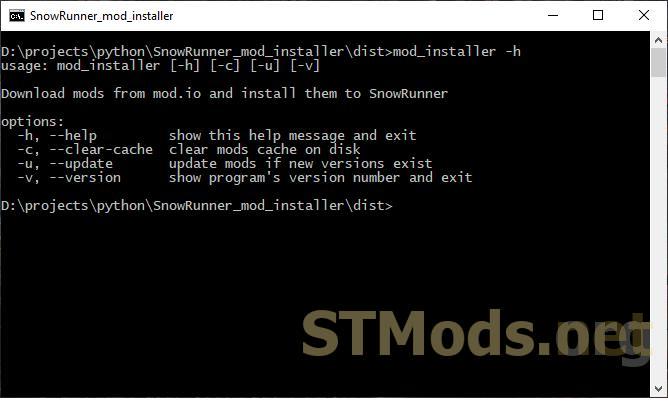
If you need to delete all mods from the cache, run the installer with the --clear-cache key.
If you need to download new versions of mods, run the installer with the --update key (without the key, you will simply see a message about new mod versions being available).
Version 1.6.2 for SnowRunner (vALL):
- Added a pause before the program exits.
Rules for writing comments. For non-compliance - ban!
Forbidden:- Use of profanity in messages
- Communication is not on the topic of the material
- Any insults of other users, including the author of the material
- Writing messages in whole or in part in CAPITAL letters (Caps Lock)
- Expressing your opinion without supporting it with arguments
- The use of links to third-party sites, or the use of images/videos/other content containing the aforementioned links
Rules for writing reviews
The review must necessarily be about a specific material (not about the uploader, not about the author and all his works in general)
Forbidden:- Use of profanity (mat)
- Writing a review in whole or in part in CAPITAL letters (Caps Lock)
- Expressing your opinion without supporting it with arguments
- The use of links to third-party sites, or the use of images/videos/other content containing the aforementioned links
There are no reviews yet. Be the first!
Log in to your account to add a review

Version 1.6.1 for SnowRunner (v26.2):
The installer allows you to download mods from mod.io in a semi-automatic mode. Once you complete all the steps in the instructions, you will be able to subscribe to the desired mods, and the installer will handle the rest.
Tested on game versions up to and including 26.2 on builds with CODEX Steam emu and Nemirtingas Epic emu. It may not work with other builds.
Instructions:
1. Register on mod.io;
2. Create a token in your account at https://mod.io/me/access (you need to confirm the API Access Terms first). The token name can be anything;
3. Rename .env_example to .env, then add your token to it. Edit the paths to the mods folder and the player profile file. The paths are roughly as follows, but yours may differ slightly:
- Mods folder: C:/Users/USER_NAME/Documents/My Games/SnowRunner/base/Mods/.modio/mods
- Steam version profile: C:/Users/Public/Documents/Steam/CODEX/1465360/remote/user_profile.cfg
- EGS version profile: C:/Users/USER_NAME/Documents/My Games/SnowRunner/base/storage/0/user_profile.dat
4. Block the game's internet access through Windows Firewall: press Win + R and run wf.msc, create a rule for outbound connections, select "For a program," specify the path to the game (you can specify the desktop shortcut), select "Block the connection."
5. Replace the file C:/Users/Public/Documents/Steam/CODEX/1465360/remote/user_profile.cfg (or C:/Users/USER_NAME/Documents/My Games/SnowRunner/base/storage/0/user_profile.dat) with user_profile.cfg from the archive (rename it to user_profile.dat if you have the EGS version).
6. Subscribe (or unsubscribe) to the desired mods on mod.io
7. Run mod_installer.exe, wait until all the mods you subscribed to are downloaded.
8. Launch the game, go to "Load," then go back (this is needed to activate the "View Modifications" menu, but sometimes the menu is available immediately).
9. Go to "View Modifications" and enable the desired mods. Vehicles will become available in the store, maps will be available in "Custom Scenarios," and test areas will also be accessible.
After new subscriptions or unsubscriptions on mod.io, repeat everything from step 7. After unsubscribing and running the installer, the mod will be deactivated and removed from the modifications list. However, the mod's folder remains on disk (in the cache at C:/Users/USER_NAME/Documents/My Games/SnowRunner/base/Mods/.modio/cache), and if you subscribe to the mod again, after running the installer the mod will not be downloaded again but will be moved from the cache to the mods folder. However, you will need to enable it again manually in the game under "View Modifications."
If you need to delete all mods from the cache, run the installer with the --clear-cache key
If you need to download new versions of mods, run the installer with the --update key (without the key, you will simply get a notification about new mod versions)

from ModsFire

 Spintires: MudRunner
 SnowRunner
 Euro Truck Simulator 2
 American Truck Simulator
 Farming Simulator 2017
 Farming Simulator 2019
 Farming Simulator 2022
 BeamNG.drive
 City Car Driving
 Farming Simulator 20
 OMSI 2
 Assetto Corsa
 MXB
MXB
