Total files: 44559
|
|
MOD UPDATE |
||
|
226
112 |
0
0 |
||
28 Sep 2025 at 16:42
Chevrolet Veraneio 73 version 1.0 for American Truck Simulator (v1.43.x)
Standalone
Purchased from the mod dealer
Own interior
Physics
Own wheels
High-quality sound
Realistic design
Tuning
Trailer included
Purchased from the mod dealer
Own interior
Physics
Own wheels
High-quality sound
Realistic design
Tuning
Trailer included
|
|
MOD UPDATE |
||
|
405
135 |
0
0 |
||
28 Sep 2025 at 16:41
Real Winter Mod version 1.0 for Euro Truck Simulator 2 (v1.43.x)
Tire tracks on snow road textures
Tire tracks vary by region
Winter weather conditions
Ice and snowfall
Winter time
Snowflakes falling on truck windows
Different snow cover by region
Snow-covered trees and surroundings
Add-on for this mod
Tire tracks vary by region
Winter weather conditions
Ice and snowfall
Winter time
Snowflakes falling on truck windows
Different snow cover by region
Snow-covered trees and surroundings
Add-on for this mod
|
|
MOD UPDATE |
||
|
184
72 |
0
0 |
||
28 Sep 2025 at 16:40
Real Winter Pack Chain Traffic Wind Noise v1.0 for Euro Truck Simulator 2 (v1.43.x)
This is an add-on for the Real Winter Mod Adds tire chains for more realistic traffic and wind sounds

|
MOD UPDATE |
||
|
156
67 |
0
0 |
||
28 Sep 2025 at 16:39
Toyota LandCruiser Troop Carrier J78 (1990) v1 for Spintires: MudRunner (v25.02.21)
There is one multifunctional addon and default trailers, transporting 4 cargo points.
|
|
MOD UPDATE |
||
|
151
76 |
0
0 |
||
28 Sep 2025 at 16:38
My Map version 1 for Spintires: MudRunner (v25.02.21)
Greetings to everyone. I present to you my latest map. The map is 320x320 meters. The archive contains two versions: summer and autumn. On the map:
- 1 garage (closed);
- 1 scouting point;
- 1 loading point;
- 1 fuel station;
- 3 sawmills;
- 2 vehicles at the start.
Wishing everyone great rides!
- 1 garage (closed);
- 1 scouting point;
- 1 loading point;
- 1 fuel station;
- 3 sawmills;
- 2 vehicles at the start.
Wishing everyone great rides!
|
|
MOD UPDATE |
||
|
266
107 |
0
0 |
||
28 Sep 2025 at 16:37
Fiat 126 version 1.0 for Spintires: MudRunner (v25.02.21)
The mod carries no meaningful content, made for entertainment in 10 minutes. There are no add-ons, it has high speed.
|
|
ARTICLE | ||
|
1.8K
|
0
0 |
||
28 Sep 2025 at 16:36
Crop Sowing and Planting in FS 22
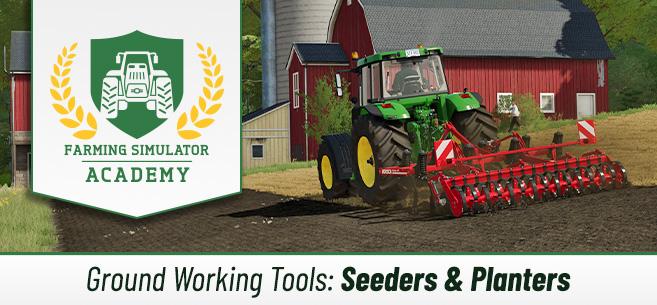
Welcome to another guide. Today we will take a closer look at sowing and planting various crops.
Equipment for sowing and planting crops in FS22
The game features a lot of different equipment for sowing and planting agricultural crops. In general, we will need seeders and planters. They are designed for different crops. Let's take a closer look at this.
Seeders are suitable for most types of crops, specifically the following: wheat, barley, oats, canola, sorghum, soybeans, oilseed radish, grass.Planters are suitable for corn, sugar beets, cotton, soybeans, potatoes, sugarcane, trees. Note that if you need a planter for potatoes, you should look for that type of planter in the section where only potato equipment is sold. The same applies to trees (look in the forestry equipment category), and for sugarcane.
Some interesting facts:
There are expensive seeder options that allow you to skip the cultivation and soil preparation stages. This saves you a lot of time. However, if you have little money, it’s better not to buy this type of seeder.You can buy an additional tank for some seeders to increase their maximum capacity.
How to sow/plant crops
Now let's go over the basics of this process. How to sow/plant various crops in FS22? Let's break it down step by step.
Step 1: cultivation, soil preparation
First of all, you must prepare the soil for sowing unless you have special seeders that allow you to skip this step. Attach a cultivator to your tractor and start working the field. Note that stones may appear on the field during this process, which should also be removed. The size of the stones depends directly on the type of cultivator or plow you use. You can learn more about plowing and cultivating fields in this guide (https://stmods.ru/farming_simulator_2022/articles/vspashka_i_kultivaciya_v_fs_22/).
Small stones themselves won’t bother you much, so you can remove them later. However, if medium or large stones appear, you should remove them immediately, otherwise they may damage your equipment.
Helpful tip! In the map menu, you can select the "Soil Properties" filter, and in this case, small stones will be shown in yellow, medium stones in orange, and large stones in red. Thanks to this feature, you can understand where you urgently need to run stone-collecting equipment.
Step 2: buying seeds, filling the seeder/planter
Of course, first you need to purchase seeds. Buy a large bag of the seeds you need, place your seeder/planter next to this bag, and press "Refill," after which your seeder/planter will be filled and you can start working.
If you want to plant trees, sugarcane, or poplars, you will find them in the "Pallets" section in the store. Planters are refilled exactly the same way as seeders.
In the case of potatoes, there is a rather interesting feature. The harvested potatoes can be loaded back into a special planter, so you can skip the seed purchase stage.
Step 3: sowing seeds
Now it’s time to move on to the sowing process. Attach your seeder/planter to the tractor, select the type of crop you want to sow (since there are many different crops in the bags). Approach your field, lower the seeder/planter, turn it on, and the sowing process begins. Drive over the entire field in straight lines until all seeds are distributed.
The game has a seasonal growth feature, so be sure to check the harvest calendar before sowing, because if you sow at the wrong time, there will be no harvest. If seasonal growth is disabled in your settings, you won’t have such problems.
Step 4: use a soil roller
This step is not mandatory, so you can safely skip it. But if you want to get maximum yield, you should roll the field, as this will increase yield by 2.5%. By the way, this process not only helps increase yield but also presses small stones back into the soil. Consequently, your equipment will not be damaged during subsequent operations. You can learn more about rolling and leveling in our guide (https://stmods.ru/farming_simulator_2022/articles/prokatka_i_vyravnivanie_v_fs_22/).
That’s all! Actually, there is nothing complicated about the sowing process, and anyone can handle it. If you are new to Farming Simulator 22, visit the F.A.Q page where we constantly publish game guides (https://stmods.ru/farming_simulator_2022/vopros-otvet/). There you will find answers to your questions!
Equipment for sowing and planting crops in FS22
The game features a lot of different equipment for sowing and planting agricultural crops. In general, we will need seeders and planters. They are designed for different crops. Let's take a closer look at this.
Seeders are suitable for most types of crops, specifically the following: wheat, barley, oats, canola, sorghum, soybeans, oilseed radish, grass.Planters are suitable for corn, sugar beets, cotton, soybeans, potatoes, sugarcane, trees. Note that if you need a planter for potatoes, you should look for that type of planter in the section where only potato equipment is sold. The same applies to trees (look in the forestry equipment category), and for sugarcane.
Some interesting facts:
There are expensive seeder options that allow you to skip the cultivation and soil preparation stages. This saves you a lot of time. However, if you have little money, it’s better not to buy this type of seeder.You can buy an additional tank for some seeders to increase their maximum capacity.
How to sow/plant crops
Now let's go over the basics of this process. How to sow/plant various crops in FS22? Let's break it down step by step.
Step 1: cultivation, soil preparation
First of all, you must prepare the soil for sowing unless you have special seeders that allow you to skip this step. Attach a cultivator to your tractor and start working the field. Note that stones may appear on the field during this process, which should also be removed. The size of the stones depends directly on the type of cultivator or plow you use. You can learn more about plowing and cultivating fields in this guide (https://stmods.ru/farming_simulator_2022/articles/vspashka_i_kultivaciya_v_fs_22/).
Small stones themselves won’t bother you much, so you can remove them later. However, if medium or large stones appear, you should remove them immediately, otherwise they may damage your equipment.
Helpful tip! In the map menu, you can select the "Soil Properties" filter, and in this case, small stones will be shown in yellow, medium stones in orange, and large stones in red. Thanks to this feature, you can understand where you urgently need to run stone-collecting equipment.
Step 2: buying seeds, filling the seeder/planter
Of course, first you need to purchase seeds. Buy a large bag of the seeds you need, place your seeder/planter next to this bag, and press "Refill," after which your seeder/planter will be filled and you can start working.
If you want to plant trees, sugarcane, or poplars, you will find them in the "Pallets" section in the store. Planters are refilled exactly the same way as seeders.
In the case of potatoes, there is a rather interesting feature. The harvested potatoes can be loaded back into a special planter, so you can skip the seed purchase stage.
Step 3: sowing seeds
Now it’s time to move on to the sowing process. Attach your seeder/planter to the tractor, select the type of crop you want to sow (since there are many different crops in the bags). Approach your field, lower the seeder/planter, turn it on, and the sowing process begins. Drive over the entire field in straight lines until all seeds are distributed.
The game has a seasonal growth feature, so be sure to check the harvest calendar before sowing, because if you sow at the wrong time, there will be no harvest. If seasonal growth is disabled in your settings, you won’t have such problems.
Step 4: use a soil roller
This step is not mandatory, so you can safely skip it. But if you want to get maximum yield, you should roll the field, as this will increase yield by 2.5%. By the way, this process not only helps increase yield but also presses small stones back into the soil. Consequently, your equipment will not be damaged during subsequent operations. You can learn more about rolling and leveling in our guide (https://stmods.ru/farming_simulator_2022/articles/prokatka_i_vyravnivanie_v_fs_22/).
That’s all! Actually, there is nothing complicated about the sowing process, and anyone can handle it. If you are new to Farming Simulator 22, visit the F.A.Q page where we constantly publish game guides (https://stmods.ru/farming_simulator_2022/vopros-otvet/). There you will find answers to your questions!
The most popular mods

 Spintires: MudRunner
 SnowRunner
 Euro Truck Simulator 2
 American Truck Simulator
 Farming Simulator 2017
 Farming Simulator 2019
 Farming Simulator 2022
 BeamNG.drive
 City Car Driving
 Farming Simulator 20
 OMSI 2
 Assetto Corsa
 MXB
MXB
by downloads per week
by downloads per month
There are no mods yet
by downloads per week
by downloads per month
There are no mods yet
by downloads per week
by downloads per month
There are no mods yet
by downloads per week
by downloads per month
There are no mods yet
by downloads per week
by downloads per month
There are no mods yet
by downloads per week
by downloads per month
There are no mods yet
by downloads per week
by downloads per month
There are no mods yet
by downloads per week
by downloads per month
There are no mods yet
by downloads per week
by downloads per month
There are no mods yet
by downloads per week
by downloads per month
There are no mods yet
by downloads per week
by downloads per month
There are no mods yet
by downloads per week
by downloads per month
There are no mods yet
by downloads per week
by downloads per month
There are no mods yet
by downloads per week
by downloads per month
There are no mods yet