Total files: 44559
|
|
NEWS | ||
|
3.9K
|
0
0 |
||
29 Sep 2025 at 10:02
Farming Simulator Academy: FS22 Guides
For a newcomer to the Farming Simulator series, it’s not very easy. Farming Simulator 22 has many interesting mechanics, all kinds of machinery, engaging gameplay features, and all of this turns into a real nightmare for a beginner, because how do you distinguish cultivators, plows, and subsoilers from each other? How do you find out what they are for, and how to play FS22 correctly? We will answer all these questions for you on the FS22 FAQ page, where you will find a lot of useful information about the game: both translations of articles from ModHub and original content.
If you don’t know much about agriculture but want to learn how to play Farming Simulator 22 – our articles will help you and quickly turn you into a professional farmer.
General topics
You might wonder – what topics will the guides cover? You will find information about logging, seasonal cycles, the construction mode, features of various crops, and much more. All important game features, all the basics, mechanics, the use of machinery and tools, and much more. We intend to create a full tutorial so that even beginners can understand how to play FS22.
The most important thing is to provide information to beginners as clearly and thoroughly as possible, answer all their questions, and teach them how to play FS22. But sometimes even experienced players need to revisit the basics, so if you already have experience in agricultural work – some articles will still be interesting to you.
If you don’t know much about agriculture but want to learn how to play Farming Simulator 22 – our articles will help you and quickly turn you into a professional farmer.
General topics
You might wonder – what topics will the guides cover? You will find information about logging, seasonal cycles, the construction mode, features of various crops, and much more. All important game features, all the basics, mechanics, the use of machinery and tools, and much more. We intend to create a full tutorial so that even beginners can understand how to play FS22.
The most important thing is to provide information to beginners as clearly and thoroughly as possible, answer all their questions, and teach them how to play FS22. But sometimes even experienced players need to revisit the basics, so if you already have experience in agricultural work – some articles will still be interesting to you.
|
|
ARTICLE | ||
|
2.7K
|
0
0 |
||
29 Sep 2025 at 10:01
How to Sow and Harvest Grain Crops
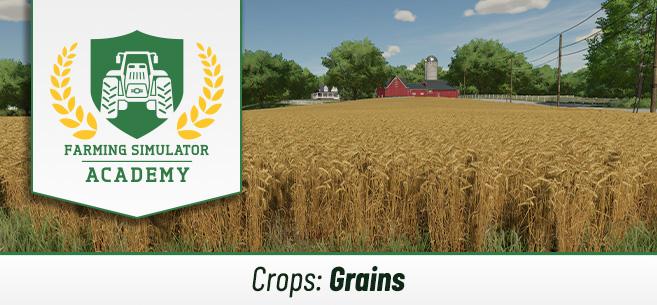
Well, it's time to talk about cereal crops, and learn how to sow and harvest cereals in Farming Simulator 22, and how to sell them. By the way, everything said in this guide also applies to soybeans. Let's get started!
Which crops are considered cereals in FS22
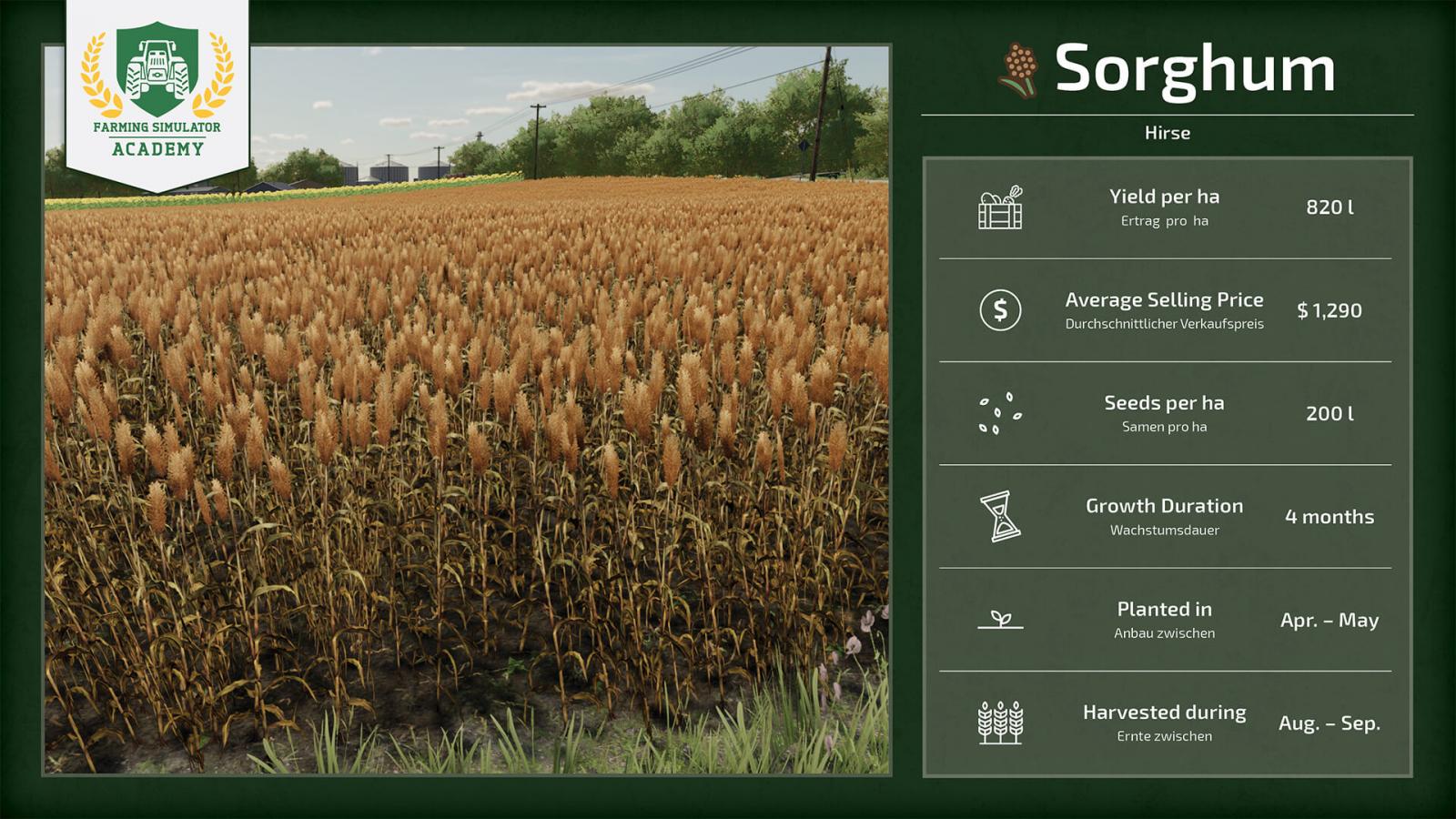
Let's take a look at all the cereal crops in FS22. Below are all the cereal crops in the game (at the time of the game's release):
What you need to sow and harvest cereals
We have already explained where to start (https://stmods.ru/farming_simulator_2022/articles/s_chego_nachat_v_farming_simulator_2022/), and what equipment you will need. In that article, you will learn in more detail what equipment is required, but here is a brief overview. You will need the following devices:
Tractor. Obviously, the most important vehicle for a farmer.Cultivator.Seeder and the cereal seeds themselves.Fertilizer spreader, fertilizers, lime. Note that not all fertilizer spreaders can spread lime. Keep this in mind when purchasing.Weed removal device.Combine harvester, grain header.Trailer. After all, you need to transport the harvest.
Which equipment to choose for cereals
If you have no idea which equipment is best to take at the start – here is a list of recommended equipment from the developers of Farming Simulator 22 themselves. These machines will be available to you for free if you start the game on the easiest difficulty mode. You can choose equipment yourself, just watch your balance carefully to have enough for all purchases.
Tractor: John Deere 7810;Cultivator: RABE MR 250;Seeder: NORDSTEN NS 3030;Weed removal device: Einböck Aerostar-Exact 600;Combine harvester: DEUTZ-FAHR Topliner 4090 HTS + grain header 4090;Fertilizer spreader: BREDAL K105;Trailer: WELGER DK 115.
Keep in mind that some tools perform several tasks at once, so you can buy a multifunctional tool that, for example, will be both a seeder and a fertilizer spreader. Don’t forget that equipment can be rented if you don’t have enough money to buy it.
Let's get to work!
Have you bought everything you need and are ready to start? Let's begin. First, you should decide what you will sow. If seasonal cycles are enabled – it is recommended to start with canola, since the game starts in August, and this is the ideal season for canola.
Step 1: cultivate the field
As a rule, cereals require soil cultivation rather than plowing. Just get to the field, attach the cultivator, and start the cultivation process.
Step 2: sow the crop
First, fill the seeder. To do this, buy seeds, stand next to the pallets, press the refill button. Done! Now take your filled seeder and head to your field. Choose the crop you want to grow (in our case – rapeseed), go to the very corner, lower the seeder, turn it on, and start working.
Important note. Do not speed up time during this process, otherwise the crop will grow unevenly. If you decided to grow canola and there are beehives near the field – the yield will increase.
Step 3: apply fertilizers (and lime, if required)
Buy solid fertilizers in so-called big bags, connect the fertilizer spreader to your tractor, go to the big bags, and refill the spreader. Fertilizers increase yield, so this is an important process.
Now head to the field, turn on the fertilizer spreader, and start working. Once you finish, the field will be fertilized at 50%. If you want to achieve really good yields – after sowing, go over the field with the fertilizer spreader once more to reach 100%. With some types of manure spreaders, as well as with slurry, you can achieve 100% fertilization in one go.
Keep in mind that in some cases you may also need lime.
Step 4: remove weeds
It is very important to remove weeds in time, because the more they grow, the more work you will have to do later. At the initial stage, weeds can be removed with a regular weeding harvester, but if they have grown to the first stage – you will need to purchase a field sprayer separately, and at the start you don’t have much money, so be careful.
Another important point. If you have enabled the crop destruction setting – make sure you choose narrow tires for your tractor, otherwise you risk destroying most of your crop. If the setting is off – no problems.
Step 5: harvest the crop
As soon as the crop is ready for harvest – don’t waste time. Take the combine harvester, don’t forget to take the grain header. Lower the header, start harvesting. If you don’t harvest on time – the crop can dry out and become useless. However, this option can be turned off in the settings.
Step 6: sell the harvest
Starting cheap combines don’t have a large capacity, so the tank will fill up quite quickly. Approach your trailer, extend the combine’s pipe (so that the pipe is right above the trailer), and unload all the harvest into the trailer.
Now the most important part. Check if the selling price is acceptable. If not – you can take the harvest to a bunker for further storage and sell it later when the price is better. Don’t forget about production chains. If there are productions on the map – you can take the harvest there. Drive the trailer to the designated place and unload. That’s it!
Don’t forget that in the special menu you can check price fluctuations and decide whether it’s a good time to sell the harvest or better to wait. Try to sell everything at the best price possible, because you worked hard for it!
Which crops are considered cereals in FS22
Let's take a look at all the cereal crops in FS22. Below are all the cereal crops in the game (at the time of the game's release):
What you need to sow and harvest cereals
We have already explained where to start (https://stmods.ru/farming_simulator_2022/articles/s_chego_nachat_v_farming_simulator_2022/), and what equipment you will need. In that article, you will learn in more detail what equipment is required, but here is a brief overview. You will need the following devices:
Tractor. Obviously, the most important vehicle for a farmer.Cultivator.Seeder and the cereal seeds themselves.Fertilizer spreader, fertilizers, lime. Note that not all fertilizer spreaders can spread lime. Keep this in mind when purchasing.Weed removal device.Combine harvester, grain header.Trailer. After all, you need to transport the harvest.
Which equipment to choose for cereals
If you have no idea which equipment is best to take at the start – here is a list of recommended equipment from the developers of Farming Simulator 22 themselves. These machines will be available to you for free if you start the game on the easiest difficulty mode. You can choose equipment yourself, just watch your balance carefully to have enough for all purchases.
Tractor: John Deere 7810;Cultivator: RABE MR 250;Seeder: NORDSTEN NS 3030;Weed removal device: Einböck Aerostar-Exact 600;Combine harvester: DEUTZ-FAHR Topliner 4090 HTS + grain header 4090;Fertilizer spreader: BREDAL K105;Trailer: WELGER DK 115.
Keep in mind that some tools perform several tasks at once, so you can buy a multifunctional tool that, for example, will be both a seeder and a fertilizer spreader. Don’t forget that equipment can be rented if you don’t have enough money to buy it.
Let's get to work!
Have you bought everything you need and are ready to start? Let's begin. First, you should decide what you will sow. If seasonal cycles are enabled – it is recommended to start with canola, since the game starts in August, and this is the ideal season for canola.
Step 1: cultivate the field
As a rule, cereals require soil cultivation rather than plowing. Just get to the field, attach the cultivator, and start the cultivation process.
Step 2: sow the crop
First, fill the seeder. To do this, buy seeds, stand next to the pallets, press the refill button. Done! Now take your filled seeder and head to your field. Choose the crop you want to grow (in our case – rapeseed), go to the very corner, lower the seeder, turn it on, and start working.
Important note. Do not speed up time during this process, otherwise the crop will grow unevenly. If you decided to grow canola and there are beehives near the field – the yield will increase.
Step 3: apply fertilizers (and lime, if required)
Buy solid fertilizers in so-called big bags, connect the fertilizer spreader to your tractor, go to the big bags, and refill the spreader. Fertilizers increase yield, so this is an important process.
Now head to the field, turn on the fertilizer spreader, and start working. Once you finish, the field will be fertilized at 50%. If you want to achieve really good yields – after sowing, go over the field with the fertilizer spreader once more to reach 100%. With some types of manure spreaders, as well as with slurry, you can achieve 100% fertilization in one go.
Keep in mind that in some cases you may also need lime.
Step 4: remove weeds
It is very important to remove weeds in time, because the more they grow, the more work you will have to do later. At the initial stage, weeds can be removed with a regular weeding harvester, but if they have grown to the first stage – you will need to purchase a field sprayer separately, and at the start you don’t have much money, so be careful.
Another important point. If you have enabled the crop destruction setting – make sure you choose narrow tires for your tractor, otherwise you risk destroying most of your crop. If the setting is off – no problems.
Step 5: harvest the crop
As soon as the crop is ready for harvest – don’t waste time. Take the combine harvester, don’t forget to take the grain header. Lower the header, start harvesting. If you don’t harvest on time – the crop can dry out and become useless. However, this option can be turned off in the settings.
Step 6: sell the harvest
Starting cheap combines don’t have a large capacity, so the tank will fill up quite quickly. Approach your trailer, extend the combine’s pipe (so that the pipe is right above the trailer), and unload all the harvest into the trailer.
Now the most important part. Check if the selling price is acceptable. If not – you can take the harvest to a bunker for further storage and sell it later when the price is better. Don’t forget about production chains. If there are productions on the map – you can take the harvest there. Drive the trailer to the designated place and unload. That’s it!
Don’t forget that in the special menu you can check price fluctuations and decide whether it’s a good time to sell the harvest or better to wait. Try to sell everything at the best price possible, because you worked hard for it!
|
|
MOD UPDATE |
||
|
282
131 |
0
0 |
||
29 Sep 2025 at 10:00
Aramatsu Forester version 1.0 for Spintires: MudRunner (v25.02.21)
Forwarder conversion from the game SnowRunner.
Can rotate the cabin (unfortunately it does not follow the boom like in SnowRunner, MudRunner does not have such a setting).
Transports short and medium logs, 4 and 6 points respectively.
Can rotate the cabin (unfortunately it does not follow the boom like in SnowRunner, MudRunner does not have such a setting).
Transports short and medium logs, 4 and 6 points respectively.

|
MOD UPDATE |
||
|
260
87 |
0
0 |
||
29 Sep 2025 at 9:59
Mercedes Actros MP3 Additional Tank by SCS v1.0 for Euro Truck Simulator 2 (v1.42.x)
I really like the old Actros trucks, but sometimes a bigger fuel tank is needed :)
A small improvement for ETS2 maybe for the Actros MP3.
Add an additional fuel tank for the entire chassis.
From 600L to 1050 liters
From 400L to 650L.
The 4x2 chassis standard tank is increased by 50L and 2 tanks of 400L each are added.
The same is done for 6x2 and 6x4.
The 6x2_4 with a lift axle and steering axle has quite limited space; the muffler had to be moved closer to the cabin, and a small additional 250-liter tank was installed, which is slightly lower than the standard 400-liter tank.
There is also a small bonus for the interior that will brighten up your long journey across Europe.
Unfortunately, if you do not have the Actros Tuning Pack DLC, some parts in the accessories shop will appear unavailable to you.
A small improvement for ETS2 maybe for the Actros MP3.
Add an additional fuel tank for the entire chassis.
From 600L to 1050 liters
From 400L to 650L.
The 4x2 chassis standard tank is increased by 50L and 2 tanks of 400L each are added.
The same is done for 6x2 and 6x4.
The 6x2_4 with a lift axle and steering axle has quite limited space; the muffler had to be moved closer to the cabin, and a small additional 250-liter tank was installed, which is slightly lower than the standard 400-liter tank.
There is also a small bonus for the interior that will brighten up your long journey across Europe.
Unfortunately, if you do not have the Actros Tuning Pack DLC, some parts in the accessories shop will appear unavailable to you.
|
|
NEWS | ||
|
3K
|
0
0 |
||
29 Sep 2025 at 9:58
Farming Simulator 2022 Release and New Trailer
The official release of FS22 took place last night, and the game is now available on all platforms. Along with the game's release, the developers have prepared a new trailer, which you can watch below. Don't forget about our FS22 knowledge base.
Have you had a chance to play it yet?
Have you had a chance to play it yet?
|
|
MATERIAL | ||
|
163
71 |
0
0 |
||
29 Sep 2025 at 9:57
Distributions for Spintires Editor version 1.0.0 for SpinTires (v03.03.16)
Distributions for Spintires Editor - brushes file with XML extension from Map "Logging" (Author: k-700) mod with specified plants (reed, oak) for painting them with a brush in the map editor. This material makes sense to download for map makers if you want to see exactly these materials on your map:
1. Material for editor: Reed (Author: Psix19rus).
2. Oak for SpinTires and Mudrunner editor (Author: Ser.Rosszz (Sergey)).
For those who are not familiar, the XML file itself is installed into the editor at Media/prebuild/common with replacement. As for the plants, everything is like with regular additional objects.
1. Material for editor: Reed (Author: Psix19rus).
2. Oak for SpinTires and Mudrunner editor (Author: Ser.Rosszz (Sergey)).
For those who are not familiar, the XML file itself is installed into the editor at Media/prebuild/common with replacement. As for the plants, everything is like with regular additional objects.
The most popular mods

 Spintires: MudRunner
 SnowRunner
 Euro Truck Simulator 2
 American Truck Simulator
 Farming Simulator 2017
 Farming Simulator 2019
 Farming Simulator 2022
 BeamNG.drive
 City Car Driving
 Farming Simulator 20
 OMSI 2
 Assetto Corsa
 MXB
MXB
by downloads per week
by downloads per month
There are no mods yet
by downloads per week
by downloads per month
There are no mods yet
by downloads per week
by downloads per month
There are no mods yet
by downloads per week
by downloads per month
There are no mods yet
by downloads per week
by downloads per month
There are no mods yet
by downloads per week
by downloads per month
There are no mods yet
by downloads per week
by downloads per month
There are no mods yet
by downloads per week
by downloads per month
There are no mods yet
by downloads per week
by downloads per month
There are no mods yet
by downloads per week
by downloads per month
There are no mods yet
by downloads per week
by downloads per month
There are no mods yet
by downloads per week
by downloads per month
There are no mods yet
by downloads per week
by downloads per month
There are no mods yet
by downloads per week
by downloads per month
There are no mods yet