Total files: 44559
|
|
MOD UPDATE |
||
|
172
72 |
0
0 |
||
29 Sep 2025 at 7:14
Kolob 74941 version 1 for SpinTires (v03.03.16 и выше)
Conversion and refinement of this mod from MudRunner. The mod itself is a conversion of the heavy default truck from the game SnowRunner. Conversion author: Soul Reaver. The mod includes a folder with a green cabin texture. The mod features:
- 11 custom addons + default trailers;
- 2 types of wheels.
- 11 custom addons + default trailers;
- 2 types of wheels.
|
|
MOD UPDATE |
||
|
166
77 |
0
0 |
||
29 Sep 2025 at 7:13
Indonesian Map Combo version 2.0 for Euro Truck Simulator 2 (v1.43.x)
The mod consists of 10 maps of Indonesia from previous versions, combined into one.
Includes maps:
map jrr
map njir
map jare
map icrf
map legiunnaire
sepotong map sitinjau lauik
map sundul sundanese update utara
map tangkuban perahu
air terjun map grand utopia
And some parts of other maps
Features:
The map includes the following areas: island of Java, Tangerang, Jakarta, West Java, Central Java, East Java.
The map is standalone.
To launch, you need to create a new profile and select the corresponding module.
The starting city must be only Tegal.
All map DLCs are required.
Ready profile for those who do not want or cannot create their own.
Includes maps:
map jrr
map njir
map jare
map icrf
map legiunnaire
sepotong map sitinjau lauik
map sundul sundanese update utara
map tangkuban perahu
air terjun map grand utopia
And some parts of other maps
Features:
The map includes the following areas: island of Java, Tangerang, Jakarta, West Java, Central Java, East Java.
The map is standalone.
To launch, you need to create a new profile and select the corresponding module.
The starting city must be only Tegal.
All map DLCs are required.
Ready profile for those who do not want or cannot create their own.
|
|
MOD UPDATE |
||
|
117
64 |
0
0 |
||
29 Sep 2025 at 7:12
Front Mudflap Slots for all SCS Trucks version 1.0 for Euro Truck Simulator 2 (v1.43.x)
The mod adds slots on the front mudguards for all stock trucks
|
|
MOD UPDATE |
||
|
154
72 |
0
0 |
||
29 Sep 2025 at 7:11
Gas Tanker 3307 Conversion version 1.0.0.0 for Farming Simulator 2017 (v1.5x)
Gas Tanker 3307:
- Power: 85 kW / 115 hp;
- Speed: 70 km/h;
- Fuel tank capacity: 170 l;
- Price: €6800;
- Daily maintenance cost: €88;
- Working lights;
- Working mirrors;
- Leaves tracks;
- Gets dirty and can be washed;
- Tank volume: 5000 l.
Changes:
- Fixed the frame;
- Added brake lights;
- Changed the tank color;
- Replaced the steering wheel;
- Changed the windows;
- Added an arrow.
Author in FS13: DiNoX Games;
Converted to FS17: DiNoX Games;
Modification author: bborhbz.
- Power: 85 kW / 115 hp;
- Speed: 70 km/h;
- Fuel tank capacity: 170 l;
- Price: €6800;
- Daily maintenance cost: €88;
- Working lights;
- Working mirrors;
- Leaves tracks;
- Gets dirty and can be washed;
- Tank volume: 5000 l.
Changes:
- Fixed the frame;
- Added brake lights;
- Changed the tank color;
- Replaced the steering wheel;
- Changed the windows;
- Added an arrow.
Author in FS13: DiNoX Games;
Converted to FS17: DiNoX Games;
Modification author: bborhbz.
|
|
MATERIAL | ||
|
173
86 |
0
0 |
||
29 Sep 2025 at 7:10
Road Barriers Objects version final for SpinTires (v03.03.16 и выше)
Road barrier pack. All objects are dynamic. 3D models were taken from free online sources and adapted by me for the game. Objects are sorted into separate folders, photos included.
Wishing everyone well!
Wishing everyone well!
|
|
MOD UPDATE |
||
|
140
67 |
0
0 |
||
29 Sep 2025 at 7:09
Map Simply 2 version 1.0 for Spintires: MudRunner (v12.10.20)
Map size: 1024x1024.
On the map:
- 3 vehicles at the start (replaceable);
- 1 garage (2 vehicles each with trailers, 4 points each);
- 1 gas station;
- 1 loading point (auto-loader for arcade and 2 kiosks with logs, no access to the kiosks themselves, loading is done from an extension using a crane or unloading logs down with a Kirovets using a log construction);
- 8 and 4 sawmills (the archive contains 2 versions of the map, the main one with 8 and an additional one with 4);
- 10 scouting points;
- 2 bridges for construction (you will need to transport not only logs but also construction materials, which are located in the garage);
- 7 vehicles on the map (the map includes equipment - a conversion from SnowRunner).
On the map:
- 3 vehicles at the start (replaceable);
- 1 garage (2 vehicles each with trailers, 4 points each);
- 1 gas station;
- 1 loading point (auto-loader for arcade and 2 kiosks with logs, no access to the kiosks themselves, loading is done from an extension using a crane or unloading logs down with a Kirovets using a log construction);
- 8 and 4 sawmills (the archive contains 2 versions of the map, the main one with 8 and an additional one with 4);
- 10 scouting points;
- 2 bridges for construction (you will need to transport not only logs but also construction materials, which are located in the garage);
- 7 vehicles on the map (the map includes equipment - a conversion from SnowRunner).
|
|
ARTICLE | ||
|
2.2K
|
0
0 |
||
29 Sep 2025 at 7:08
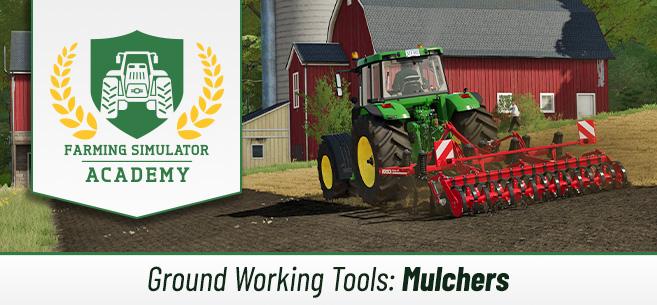
Mulching in FS 22
In previous articles, we have already figured out how to increase crop yields, what types of fertilizers exist, and covered the basics of plowing, cultivating, rolling, and leveling. Now it's time to learn more about mulching, as it is also an important process in Farming Simulator 22.
How Mulching Works
First of all, it’s worth discussing the benefits of mulching. Because mulching improves the quality of your soil, it increases the yield of your crops by 2.5% for the next sowing (next harvest). By the way, mulching is an optional process, so it’s just a small nice bonus to your yield.
Special tools are used for mulching, and there are 3 types of mulching in the game.
A mulcher is used after crops that leave stubble behind: wheat, barley, sorghum, soybeans, corn, and other similar crops. Mulching should be done before cultivating the field, after the harvest. In the case of growing olives or grapes, mulching should be done after cultivation. For these crops, mulching helps prevent weed growth, so the yield will not decrease, and your vineyards and olive groves will look much nicer. There is also another category of mulchers – they are specifically suited for forestry work and help remove bushes, branches, stumps, and the like. This way, you clear the area.
We have covered the three types of mulching.
How to Use a Mulcher in FS22
Now it’s time to understand how to use a mulcher in Farming Simulator 22. Actually, it’s very easy. You only need a tractor and a mulcher. Attach the appropriate type of mulcher (depending on the type of work, we covered the mulcher options above), lower the tool, and drive over the field. The work is done automatically.
By the way, there is a trick you can use here. You can attach the mulcher to the front of the tractor and the cultivator to the back. This way, you can perform two tasks simultaneously, saving a lot of time and effort.
After mulching, the 2.5% yield bonus will be applied to the next harvest.
How Mulching Works
First of all, it’s worth discussing the benefits of mulching. Because mulching improves the quality of your soil, it increases the yield of your crops by 2.5% for the next sowing (next harvest). By the way, mulching is an optional process, so it’s just a small nice bonus to your yield.
Special tools are used for mulching, and there are 3 types of mulching in the game.
A mulcher is used after crops that leave stubble behind: wheat, barley, sorghum, soybeans, corn, and other similar crops. Mulching should be done before cultivating the field, after the harvest. In the case of growing olives or grapes, mulching should be done after cultivation. For these crops, mulching helps prevent weed growth, so the yield will not decrease, and your vineyards and olive groves will look much nicer. There is also another category of mulchers – they are specifically suited for forestry work and help remove bushes, branches, stumps, and the like. This way, you clear the area.
We have covered the three types of mulching.
How to Use a Mulcher in FS22
Now it’s time to understand how to use a mulcher in Farming Simulator 22. Actually, it’s very easy. You only need a tractor and a mulcher. Attach the appropriate type of mulcher (depending on the type of work, we covered the mulcher options above), lower the tool, and drive over the field. The work is done automatically.
By the way, there is a trick you can use here. You can attach the mulcher to the front of the tractor and the cultivator to the back. This way, you can perform two tasks simultaneously, saving a lot of time and effort.
After mulching, the 2.5% yield bonus will be applied to the next harvest.
The most popular mods

 Spintires: MudRunner
 SnowRunner
 Euro Truck Simulator 2
 American Truck Simulator
 Farming Simulator 2017
 Farming Simulator 2019
 Farming Simulator 2022
 BeamNG.drive
 City Car Driving
 Farming Simulator 20
 OMSI 2
 Assetto Corsa
 MXB
MXB
by downloads per week
by downloads per month
There are no mods yet
by downloads per week
by downloads per month
There are no mods yet
by downloads per week
by downloads per month
There are no mods yet
by downloads per week
by downloads per month
There are no mods yet
by downloads per week
by downloads per month
There are no mods yet
by downloads per week
by downloads per month
There are no mods yet
by downloads per week
by downloads per month
There are no mods yet
by downloads per week
by downloads per month
There are no mods yet
by downloads per week
by downloads per month
There are no mods yet
by downloads per week
by downloads per month
There are no mods yet
by downloads per week
by downloads per month
There are no mods yet
by downloads per week
by downloads per month
There are no mods yet
by downloads per week
by downloads per month
There are no mods yet
by downloads per week
by downloads per month
There are no mods yet