Total files: 44559
|
|
ARTICLE | ||
|
2.3K
|
0
0 |
||
28 Sep 2025 at 12:02
Stones in FS 22: Collecting, Removing, Selling
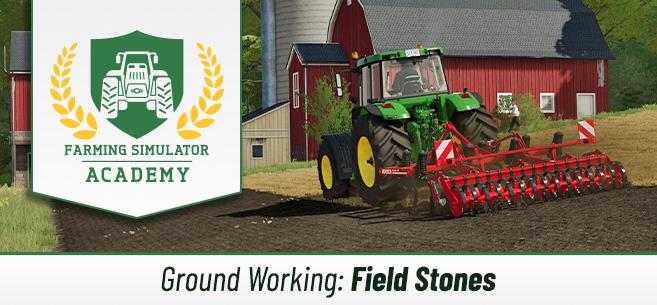
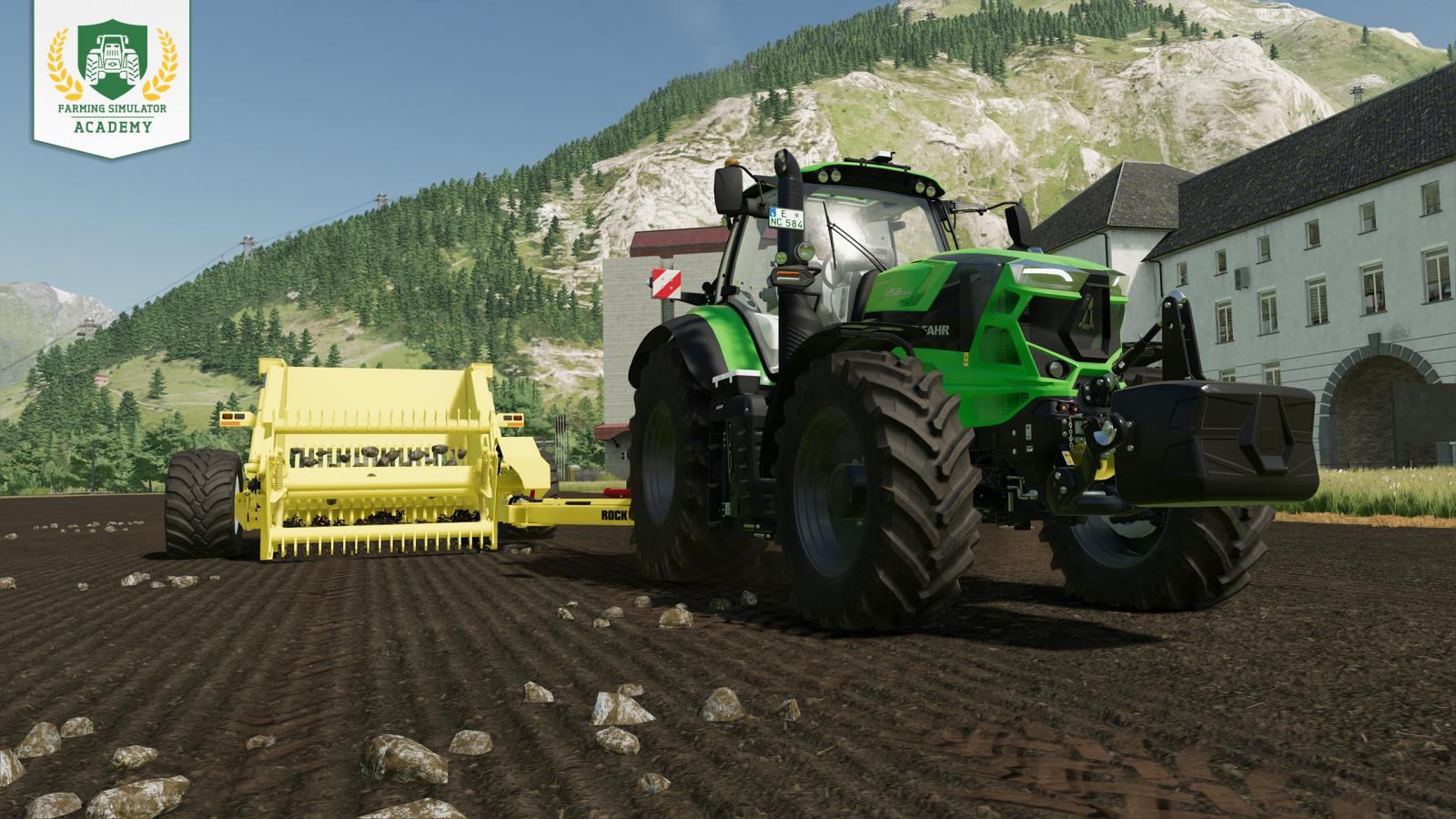
Farming Simulator 22 features a stone system where stones of various sizes appear after plowing/cultivating, which can severely damage your equipment. Therefore, it is very important to remove these stones as quickly as possible, and there are different ways to do this. By the way, this setting can be turned off. In that case, you don’t need to remove the stones.
Stone Sizes and Effects
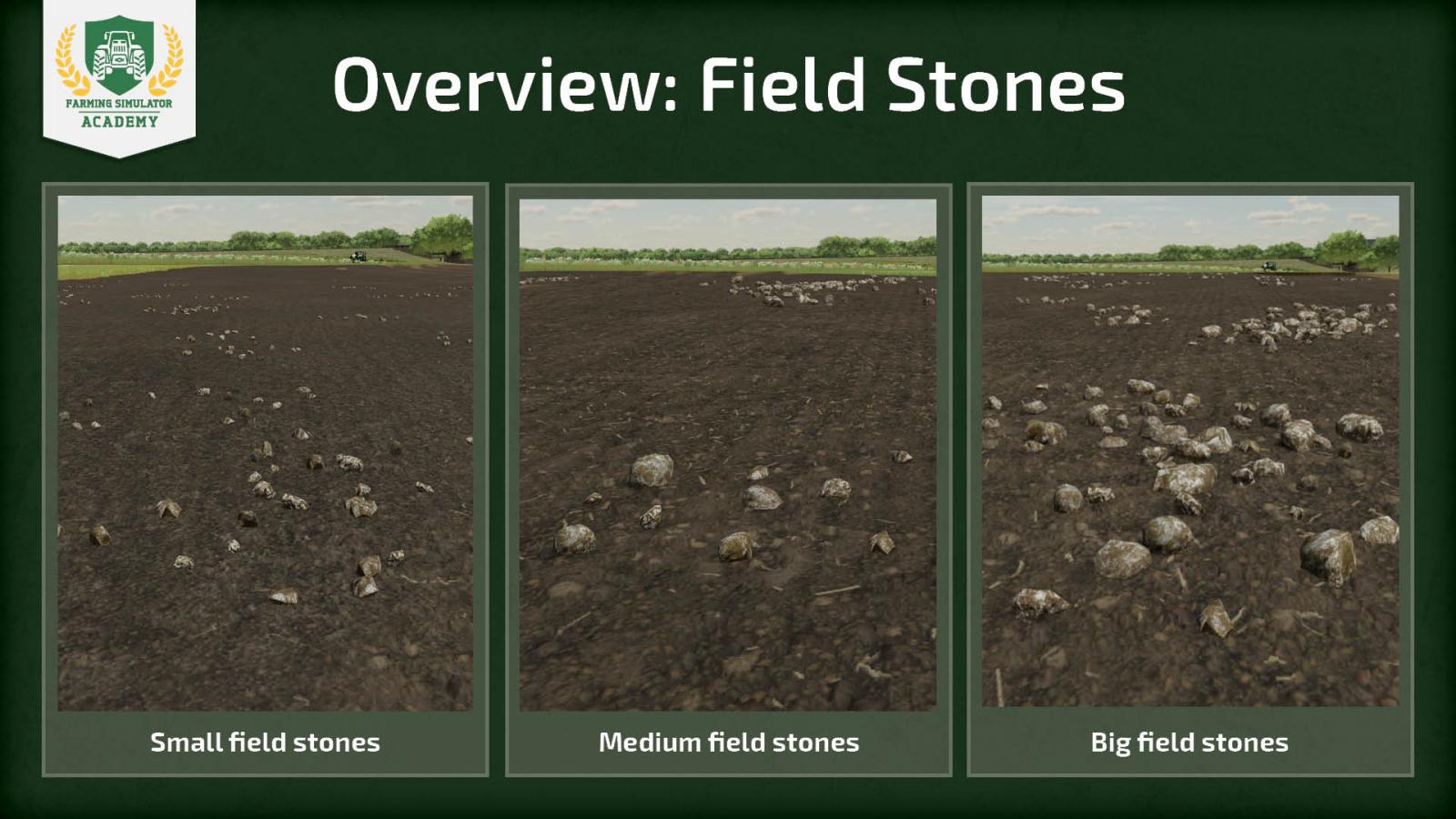
In FS22, stones come in different sizes. You can accidentally dig up small, medium, or large stones, and each size has its own effects. Let’s start with how to determine the size of a stone. Small stones on the map are shown in yellow, medium stones are shown in orange, and the largest ones are red. However, you can also distinguish them visually; it’s quite simple. You can see the difference between stone sizes in this screenshot.
But what gameplay role do stones have in FS22? They do not affect the yield of your crops, so you can expect full income. However, if you don’t remove the stones (especially if they are medium or large), there is a high chance of damaging your equipment, and repairs will cost you a pretty penny. It’s quite possible that your seeders and planters won’t be damaged during work, but if you don’t remove the stones, the harvester will definitely need to be taken for repairs.
Remove stones whenever you have the chance, because if you don’t remove them and continue working the soil on that field, the number of stones will gradually increase, and there is a high chance of encountering larger stones. Don’t be lazy, always remove the stones!
Tip! If you have the seasons setting enabled and your crop is about to wither, it’s better to take the risk and harvest the crop even if there are large stones in the field. Yes, you will damage your equipment, but the income will most likely cover the expenses. You will lose part of the profit, but it’s worth it.
When and Why Field Stones Appear
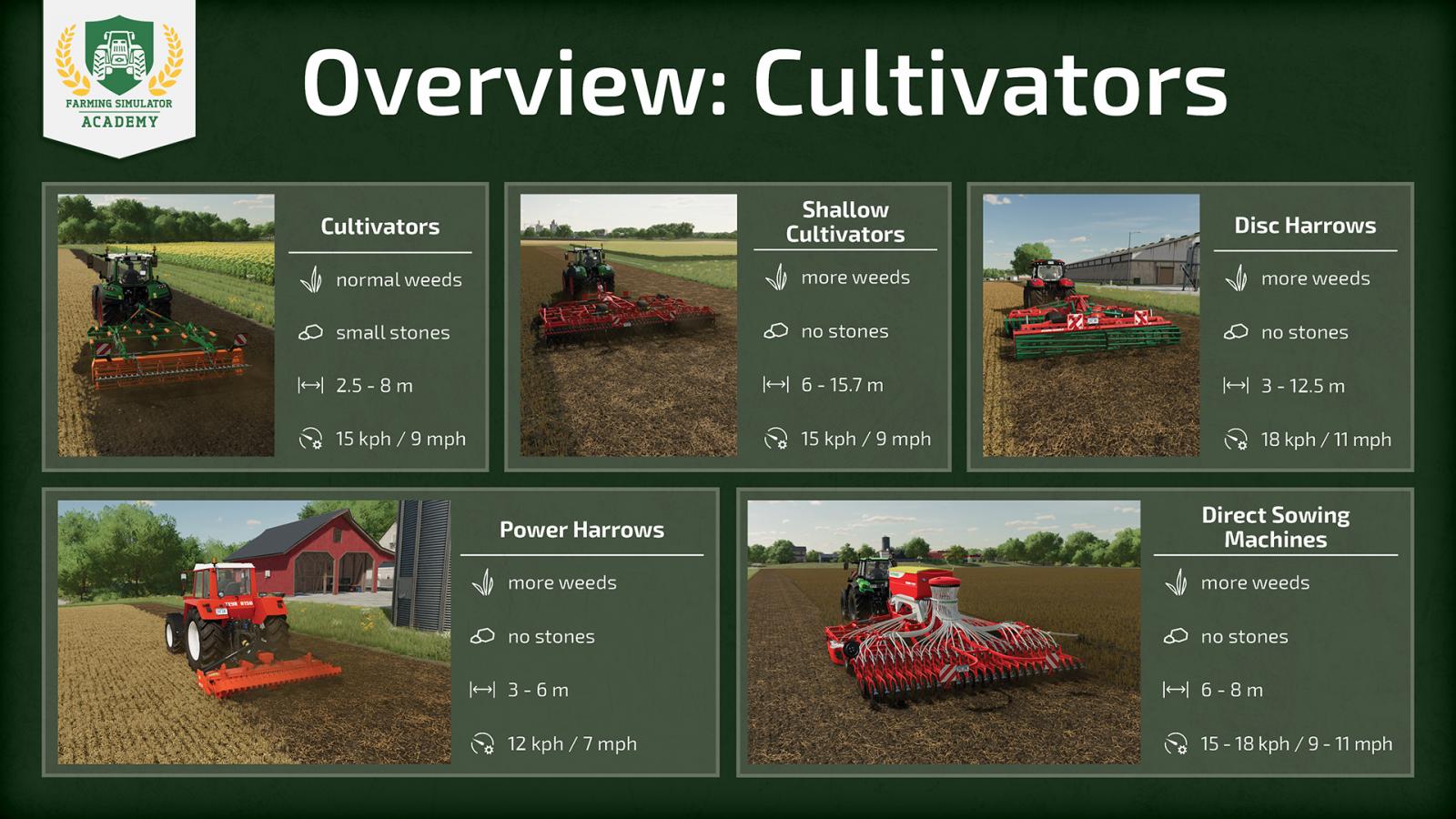
But what causes field stones to appear? It’s the result of plowing and soil cultivation when you use a cultivator or plow. The equipment you use also plays an important role. Depending on the equipment you use, the quantity and size of stones may vary. There are certain types of equipment that prevent stones from appearing: disc harrows, rotary harrows, direct seeders, and small cultivators.
How to Remove Field Stones – Soil Rolling
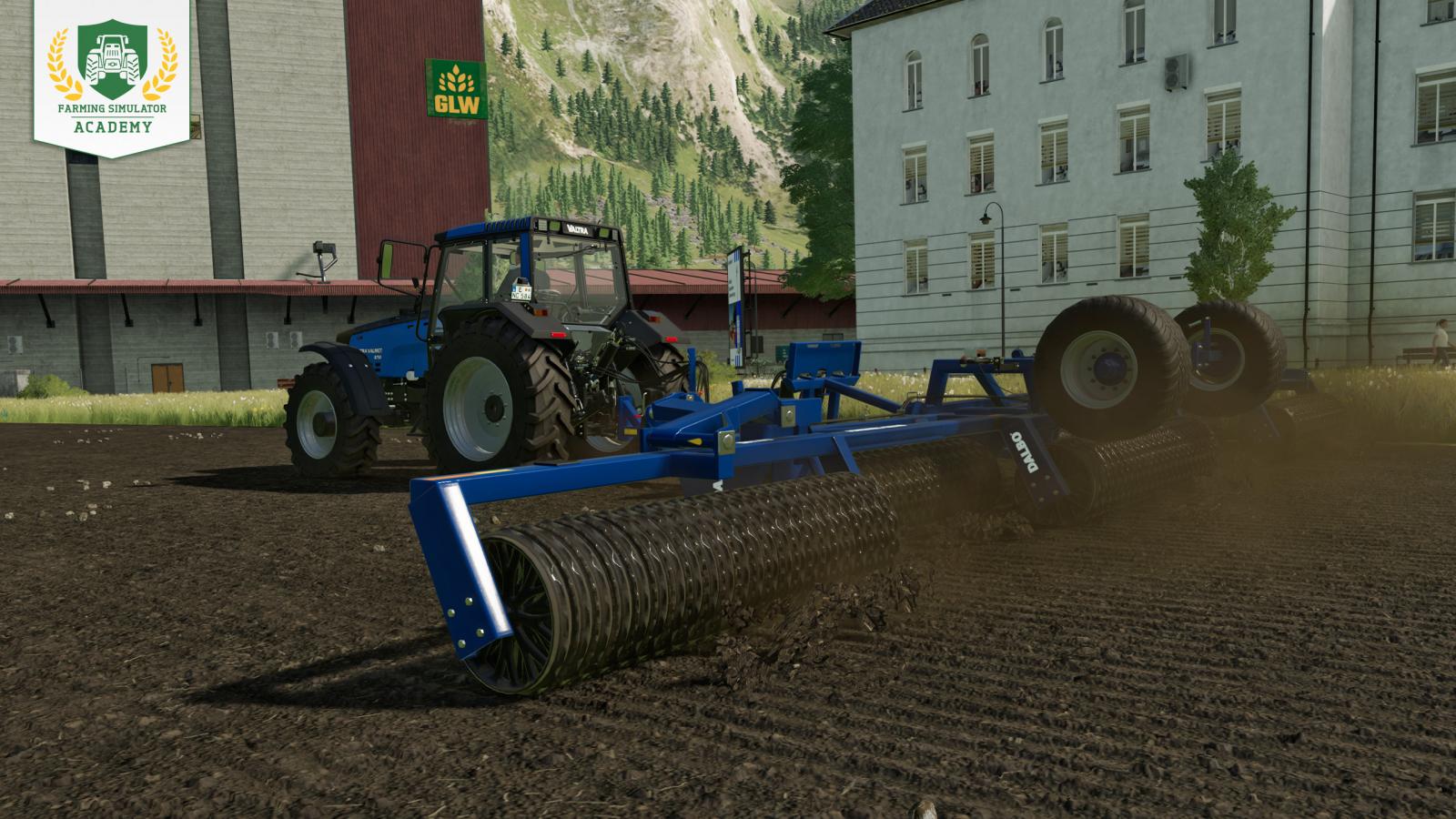
If small stones appear on your fields, you can simply use a roller, which will press all these small stones back into the soil and also compact the soil. Consequently, with one rolling, you get two bonuses at once: you remove stones and increase yield by 2.5%. Use a soil roller after sowing crops and that’s it. However, this method only works with small stones; it won’t work with medium and large ones.
You can read our article about rolling and leveling at this link.
Collecting Stones
We’ve covered small stones, but what about medium and large ones? Let’s figure it out. You can’t press them back into the soil, and medium and large stones can seriously damage your equipment. To collect them, you will need special equipment – a stone picker tool. Yes, this will take more time than simply rolling the soil and pressing the stones back, but look on the bright side – collected stones can be taken to a stone crusher and sold, thus earning you extra profit.
By the way, small stones can also be collected using these tools, but in the case of small stones, it’s much more profitable to just press them back into the soil, since collecting small stones takes too much time and the money from selling them is too little.
Stone Sizes and Effects
In FS22, stones come in different sizes. You can accidentally dig up small, medium, or large stones, and each size has its own effects. Let’s start with how to determine the size of a stone. Small stones on the map are shown in yellow, medium stones are shown in orange, and the largest ones are red. However, you can also distinguish them visually; it’s quite simple. You can see the difference between stone sizes in this screenshot.
But what gameplay role do stones have in FS22? They do not affect the yield of your crops, so you can expect full income. However, if you don’t remove the stones (especially if they are medium or large), there is a high chance of damaging your equipment, and repairs will cost you a pretty penny. It’s quite possible that your seeders and planters won’t be damaged during work, but if you don’t remove the stones, the harvester will definitely need to be taken for repairs.
Remove stones whenever you have the chance, because if you don’t remove them and continue working the soil on that field, the number of stones will gradually increase, and there is a high chance of encountering larger stones. Don’t be lazy, always remove the stones!
Tip! If you have the seasons setting enabled and your crop is about to wither, it’s better to take the risk and harvest the crop even if there are large stones in the field. Yes, you will damage your equipment, but the income will most likely cover the expenses. You will lose part of the profit, but it’s worth it.
When and Why Field Stones Appear
But what causes field stones to appear? It’s the result of plowing and soil cultivation when you use a cultivator or plow. The equipment you use also plays an important role. Depending on the equipment you use, the quantity and size of stones may vary. There are certain types of equipment that prevent stones from appearing: disc harrows, rotary harrows, direct seeders, and small cultivators.
How to Remove Field Stones – Soil Rolling
If small stones appear on your fields, you can simply use a roller, which will press all these small stones back into the soil and also compact the soil. Consequently, with one rolling, you get two bonuses at once: you remove stones and increase yield by 2.5%. Use a soil roller after sowing crops and that’s it. However, this method only works with small stones; it won’t work with medium and large ones.
You can read our article about rolling and leveling at this link.
Collecting Stones
We’ve covered small stones, but what about medium and large ones? Let’s figure it out. You can’t press them back into the soil, and medium and large stones can seriously damage your equipment. To collect them, you will need special equipment – a stone picker tool. Yes, this will take more time than simply rolling the soil and pressing the stones back, but look on the bright side – collected stones can be taken to a stone crusher and sold, thus earning you extra profit.
By the way, small stones can also be collected using these tools, but in the case of small stones, it’s much more profitable to just press them back into the soil, since collecting small stones takes too much time and the money from selling them is too little.
|
|
MOD UPDATE |
||
|
168
69 |
0
0 |
||
28 Sep 2025 at 12:01
GSG Spedition Combo Skin version 1.0 for Euro Truck Simulator 2 (v1.43.x)
Combo skin GSG Spedition
Mercedes-Benz Actros 2014
Krone Profi Liner
Mercedes-Benz Actros 2014
Krone Profi Liner
|
|
MOD UPDATE |
||
|
205
119 |
0
0 |
||
28 Sep 2025 at 12:00
Bashkiria Skins version 1.1 for Euro Truck Simulator 2 (v1.43.x)
Added JSC "Bashkiravtodor". Plus a couple of skins:
- SCS MAN TGX E6: pure white "Bashavtotrans" skin
- SCS Mercedes-Benz Actros MP4: pure white and blue "Bashavtotrans" + JSC "Bashkiravtodor" 2 skins, for 8x4 chassis and for StreamSpace cab.
- SCS Mercedes-Benz Actros MP3: "Bashkir Brick" all cabs supported, JSC "Bashkiravtodor" cab C (the smallest)
- SCS Box: "Bashavtotrans" pure white for all types, "Bashkir Brick" only 13-meter tarp
- SCS Dumper: JSC "Bashkiravtodor" 2 variants: for steel body and for aluminum.
Skin Pack for Euro Truck Simulator 2. It represents a set of Bashkir Organizations.
Skins are added to the following models:
- SCS MAN TGX E6
--- "Bashavtotrans" 2 variants Blue and White
- SCS Mercedes-Benz Actros MP4
--- "Bashavtotrans" White variant
- SCS Box
--- "Bashavtotrans" White variant
- SCS Dumper
--- "Bashkir Brick" 1 variant
The modification features three companies (organizations): "Bashavtotrans", JSC "Bashkiravtodor", and "Bashkir Brick".
Comments indicate some shortcomings or suggestions.
Installation:
Extract the contents of the archive into the mod folder. Directory: C:\Users\User Name\Documents\Euro Truck Simulator 2\mod
- SCS MAN TGX E6: pure white "Bashavtotrans" skin
- SCS Mercedes-Benz Actros MP4: pure white and blue "Bashavtotrans" + JSC "Bashkiravtodor" 2 skins, for 8x4 chassis and for StreamSpace cab.
- SCS Mercedes-Benz Actros MP3: "Bashkir Brick" all cabs supported, JSC "Bashkiravtodor" cab C (the smallest)
- SCS Box: "Bashavtotrans" pure white for all types, "Bashkir Brick" only 13-meter tarp
- SCS Dumper: JSC "Bashkiravtodor" 2 variants: for steel body and for aluminum.
Skin Pack for Euro Truck Simulator 2. It represents a set of Bashkir Organizations.
Skins are added to the following models:
- SCS MAN TGX E6
--- "Bashavtotrans" 2 variants Blue and White
- SCS Mercedes-Benz Actros MP4
--- "Bashavtotrans" White variant
- SCS Box
--- "Bashavtotrans" White variant
- SCS Dumper
--- "Bashkir Brick" 1 variant
The modification features three companies (organizations): "Bashavtotrans", JSC "Bashkiravtodor", and "Bashkir Brick".
Comments indicate some shortcomings or suggestions.
Installation:
Extract the contents of the archive into the mod folder. Directory: C:\Users\User Name\Documents\Euro Truck Simulator 2\mod
|
|
ARTICLE | ||
|
1.4K
|
0
0 |
||
28 Sep 2025 at 11:59
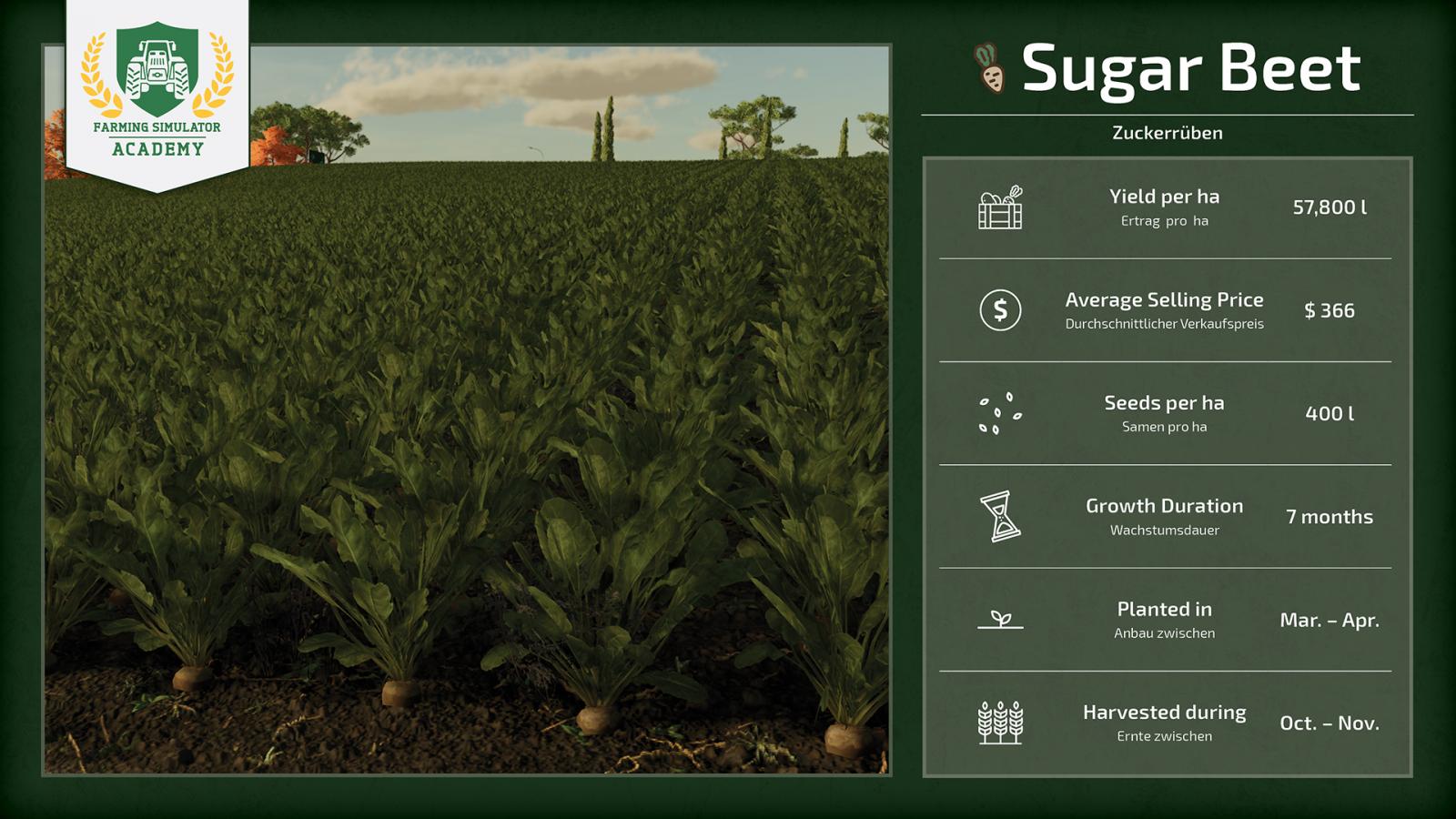
How to Plant and Harvest Sugar Beets in FS 22
In Farming Simulator 22, you can grow sugar beets. However, beginners may not understand how to plant and harvest this crop, what equipment is required, and what features may arise during the process. Let’s figure this out.
What is required for this crop
First, let’s understand what we will need for the entire process. Sugar beet requires special equipment. If you don’t yet have a sufficiently large farm and a decent amount of money in your account, it’s better not to engage in growing sugar beets yet, as this crop requires quite significant expenses.
Plow or subsoiler. The first step is to prepare the soil before sowing, for which you will need a plow. You need to plow the field after every 3rd sugar beet harvest because roots remain in the soil after harvesting. You can use a plow and cultivator for soil preparation, but you can also use a subsoiler to make the task easier. Yes, subsoilers are more expensive, but it’s worth it. Planter. Sugar beet requires a special planter. In the corresponding section, select the model you need. Next to the equipment, there will be an icon of a sugar beet. This means the equipment is suitable for this crop. Then, you will need to purchase a big bag with seeds, and during the planter refilling, you must select sugar beet seeds specifically.Fertilizer spreader. Yes, you can grow the crop without fertilizers, but in that case, the yield will be much lower. Therefore, it is important to have a fertilizer spreader (and lime spreader) and the fertilizers themselves. It is worth choosing a fertilizer spreader that is also suitable for lime. If the field requires liming, you will be notified in the right corner when you are on the field.Weed removal equipment. Weeds can significantly reduce your crop yield. Don’t forget to buy special equipment (developer recommendations below) for weed removal. Harvesting equipment. Of course, you will need to harvest the crop somehow. In this case, you can buy special equipment – a sugar beet harvester, or separately a topper + a beet harvester tool. Trailer. You can’t do without it, as you need to transport the harvest.
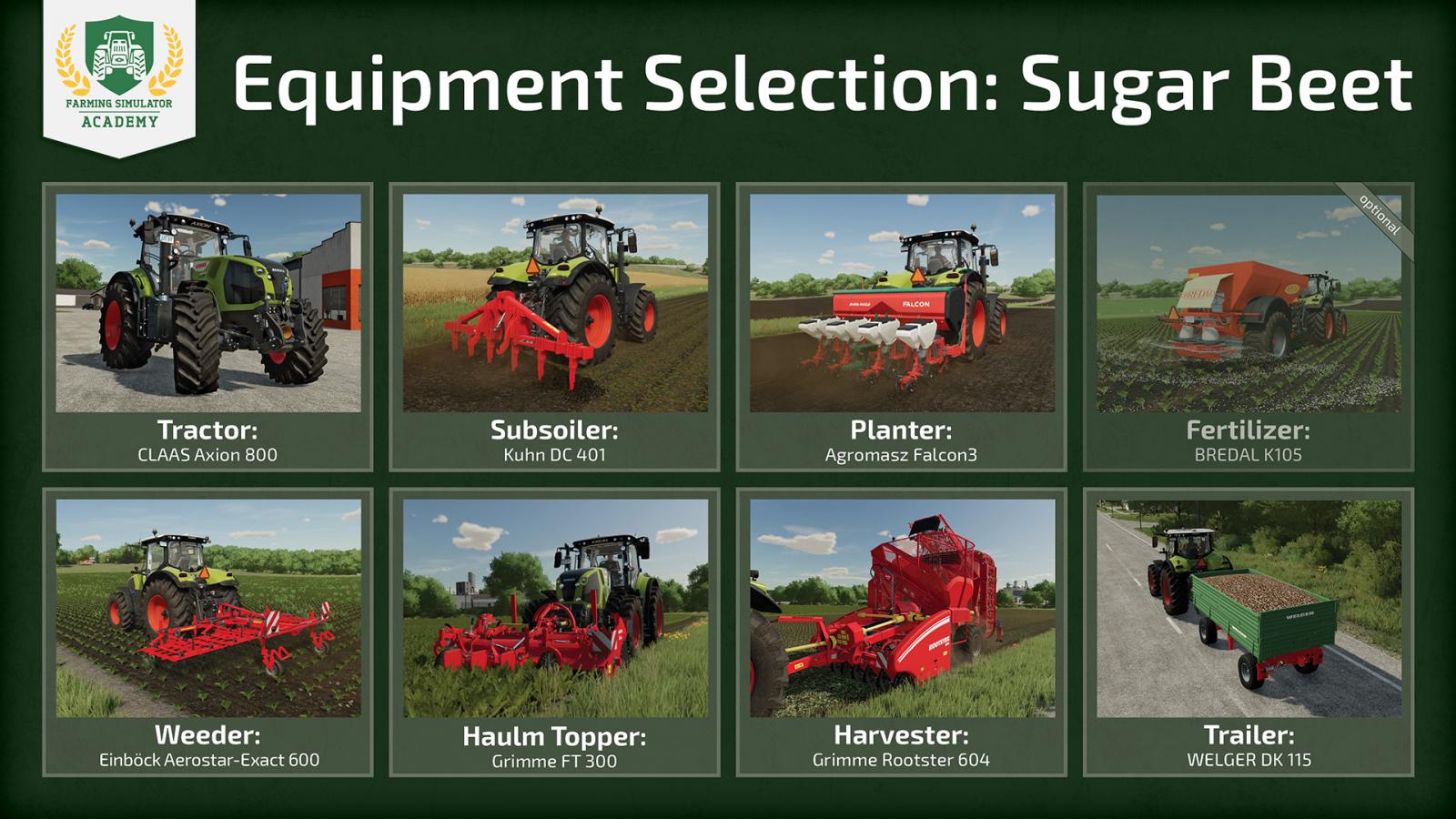
Recommended equipment
The developers provided a list of recommended equipment for those who want to grow sugar beets. Remember, this is only a recommendation, and you can independently choose the tools and equipment you will use.
Tractor: CLAAS Axion 800Subsoiler: Kuhn DC 401Planter: Agromasz Falcon3Topper tool: Grimme FT 300Harvesting equipment: Grimme Rootster 604Weed removal equipment: Einböck Aerostar-Exact 600Fertilizer spreader: BREDAL K105 (optional, for lime);Trailer: WELGER DK 115.
Stages of growing sugar beets
The equipment is clear, now it’s time to start the actual process of growing sugar beets in Farming Simulator 22. Let’s look at the entire process step by step.
Stage 1
First, you need to prepare the soil. Sugar beet is much more interesting. After harvesting, roots remain in the soil, and they must be removed, otherwise it will negatively affect the yield. It’s best to use a subsoiler because this tool works faster than a regular plow.
You can learn more about plowing and cultivating in this article.
Stage 2
This is an optional, very situational stage. You need to check in the special field whether the field requires liming, and if yes – attach your fertilizer spreader to the tractor, fill it with lime, and start the liming process. Ignoring this stage will reduce yield, but only if liming was required and you decided not to do it.
Stage 3
Now we plant our sugar beets. First, you need to purchase big bags with seeds. The planter recommended by the developers (Agromasz Falcon3) simultaneously functions as a planter and a solid fertilizer spreader, so you can save a lot of time. Buy a big bag with seeds and a big bag with solid manure.
Next, attach the planter to your tractor, drive up to the big bags, stop, and press the refill button. The equipment is refilled. Now drive to the field, lower the tool, turn it on, and start working. After completing the process, the field will be fertilized by 50%.
Tip! You can safely speed up time in the game and wait until weeds start to grow.
Stage 4
It’s time to get rid of weeds if they have appeared. For weed removal, the developers recommend using the Einböck Aerostar-Exact 600. Keep in mind that weeds should be removed as early as possible because if you don’t remove them, they will grow and negatively affect the yield. Yes, you can remove them at a fairly advanced growth stage, but in that case, you will need a sprayer, which is expensive, and spraying uses chemicals that also reduce yield.
You can learn more about weeding and spraying in this article.
Tip! If you have the sowing destruction setting enabled, be sure to use narrow tires; otherwise, you risk destroying the crop.
Stage 5
Another additional (optional) stage. You can fertilize the field a second time to reach 100%. The first time, for 50% result, we used the planter, but the second time that won’t work – you need to use the fertilizer spreader. Just go over the entire field again, apply fertilizer, and achieve 100% result.
You can learn more about fertilizers on this page.
Stage 6
Wait until the sugar beets are fully grown. Don’t waste time and immediately proceed to removing the tops. If you play with seasonal growth enabled, time is precious because after November the crop will be unsuitable for harvesting.
Using a special expensive sugar beet harvester, you can simultaneously cut the tops and harvest the crop. However, in this case, we use a cheaper option and cheaper equipment, so these are two completely different stages. First, use the topper to remove the tops.
Note! Here is another interesting trick. If you have a fairly powerful tractor, you can do the following: attach the topper tool to the front of the tractor and the harvesting equipment to the rear.
Stage 7
If your tractor is weak and you couldn’t perform both stages at once, proceed to stage 7. Have you already removed the tops? Great, now attach your harvesting tool (Grimme Rootster 604) and start harvesting. Lower the tool, start it, and collect the entire crop. The tank will fill up quickly; in this case, you need to drive to the trailer and unload the entire harvest. Repeat this process until the entire crop is harvested.
Stage 8
That’s it, now you just need to decide what to do with the harvested crop. Check the price history. If you think it’s a good time to sell, simply take the entire harvest to the appropriate place and unload it there. If you don’t want to sell the sugar beets right now, you can store the harvest to sell later.
Note! Sugar beets, like potatoes, need to be dumped on the ground (for example, under some kind of shelter).
What is required for this crop
First, let’s understand what we will need for the entire process. Sugar beet requires special equipment. If you don’t yet have a sufficiently large farm and a decent amount of money in your account, it’s better not to engage in growing sugar beets yet, as this crop requires quite significant expenses.
Plow or subsoiler. The first step is to prepare the soil before sowing, for which you will need a plow. You need to plow the field after every 3rd sugar beet harvest because roots remain in the soil after harvesting. You can use a plow and cultivator for soil preparation, but you can also use a subsoiler to make the task easier. Yes, subsoilers are more expensive, but it’s worth it. Planter. Sugar beet requires a special planter. In the corresponding section, select the model you need. Next to the equipment, there will be an icon of a sugar beet. This means the equipment is suitable for this crop. Then, you will need to purchase a big bag with seeds, and during the planter refilling, you must select sugar beet seeds specifically.Fertilizer spreader. Yes, you can grow the crop without fertilizers, but in that case, the yield will be much lower. Therefore, it is important to have a fertilizer spreader (and lime spreader) and the fertilizers themselves. It is worth choosing a fertilizer spreader that is also suitable for lime. If the field requires liming, you will be notified in the right corner when you are on the field.Weed removal equipment. Weeds can significantly reduce your crop yield. Don’t forget to buy special equipment (developer recommendations below) for weed removal. Harvesting equipment. Of course, you will need to harvest the crop somehow. In this case, you can buy special equipment – a sugar beet harvester, or separately a topper + a beet harvester tool. Trailer. You can’t do without it, as you need to transport the harvest.
Recommended equipment
The developers provided a list of recommended equipment for those who want to grow sugar beets. Remember, this is only a recommendation, and you can independently choose the tools and equipment you will use.
Tractor: CLAAS Axion 800Subsoiler: Kuhn DC 401Planter: Agromasz Falcon3Topper tool: Grimme FT 300Harvesting equipment: Grimme Rootster 604Weed removal equipment: Einböck Aerostar-Exact 600Fertilizer spreader: BREDAL K105 (optional, for lime);Trailer: WELGER DK 115.
Stages of growing sugar beets
The equipment is clear, now it’s time to start the actual process of growing sugar beets in Farming Simulator 22. Let’s look at the entire process step by step.
Stage 1
First, you need to prepare the soil. Sugar beet is much more interesting. After harvesting, roots remain in the soil, and they must be removed, otherwise it will negatively affect the yield. It’s best to use a subsoiler because this tool works faster than a regular plow.
You can learn more about plowing and cultivating in this article.
Stage 2
This is an optional, very situational stage. You need to check in the special field whether the field requires liming, and if yes – attach your fertilizer spreader to the tractor, fill it with lime, and start the liming process. Ignoring this stage will reduce yield, but only if liming was required and you decided not to do it.
Stage 3
Now we plant our sugar beets. First, you need to purchase big bags with seeds. The planter recommended by the developers (Agromasz Falcon3) simultaneously functions as a planter and a solid fertilizer spreader, so you can save a lot of time. Buy a big bag with seeds and a big bag with solid manure.
Next, attach the planter to your tractor, drive up to the big bags, stop, and press the refill button. The equipment is refilled. Now drive to the field, lower the tool, turn it on, and start working. After completing the process, the field will be fertilized by 50%.
Tip! You can safely speed up time in the game and wait until weeds start to grow.
Stage 4
It’s time to get rid of weeds if they have appeared. For weed removal, the developers recommend using the Einböck Aerostar-Exact 600. Keep in mind that weeds should be removed as early as possible because if you don’t remove them, they will grow and negatively affect the yield. Yes, you can remove them at a fairly advanced growth stage, but in that case, you will need a sprayer, which is expensive, and spraying uses chemicals that also reduce yield.
You can learn more about weeding and spraying in this article.
Tip! If you have the sowing destruction setting enabled, be sure to use narrow tires; otherwise, you risk destroying the crop.
Stage 5
Another additional (optional) stage. You can fertilize the field a second time to reach 100%. The first time, for 50% result, we used the planter, but the second time that won’t work – you need to use the fertilizer spreader. Just go over the entire field again, apply fertilizer, and achieve 100% result.
You can learn more about fertilizers on this page.
Stage 6
Wait until the sugar beets are fully grown. Don’t waste time and immediately proceed to removing the tops. If you play with seasonal growth enabled, time is precious because after November the crop will be unsuitable for harvesting.
Using a special expensive sugar beet harvester, you can simultaneously cut the tops and harvest the crop. However, in this case, we use a cheaper option and cheaper equipment, so these are two completely different stages. First, use the topper to remove the tops.
Note! Here is another interesting trick. If you have a fairly powerful tractor, you can do the following: attach the topper tool to the front of the tractor and the harvesting equipment to the rear.
Stage 7
If your tractor is weak and you couldn’t perform both stages at once, proceed to stage 7. Have you already removed the tops? Great, now attach your harvesting tool (Grimme Rootster 604) and start harvesting. Lower the tool, start it, and collect the entire crop. The tank will fill up quickly; in this case, you need to drive to the trailer and unload the entire harvest. Repeat this process until the entire crop is harvested.
Stage 8
That’s it, now you just need to decide what to do with the harvested crop. Check the price history. If you think it’s a good time to sell, simply take the entire harvest to the appropriate place and unload it there. If you don’t want to sell the sugar beets right now, you can store the harvest to sell later.
Note! Sugar beets, like potatoes, need to be dumped on the ground (for example, under some kind of shelter).
|
|
MOD UPDATE |
||
|
307
174 |
0
0 |
||
28 Sep 2025 at 11:58
New Activator Icon version 1.2 for Euro Truck Simulator 2 (v1.54.x)
- Updated for 1.54.
This mod replaces the standard activator icons with new ones.
- Includes icons in companies, garages, auto services, payment points, staffing agencies, gas stations, parking lots, ferries, etc.
This mod replaces the standard activator icons with new ones.
- Includes icons in companies, garages, auto services, payment points, staffing agencies, gas stations, parking lots, ferries, etc.
|
|
MOD UPDATE |
||
|
204
91 |
0
0 |
||
28 Sep 2025 at 11:57
Altai Valleys 2019 Map version 2.2 for Farming Simulator 2019
I present to you the updated version of the "Altai Valleys 2019" map.
- Added several product sale points;
- Redesigned almost all fields and boundaries of purchased plots, added new ones;
- Redesigned the minimap and separately created a mod installation map for production (just as an example);
- Changed the map backgrounds + some small decorative details.
The map is still designed for installing production mods. A recommended pack of production mods for this map can be downloaded from the internet (Dolini_Altaya_2019_v2_Pack_Fabrik). Also, a pack of various Soviet-era agricultural machinery mods has been assembled for this map (Dolini_Altaya_2019_v2_Pack_tehniki_USSR). The mandatory requirement is the presence of the GlobalCompany mod.
P.S. I made the map for myself, but maybe someone else will like it too.
- Added several product sale points;
- Redesigned almost all fields and boundaries of purchased plots, added new ones;
- Redesigned the minimap and separately created a mod installation map for production (just as an example);
- Changed the map backgrounds + some small decorative details.
The map is still designed for installing production mods. A recommended pack of production mods for this map can be downloaded from the internet (Dolini_Altaya_2019_v2_Pack_Fabrik). Also, a pack of various Soviet-era agricultural machinery mods has been assembled for this map (Dolini_Altaya_2019_v2_Pack_tehniki_USSR). The mandatory requirement is the presence of the GlobalCompany mod.
P.S. I made the map for myself, but maybe someone else will like it too.
The most popular mods

 Spintires: MudRunner
 SnowRunner
 Euro Truck Simulator 2
 American Truck Simulator
 Farming Simulator 2017
 Farming Simulator 2019
 Farming Simulator 2022
 BeamNG.drive
 City Car Driving
 Farming Simulator 20
 OMSI 2
 Assetto Corsa
 MXB
MXB
by downloads per week
by downloads per month
There are no mods yet
by downloads per week
by downloads per month
There are no mods yet
by downloads per week
by downloads per month
There are no mods yet
by downloads per week
by downloads per month
There are no mods yet
by downloads per week
by downloads per month
There are no mods yet
by downloads per week
by downloads per month
There are no mods yet
by downloads per week
by downloads per month
There are no mods yet
by downloads per week
by downloads per month
There are no mods yet
by downloads per week
by downloads per month
There are no mods yet
by downloads per week
by downloads per month
There are no mods yet
by downloads per week
by downloads per month
There are no mods yet
by downloads per week
by downloads per month
There are no mods yet
by downloads per week
by downloads per month
There are no mods yet
by downloads per week
by downloads per month
There are no mods yet