Articles on Farming Simulator 2022 32
|
|
ARTICLE | ||
|
2K
|
0
0 |
||
29 Sep 2025 at 10:06
All About Build Mode
We have already talked about the fact that Farming Simulator 22 will feature a construction mode. This is an important part of the game, as there are production chains, and the feature itself is very useful. Today, we will take a closer look at how to properly use the construction mode in FS22.
Construction Mode
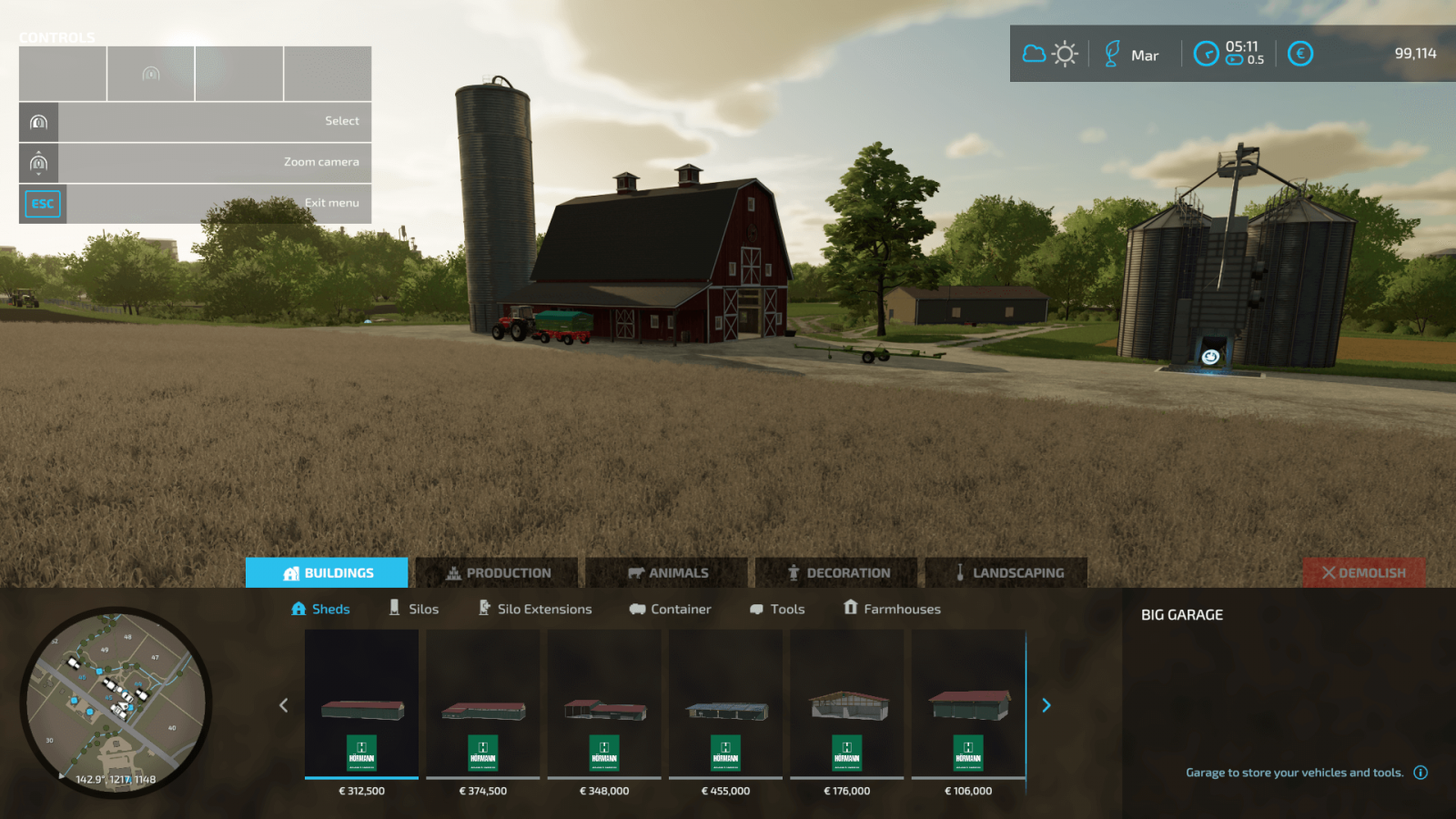
In construction mode, we see 5 separate tabs. Let’s find out what they are for. The first tab is the category with buildings, which is further divided into 6 subcategories.
Here you can find various buildings: farmhouses, garages for storing agricultural machinery, sheds that are also perfect for storing machinery, tools, and even bulk materials!In addition to the above, you can find silos for storing crops and various containers for storing liquids: water, liquid fertilizers, fuel.And, of course, high-pressure washers, auto repair shops, charging stations, and other useful buildings.
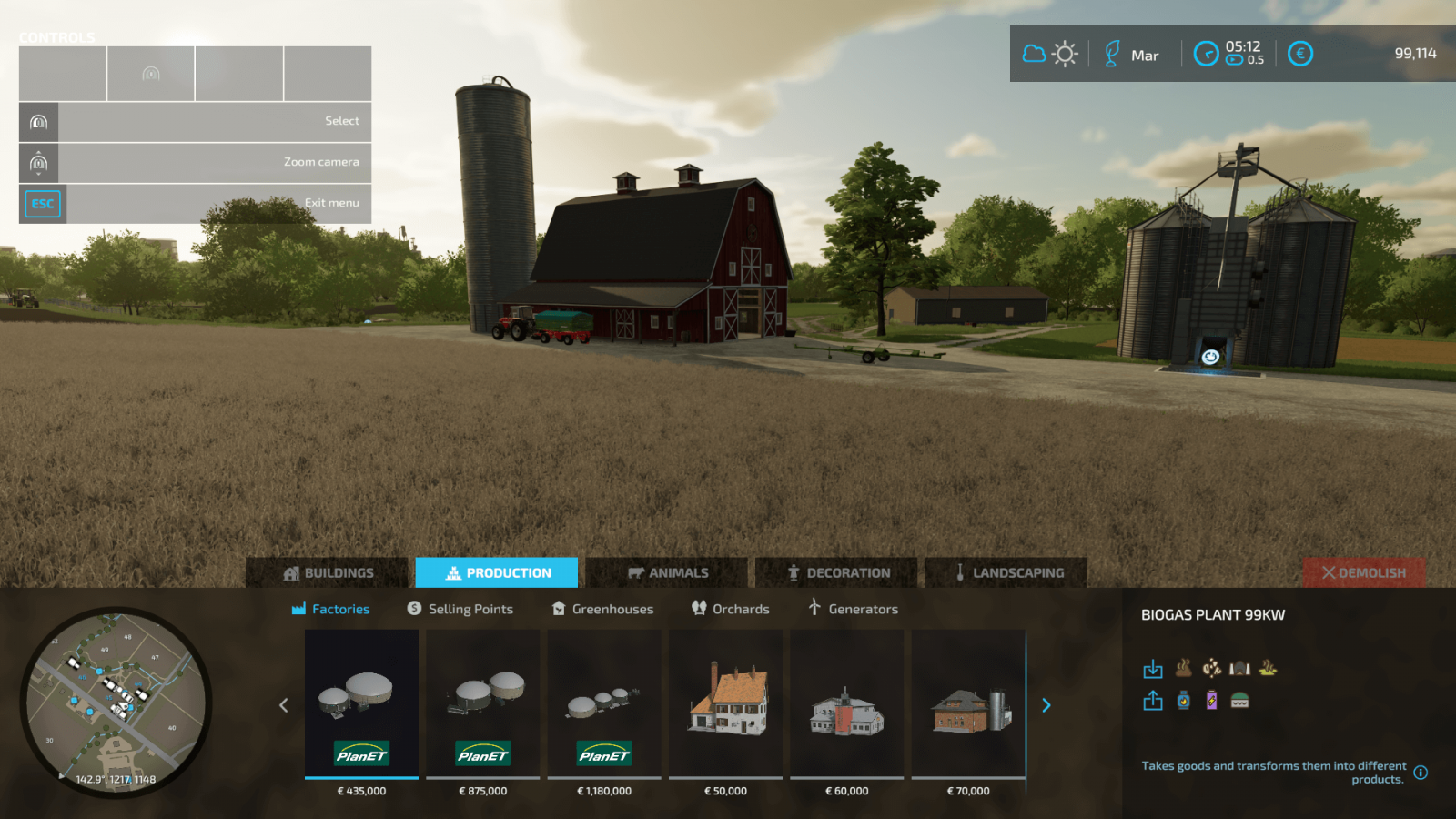
Now let’s visit the “Production” tab, where you can find various buildings that generate profit for you.
First of all, it’s worth noting the factories, thanks to which you can create real production chains. That is, you can process your harvest into something more expensive and profitable. Wheat can be turned into flour, flour into bread, and so on.Sales points. At these locations, you can sell crops and goods, earning good money.Greenhouses are intended for growing specific crops like strawberries and tomatoes. Greenhouses are very helpful if you play with seasonal cycles and snow enabled. You can build your own vineyards and olive groves. These two new crops were not available in previous Farming Simulator games, so this is a completely new experience. Generators for electricity production.
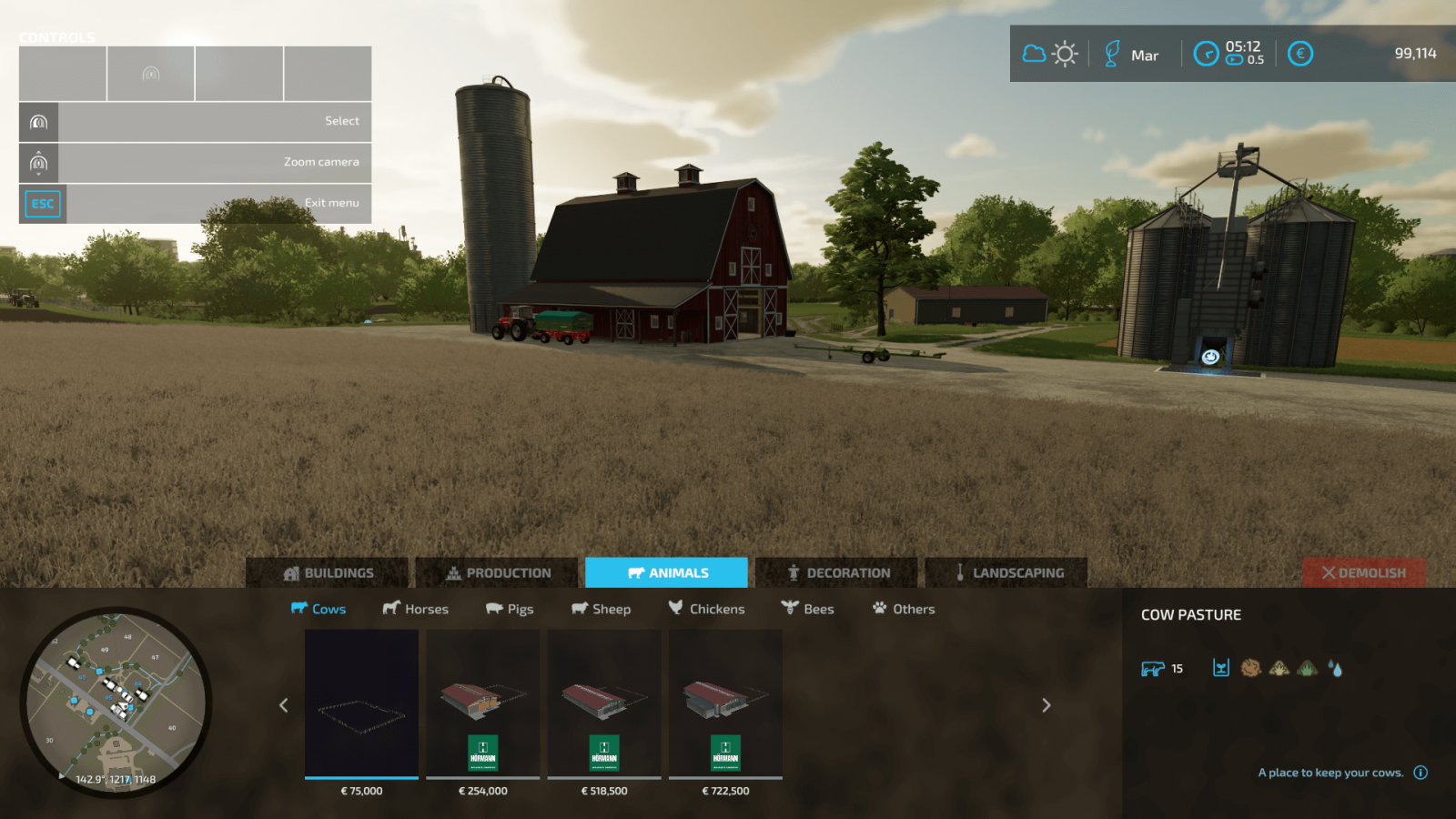
Moving on to the animal category. It’s quite interesting there as well!
Want to get into animal husbandry? In construction mode, go to the “Animals” category, which also has its own subcategories and everything needed for all types of animals. You can buy pens for various animals, special items designed for beekeeping, and even a doghouse for your pet.
How could we forget about decorations? Let’s move to the corresponding section!
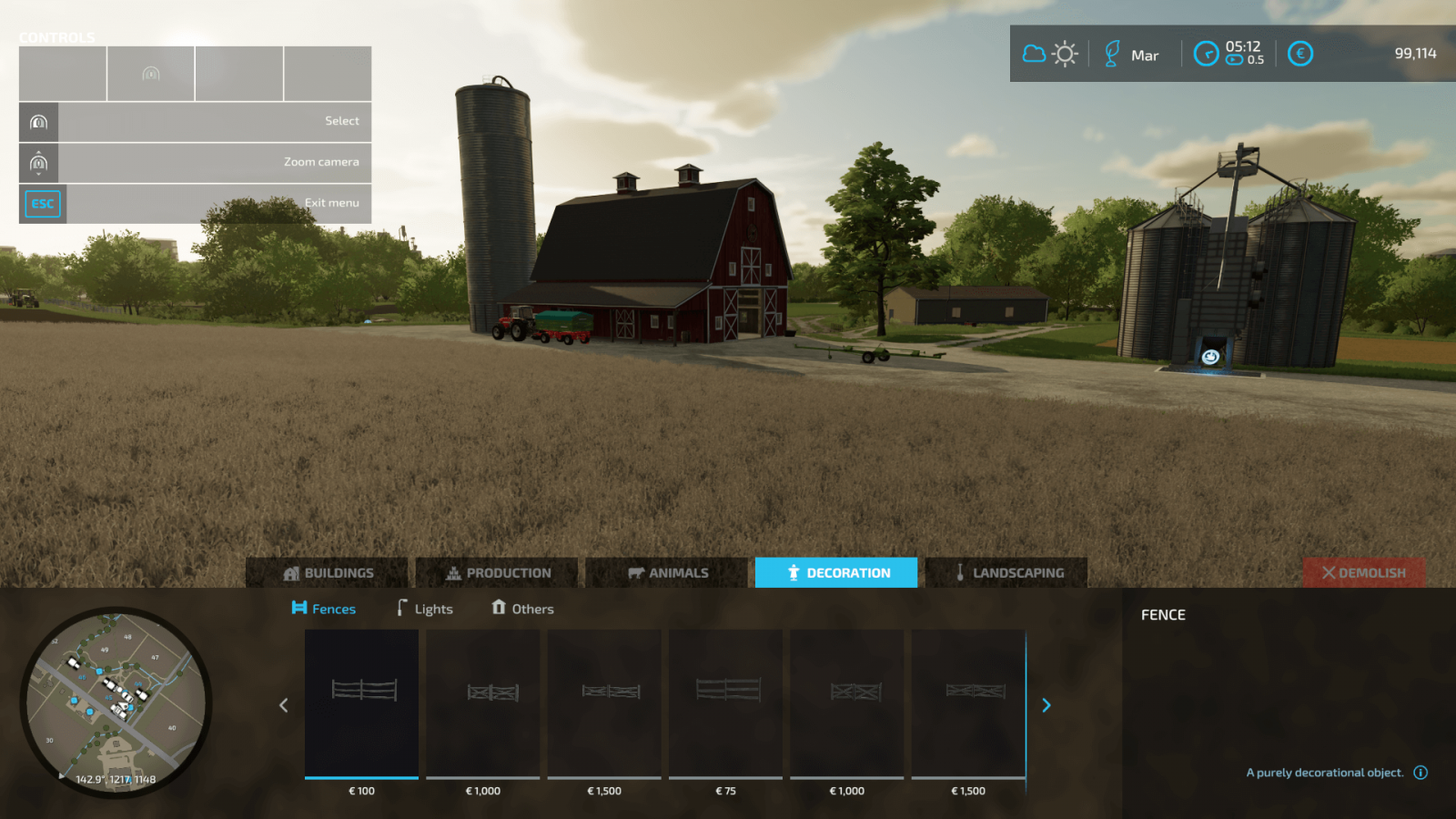
No one forbids you from decorating your farm. In the decorations section, you can find various light sources like lamps, garden sheds, fences, and other decorative elements that will make your farm much more beautiful.
And let’s not forget the incredibly important tool – landscape design in FS22!
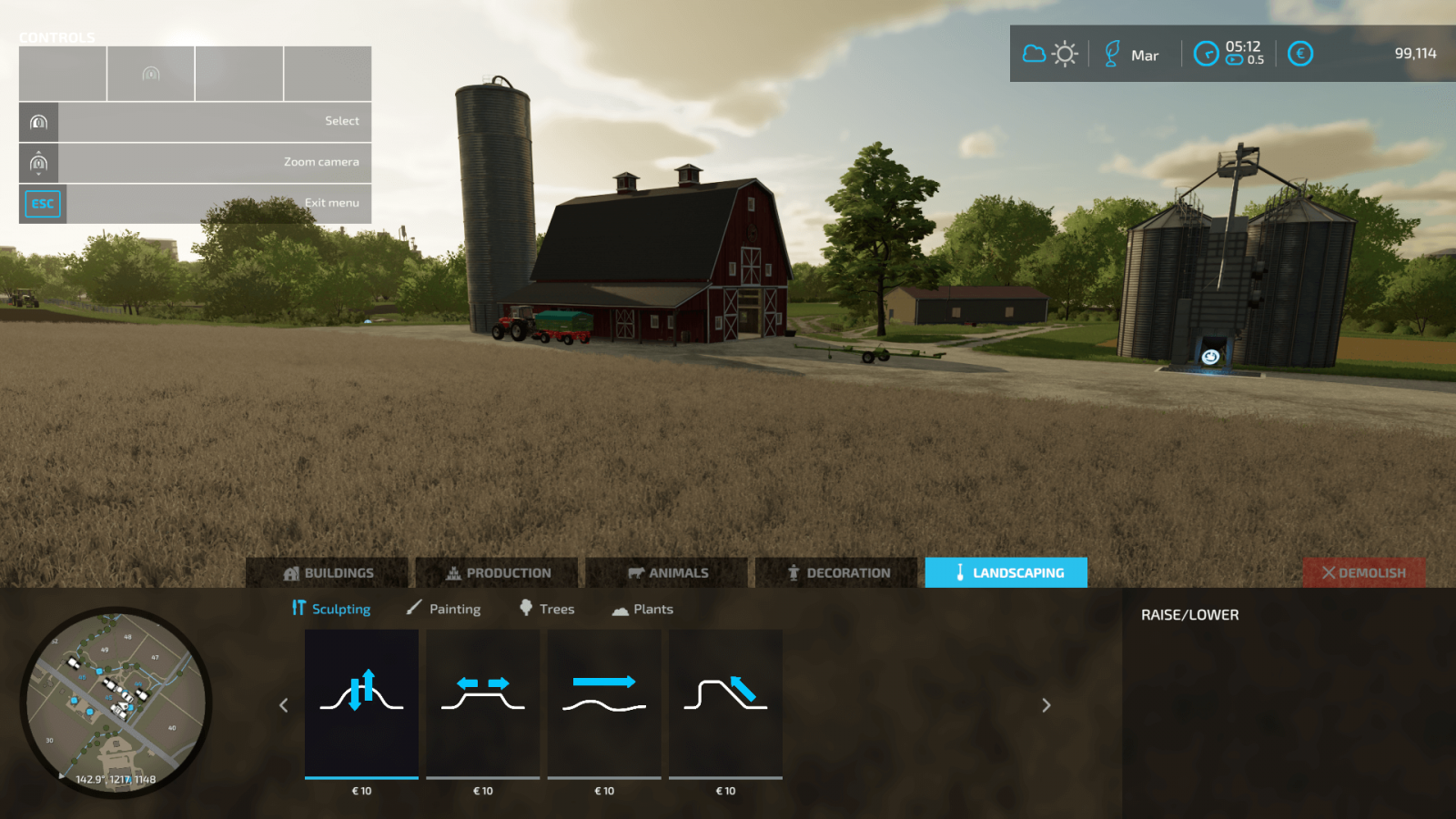
Yes, by using the landscape design tools, you can change the terrain relief, change ground textures, add asphalt, gravel, forest soil, and more, build your own roads. Of course, you can place trees and other plants on your land, turning your farm into a true paradise.
Construction Mode
In construction mode, we see 5 separate tabs. Let’s find out what they are for. The first tab is the category with buildings, which is further divided into 6 subcategories.
Here you can find various buildings: farmhouses, garages for storing agricultural machinery, sheds that are also perfect for storing machinery, tools, and even bulk materials!In addition to the above, you can find silos for storing crops and various containers for storing liquids: water, liquid fertilizers, fuel.And, of course, high-pressure washers, auto repair shops, charging stations, and other useful buildings.
Now let’s visit the “Production” tab, where you can find various buildings that generate profit for you.
First of all, it’s worth noting the factories, thanks to which you can create real production chains. That is, you can process your harvest into something more expensive and profitable. Wheat can be turned into flour, flour into bread, and so on.Sales points. At these locations, you can sell crops and goods, earning good money.Greenhouses are intended for growing specific crops like strawberries and tomatoes. Greenhouses are very helpful if you play with seasonal cycles and snow enabled. You can build your own vineyards and olive groves. These two new crops were not available in previous Farming Simulator games, so this is a completely new experience. Generators for electricity production.
Moving on to the animal category. It’s quite interesting there as well!
Want to get into animal husbandry? In construction mode, go to the “Animals” category, which also has its own subcategories and everything needed for all types of animals. You can buy pens for various animals, special items designed for beekeeping, and even a doghouse for your pet.
How could we forget about decorations? Let’s move to the corresponding section!
No one forbids you from decorating your farm. In the decorations section, you can find various light sources like lamps, garden sheds, fences, and other decorative elements that will make your farm much more beautiful.
And let’s not forget the incredibly important tool – landscape design in FS22!
Yes, by using the landscape design tools, you can change the terrain relief, change ground textures, add asphalt, gravel, forest soil, and more, build your own roads. Of course, you can place trees and other plants on your land, turning your farm into a true paradise.
|
|
ARTICLE | ||
|
2.3K
|
0
0 |
||
29 Sep 2025 at 10:05
All About Seasonal Cycles
It's time to get acquainted with the seasonal cycles and understand how they affect your farm in Farming Simulator 22.
Four Seasons
The seasons differ not only visually but also in gameplay. The game starts in August, following this cycle: summer, autumn, winter, spring. Let's take a look at each of these seasons.
Spring. This season is ideal for sowing the majority of available crops in Farming Simulator 22. Summer. This season is also suitable for sowing (since the cycle for most crops starts in March and ends in June). But summer brings other tasks as well, as it’s the perfect time to manage pastures and prepare for winter (for example, by gathering feed for your animals).Autumn. If you didn’t start preparing for winter during summer, you should do so immediately in autumn. However, this season is busy enough on its own, as from September to November you need to focus on harvesting. Winter. The most challenging period in Farming Simulator 22, since growing crops is impossible during winter (except in greenhouses). You will need to clear snow from roads, feed your animals, manage production chains, and if you have greenhouses, you can grow other crops.
Seasonal Settings
In FS22, you can change seasonal settings at any time, so you can enable or disable the gameplay aspect of seasonal cycles and work calmly without worrying that winter is approaching. However, some settings take effect only after the current season changes.
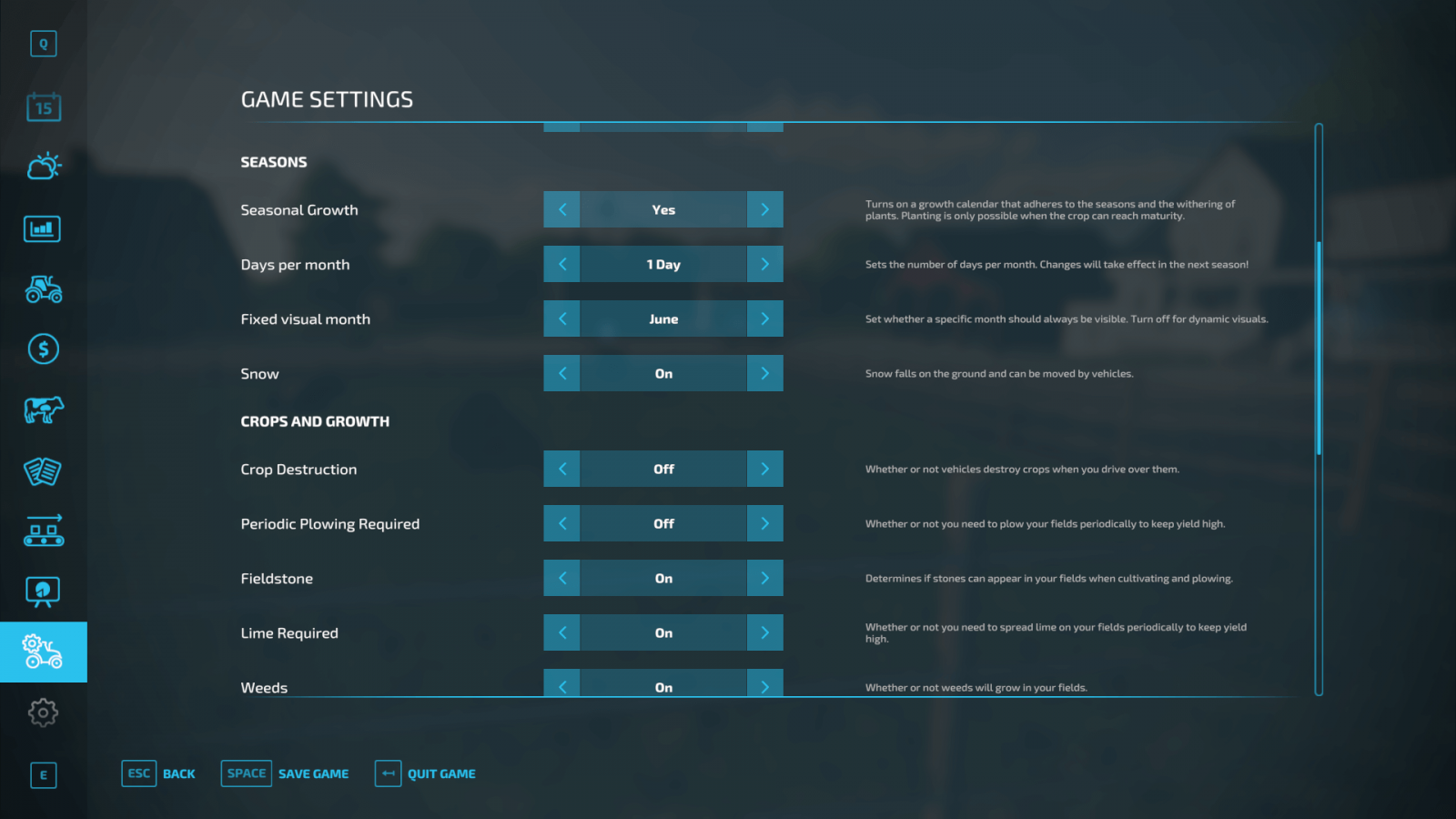
Seasonal Growth. An important setting that determines whether you need to grow your crops according to a special calendar included in the game. This option adds a lot of realism to your gameplay, but if you haven’t played the Farming Simulator series before, it’s better to keep this setting off for now. Playing with this setting enabled makes the game more realistic but also much more challenging.If you think the seasons change too quickly, you can increase the number of days in a month to 28. That means one year will last 336 days. By default, 1 day = 1 month in the game. So, 1 year in FS22 equals 12 days. But this can be easily changed. Experiment and find a comfortable value for yourself.You can use the Fixed Visual Month setting to keep the visual aspect of the seasons unchanged. So, if you want eternal summer with no snow or other visual seasonal changes, you can do that.The Snow option lets you decide whether snow will fall and remain on the ground. This setting controls the gameplay aspect of snow; snowflakes will appear regardless, but if you enable Snow mode, snow will accumulate on the ground and will need to be cleared to free paths.
These are the interesting seasonal settings in Farming Simulator 22.
Harvest Calendar
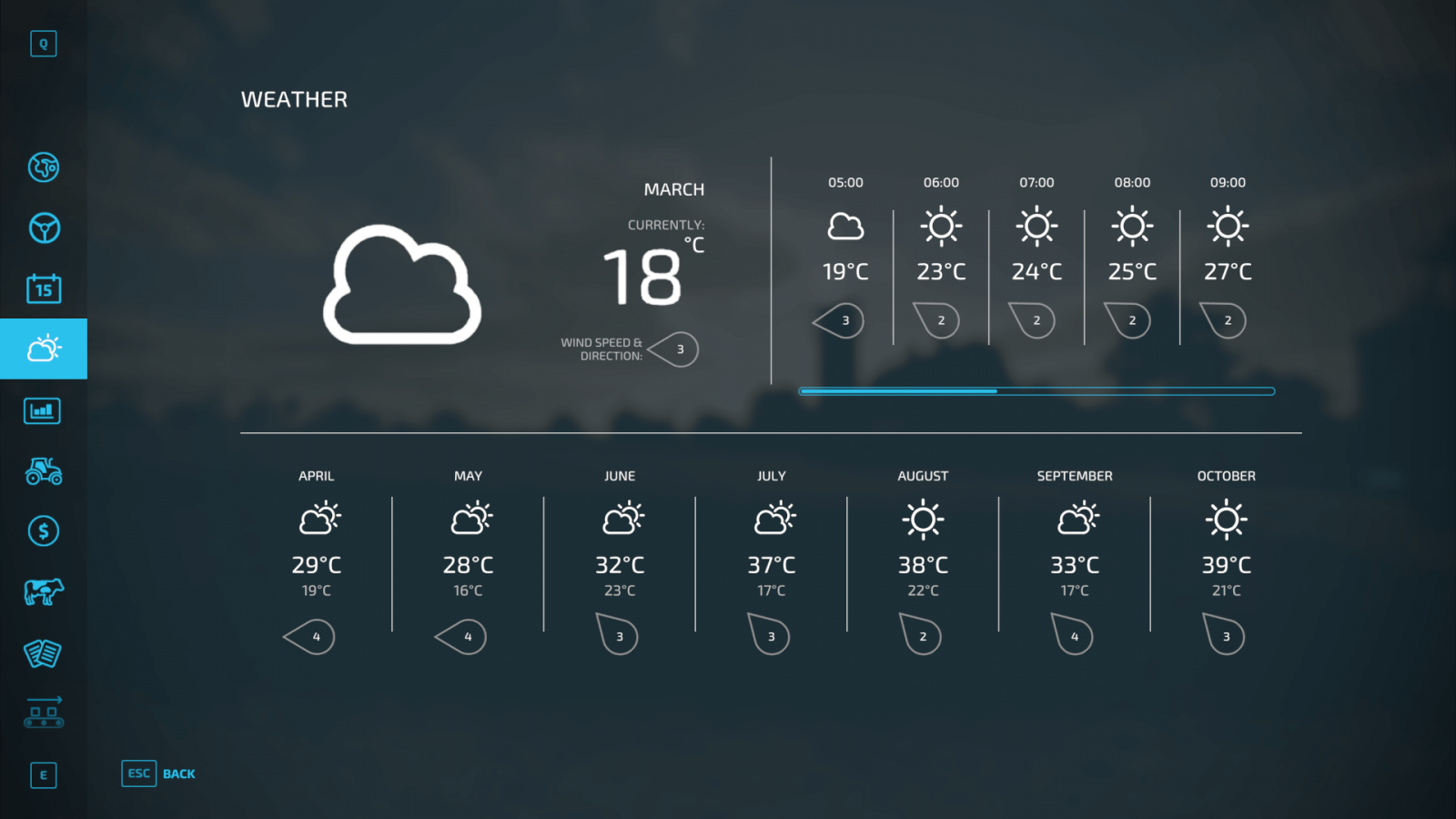
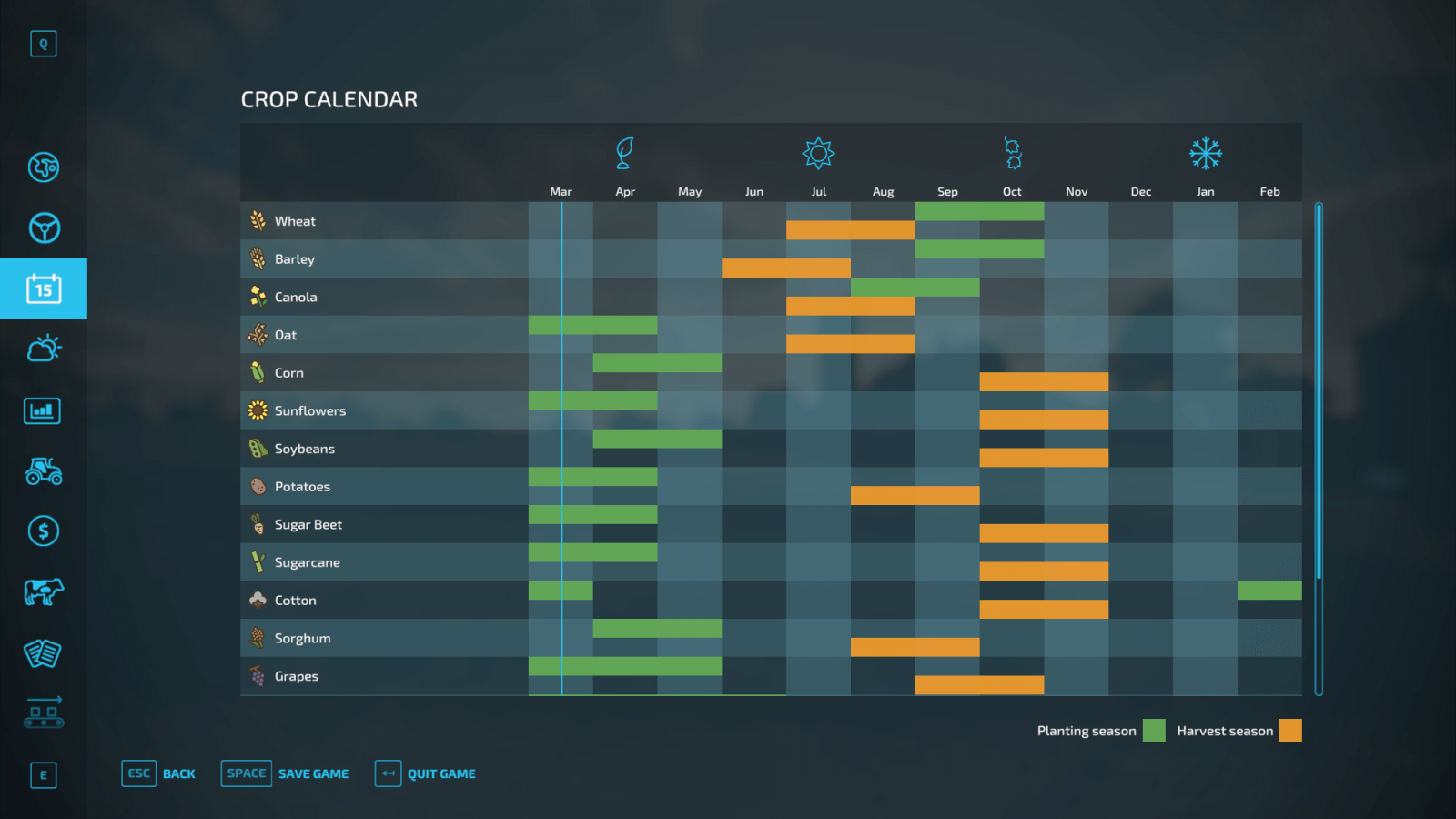
If you decide to play with seasonal cycles enabled, you will definitely need the in-game seasonal calendar. Each type of crop has specific requirements that must be followed to succeed. The seasonal calendar helps you determine which crops to grow in which seasons and when to harvest them.
Take wheat as an example. It’s best to sow wheat in September or October. This period is marked in green on the calendar. After that, you need to wait 10 months (again, according to the calendar). Therefore, the harvest should be gathered in July or August. If you ignore these requirements, you won’t get any yield.
But don’t forget, seasonal growth can be easily turned off in the settings!
Four Seasons
The seasons differ not only visually but also in gameplay. The game starts in August, following this cycle: summer, autumn, winter, spring. Let's take a look at each of these seasons.
Spring. This season is ideal for sowing the majority of available crops in Farming Simulator 22. Summer. This season is also suitable for sowing (since the cycle for most crops starts in March and ends in June). But summer brings other tasks as well, as it’s the perfect time to manage pastures and prepare for winter (for example, by gathering feed for your animals).Autumn. If you didn’t start preparing for winter during summer, you should do so immediately in autumn. However, this season is busy enough on its own, as from September to November you need to focus on harvesting. Winter. The most challenging period in Farming Simulator 22, since growing crops is impossible during winter (except in greenhouses). You will need to clear snow from roads, feed your animals, manage production chains, and if you have greenhouses, you can grow other crops.
Seasonal Settings
In FS22, you can change seasonal settings at any time, so you can enable or disable the gameplay aspect of seasonal cycles and work calmly without worrying that winter is approaching. However, some settings take effect only after the current season changes.
Seasonal Growth. An important setting that determines whether you need to grow your crops according to a special calendar included in the game. This option adds a lot of realism to your gameplay, but if you haven’t played the Farming Simulator series before, it’s better to keep this setting off for now. Playing with this setting enabled makes the game more realistic but also much more challenging.If you think the seasons change too quickly, you can increase the number of days in a month to 28. That means one year will last 336 days. By default, 1 day = 1 month in the game. So, 1 year in FS22 equals 12 days. But this can be easily changed. Experiment and find a comfortable value for yourself.You can use the Fixed Visual Month setting to keep the visual aspect of the seasons unchanged. So, if you want eternal summer with no snow or other visual seasonal changes, you can do that.The Snow option lets you decide whether snow will fall and remain on the ground. This setting controls the gameplay aspect of snow; snowflakes will appear regardless, but if you enable Snow mode, snow will accumulate on the ground and will need to be cleared to free paths.
These are the interesting seasonal settings in Farming Simulator 22.
Harvest Calendar
If you decide to play with seasonal cycles enabled, you will definitely need the in-game seasonal calendar. Each type of crop has specific requirements that must be followed to succeed. The seasonal calendar helps you determine which crops to grow in which seasons and when to harvest them.
Take wheat as an example. It’s best to sow wheat in September or October. This period is marked in green on the calendar. After that, you need to wait 10 months (again, according to the calendar). Therefore, the harvest should be gathered in July or August. If you ignore these requirements, you won’t get any yield.
But don’t forget, seasonal growth can be easily turned off in the settings!
|
|
ARTICLE | ||
|
3.1K
|
0
0 |
||
29 Sep 2025 at 10:04
Fields in FS22
We have covered the basics of Farming Simulator 22. Now it's time to learn more about fields and farmland. There will be separate guides on many topics; in this article, we will look at the basics of working with soil.
Field Information
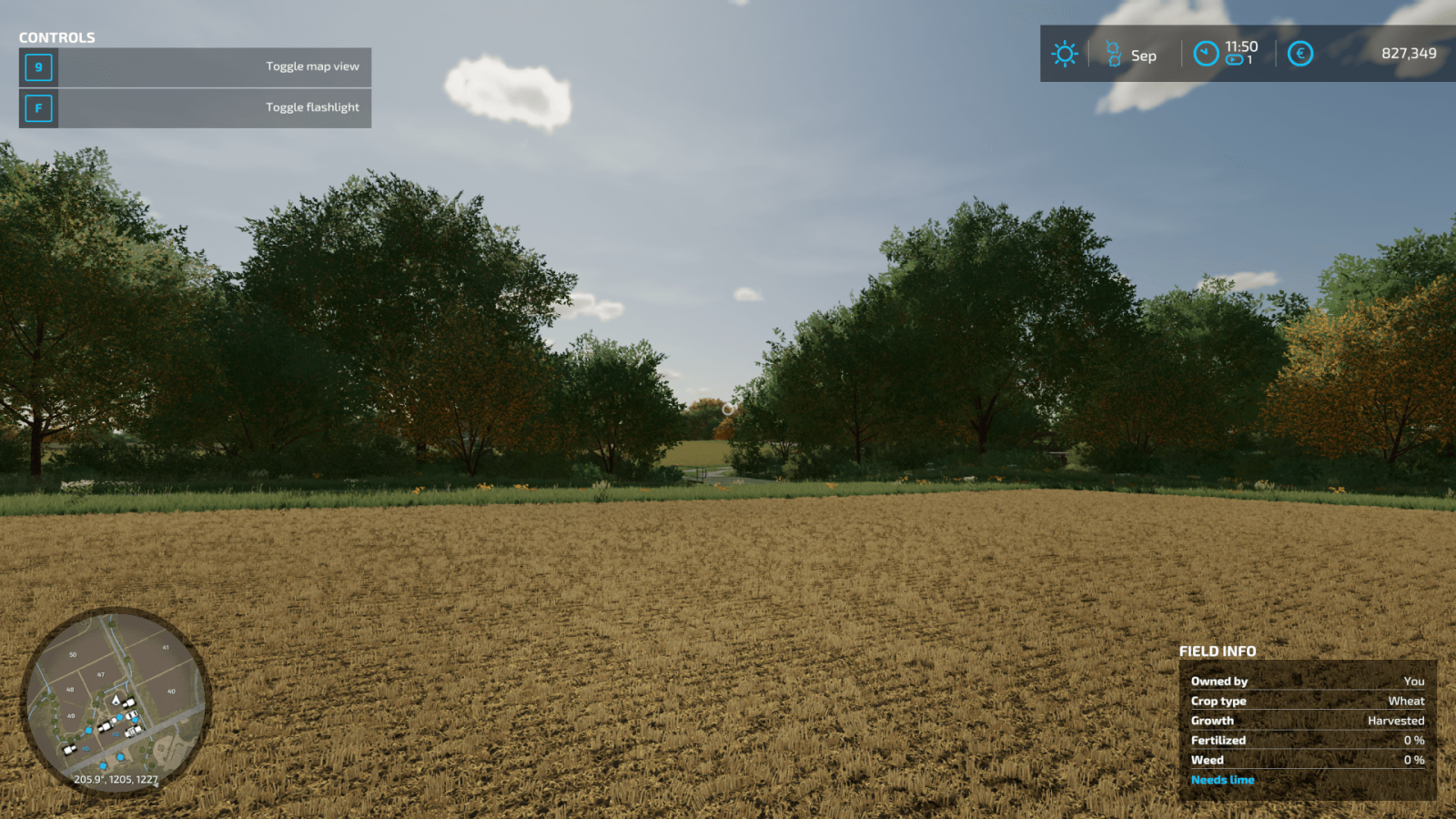
When you are on the field, in the bottom right corner you can see useful information, namely:
Field owner. Displays whether you own this field or not. If not, you cannot use it until you buy it.Crop type. Shows which crop is currently being grown on this field.Growth, progress. Provides more information about the condition of the field and the crop currently growing there.Fertilization. Information about how much fertilizer has been applied.Weeds. Shows the percentage of weed growth on the field. Weeds should be removed, so if this indicator is high and the field is yours – start weeding immediately.Additionally, you can find information on whether plowing is required.
Map Information
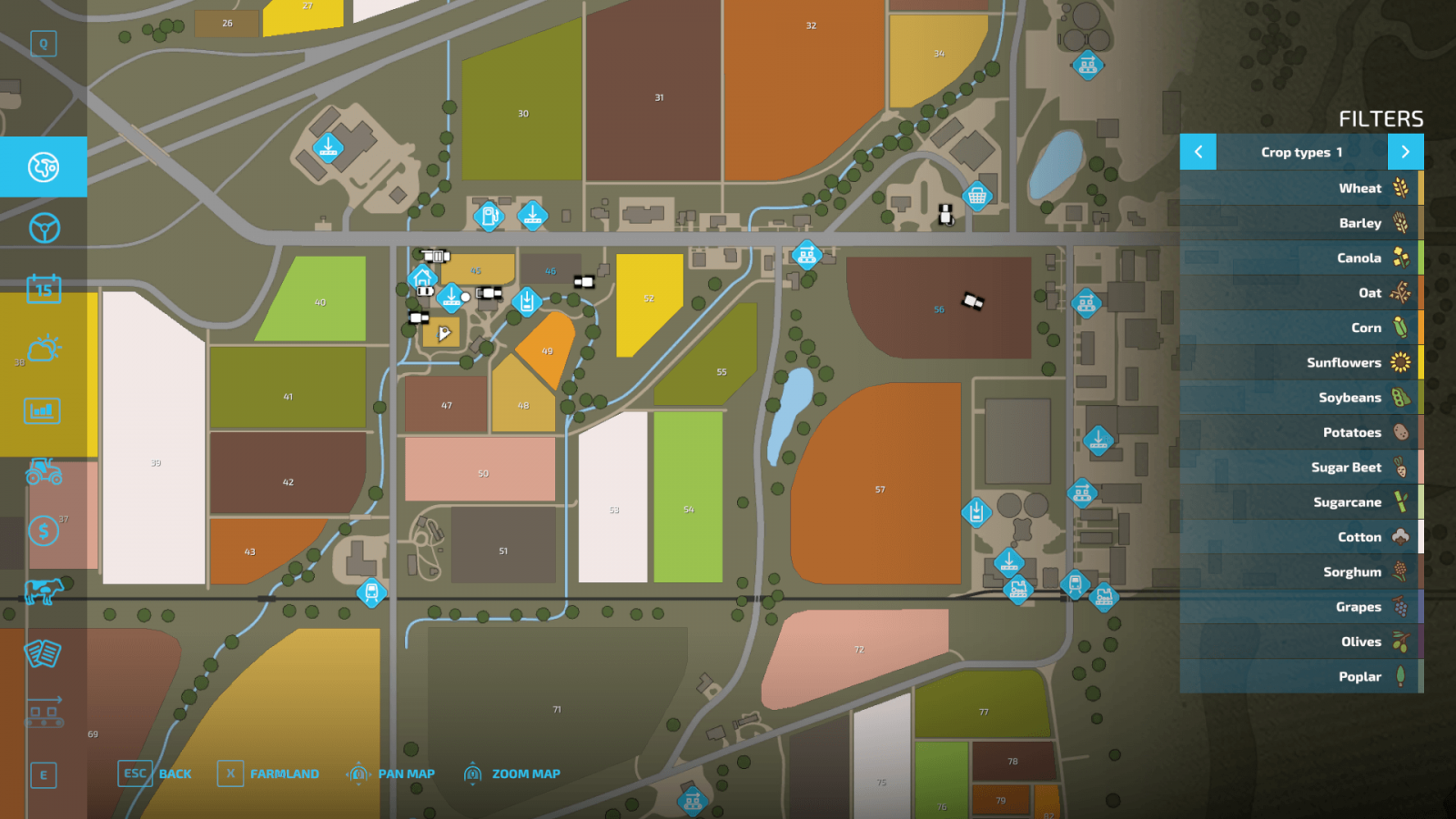
Open the map, which also contains a wealth of useful information. On the right, there are so-called filters that allow you to get useful data. On the right, you can see the legend for various icons, and crop types have different colors, so you can identify what is being grown on specific fields by color.
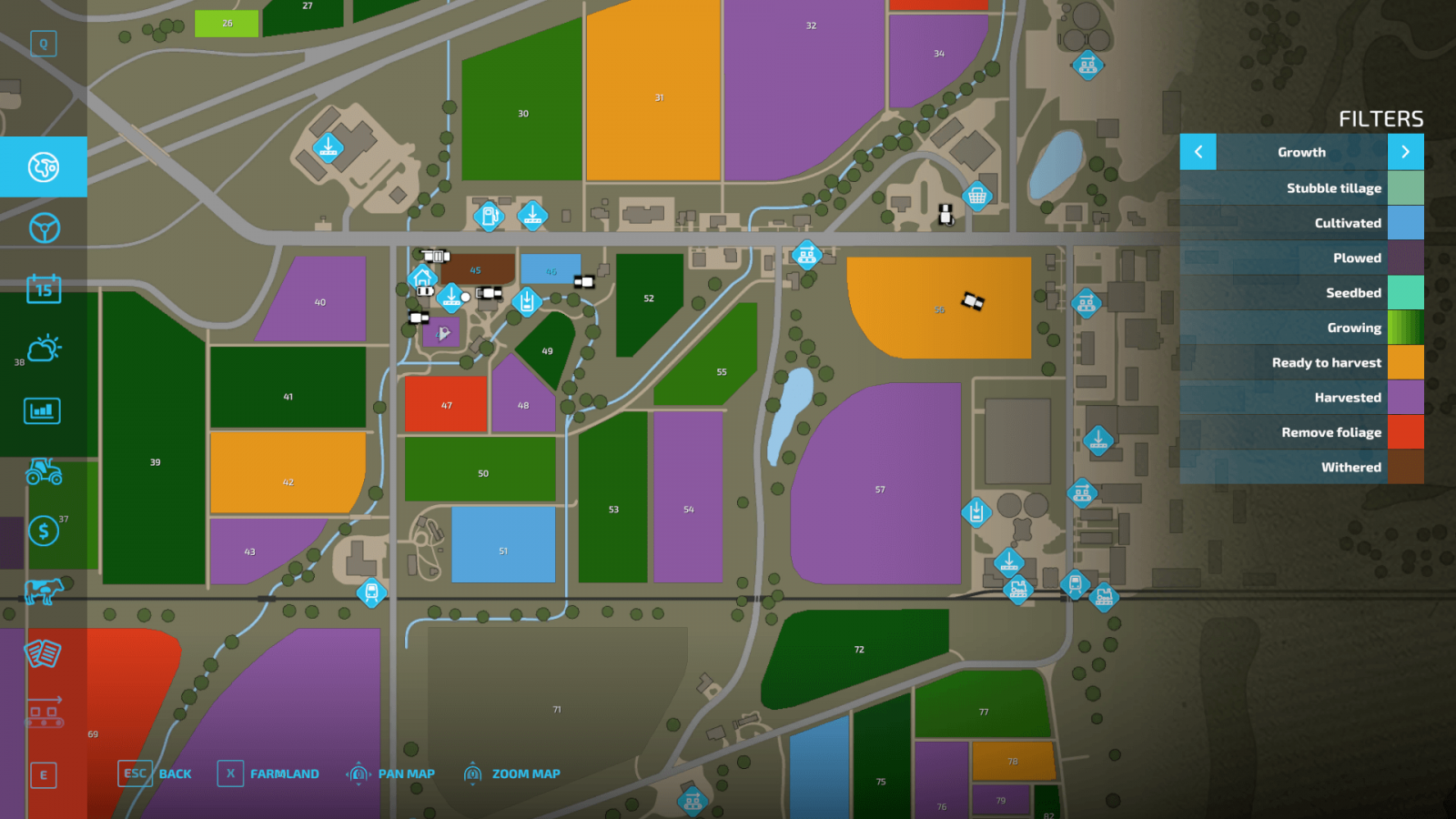
Now switch to the growth filter, which shows the condition of your fields and crops, if any.
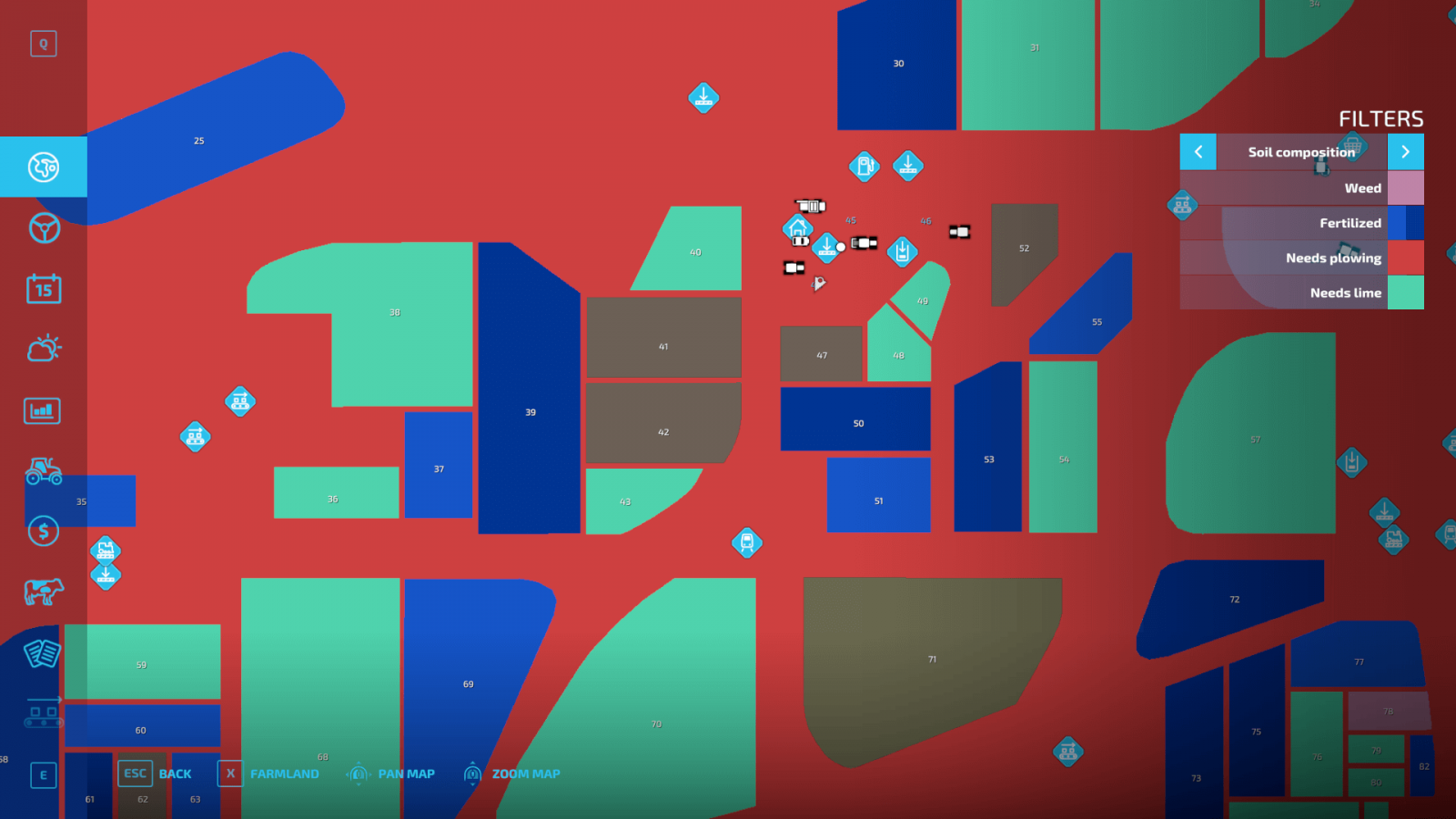
There is also a very useful filter that shows more detailed information about your fields: whether plowing is needed, if weeds need to be removed, whether fertilization is required, and other information. Again, each value has its own color.
Buying and Modifying Fields
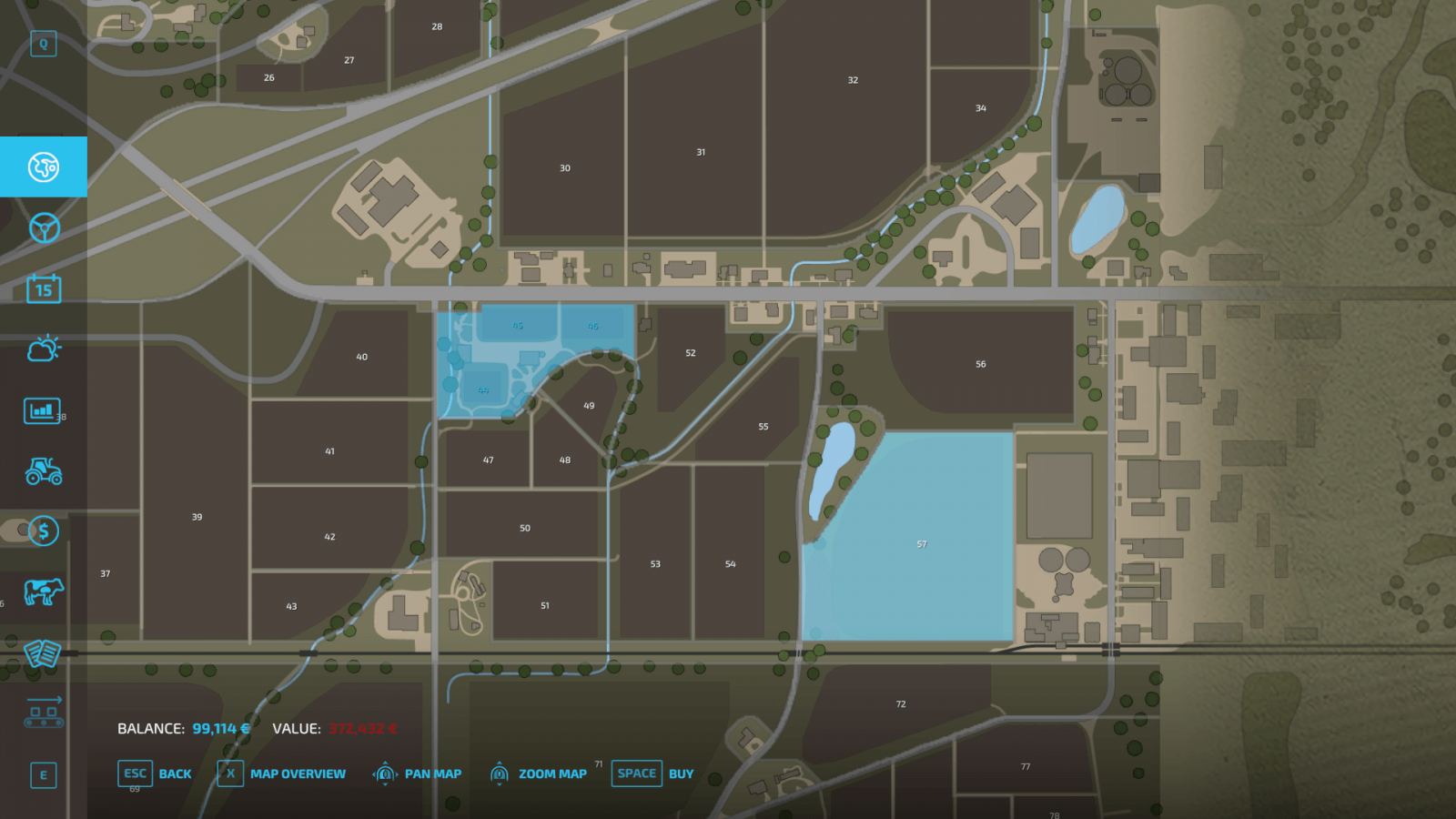
In the dedicated farmland screen, you can monitor all the fields under your control and those available for purchase. By the way, you can also sell your fields from there if you no longer need them or urgently need money.
There is another important feature you should know about. Plows have an interesting function for creating fields. By selecting the appropriate function, you can either change the shape of your fields and expand them or merge several of your fields into one. For the latter, the fields must belong to you and must not be separated by roads or other infrastructure.
If you plan to buy several fields at once – try to ensure they are located close to each other to save travel time and to have the option to merge them if desired. If there are trees on the land – you can remove them using forestry equipment, which is quite expensive. Long fields are better than wide ones because they require fewer maneuvers and turns during cultivation. Try to maintain ideal spacing between rows when using different tools (cultivator, sprayer, etc.) to cover as much area as possible in one pass and save a lot of time.
Field Information
When you are on the field, in the bottom right corner you can see useful information, namely:
Field owner. Displays whether you own this field or not. If not, you cannot use it until you buy it.Crop type. Shows which crop is currently being grown on this field.Growth, progress. Provides more information about the condition of the field and the crop currently growing there.Fertilization. Information about how much fertilizer has been applied.Weeds. Shows the percentage of weed growth on the field. Weeds should be removed, so if this indicator is high and the field is yours – start weeding immediately.Additionally, you can find information on whether plowing is required.
Map Information
Open the map, which also contains a wealth of useful information. On the right, there are so-called filters that allow you to get useful data. On the right, you can see the legend for various icons, and crop types have different colors, so you can identify what is being grown on specific fields by color.
Now switch to the growth filter, which shows the condition of your fields and crops, if any.
There is also a very useful filter that shows more detailed information about your fields: whether plowing is needed, if weeds need to be removed, whether fertilization is required, and other information. Again, each value has its own color.
Buying and Modifying Fields
In the dedicated farmland screen, you can monitor all the fields under your control and those available for purchase. By the way, you can also sell your fields from there if you no longer need them or urgently need money.
There is another important feature you should know about. Plows have an interesting function for creating fields. By selecting the appropriate function, you can either change the shape of your fields and expand them or merge several of your fields into one. For the latter, the fields must belong to you and must not be separated by roads or other infrastructure.
If you plan to buy several fields at once – try to ensure they are located close to each other to save travel time and to have the option to merge them if desired. If there are trees on the land – you can remove them using forestry equipment, which is quite expensive. Long fields are better than wide ones because they require fewer maneuvers and turns during cultivation. Try to maintain ideal spacing between rows when using different tools (cultivator, sprayer, etc.) to cover as much area as possible in one pass and save a lot of time.
|
|
ARTICLE | ||
|
5K
|
0
0 |
||
29 Sep 2025 at 10:03
More About Crops in FS22
Crops are an important part of the Farming Simulator series, as they are the very essence of the game. Farming Simulator 22 features quite a variety of crops, and some of them require a unique approach. Later, we will explain how to sow, cultivate, and harvest different crops, but today we will talk about the basic mechanics.
Types of Crops in FS22
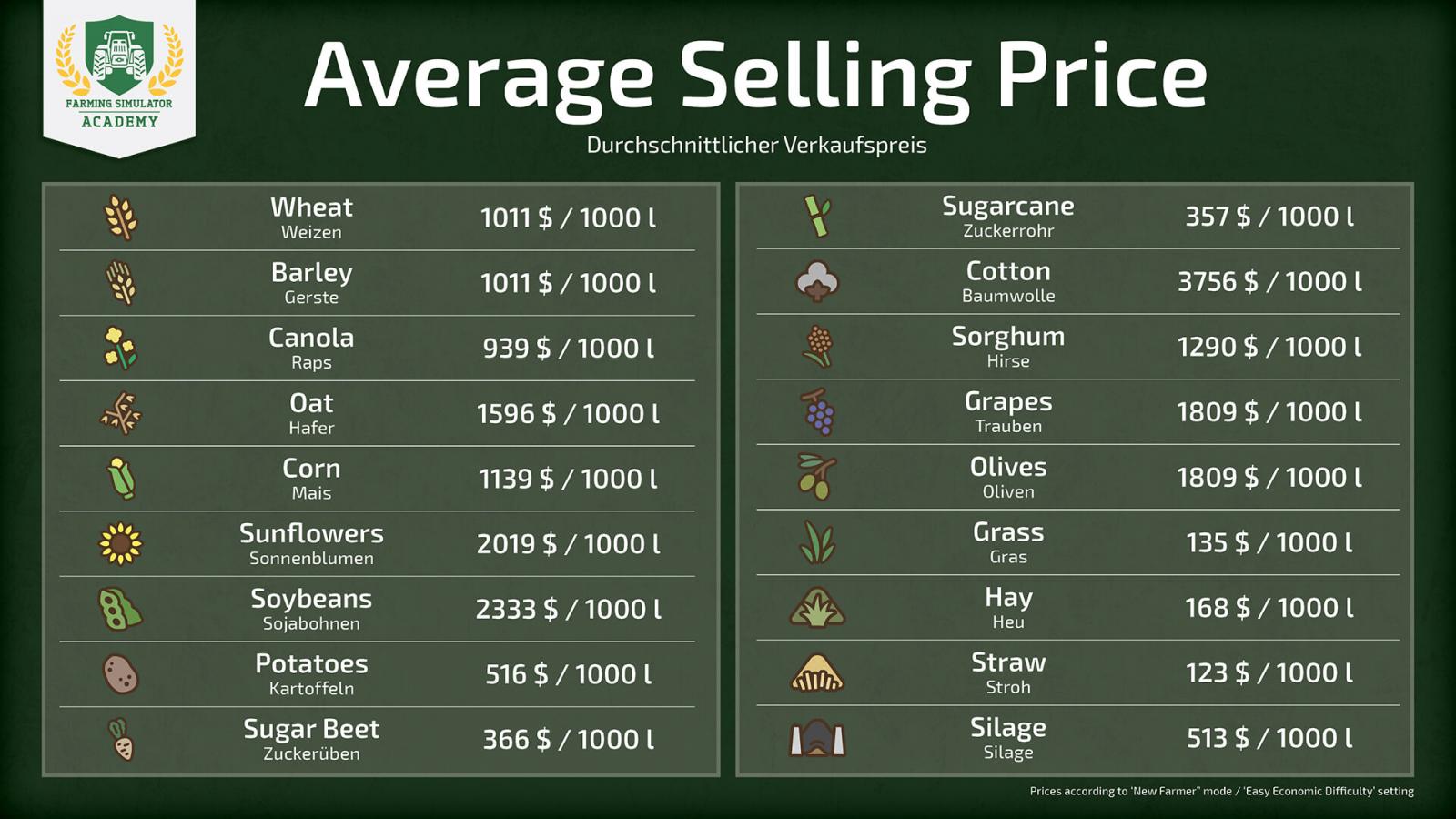
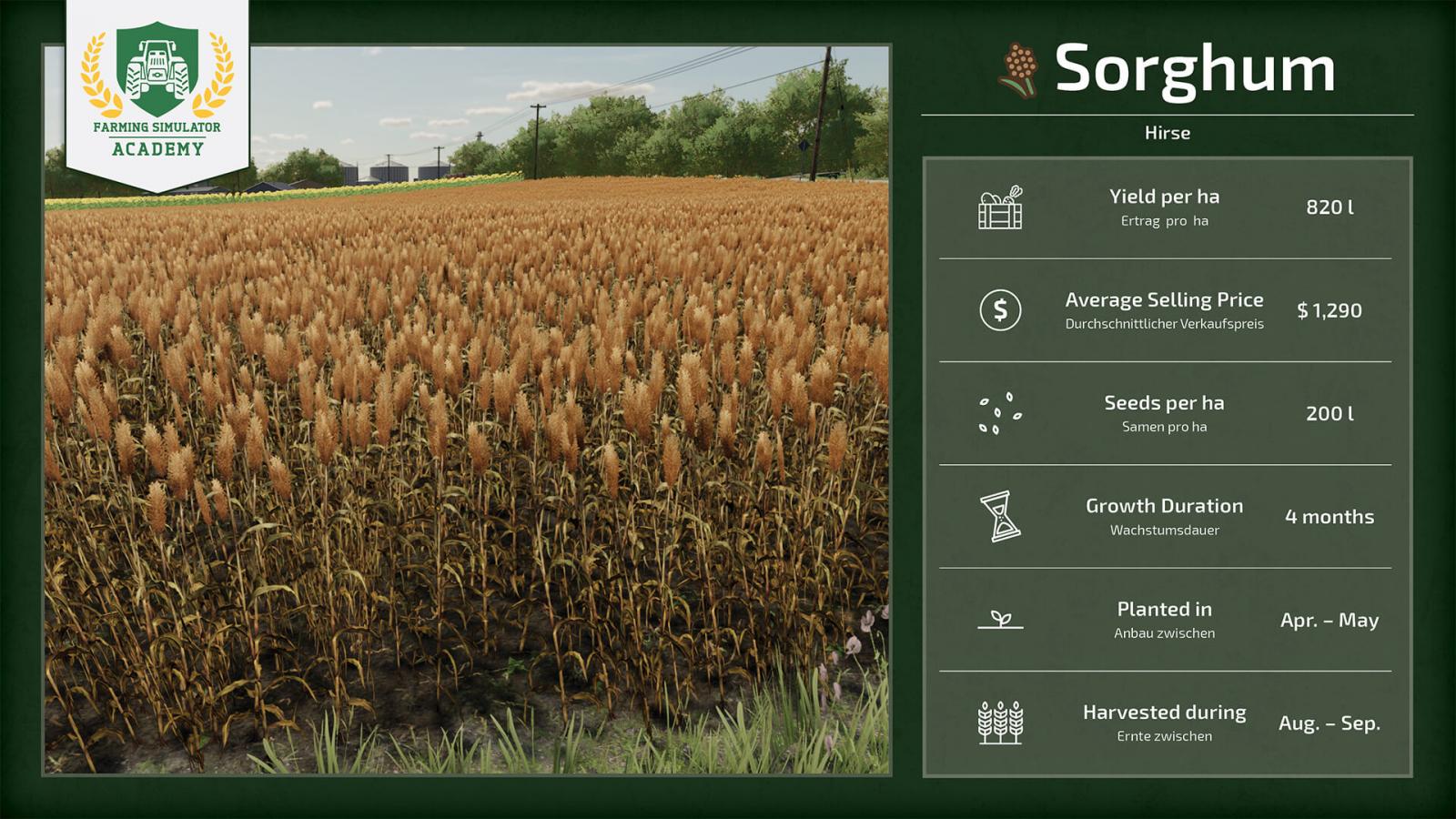
At the start of the game, it is very important to choose the right crop to grow, as each crop has its own price, yield quantity, and characteristics. If you play with seasonal cycles enabled, you will also need to keep track of the calendar, which significantly complicates the game. We suggest you take a look at the screenshots below to learn more about each crop and make your choice.
Profitability
In the screenshot above, you can see the profitability/profit margin of each crop. This will greatly simplify your choice. Keep in mind that prices constantly fluctuate, so you need to sell your harvest at the most opportune moment if you want to earn enough money and recoup your investments and time.
To achieve maximum yield and get the highest profit, you need to take care of your crops. Monitor whether the field has been plowed, if lime needs to be applied, whether it is sufficiently fertilized, and if there are any weeds. If all indicators are in good condition, you will be able to earn the maximum amount of money, as the harvest will be larger. Keep an eye on price fluctuations and choose the right moment to sell.
It is important to understand that with some additional tools, you can earn even more money. In other words, the more you invest, the more money you can make. For example, if you grow corn and there is straw left after harvesting, you can process this straw into silage and sell it if you have the necessary equipment. Therefore, one crop can generate profit in two directions. Don’t forget to constantly invest in your own farm by purchasing modern and powerful machinery.
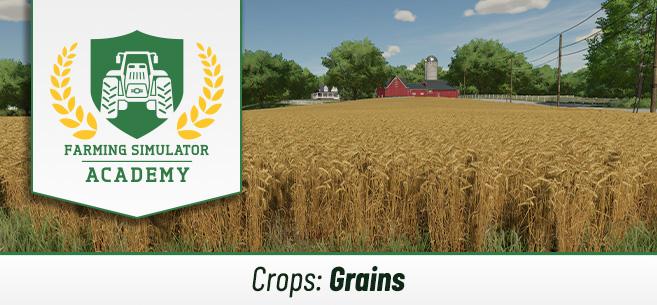
Grain Crops
It’s probably best to start the game with grain crops (wheat, barley, oats, etc.), as many of these crops are harvested with the same combine harvester and grain header, so you don’t need to invest heavily in equipment. We suggest you take a look at the screenshots with more detailed information about grain crops in Farming Simulator 22.
Wheat, sorghum, barley, oats, canola, and soybeans are harvested with the same tool, which is quite convenient and fast.
Root Crops
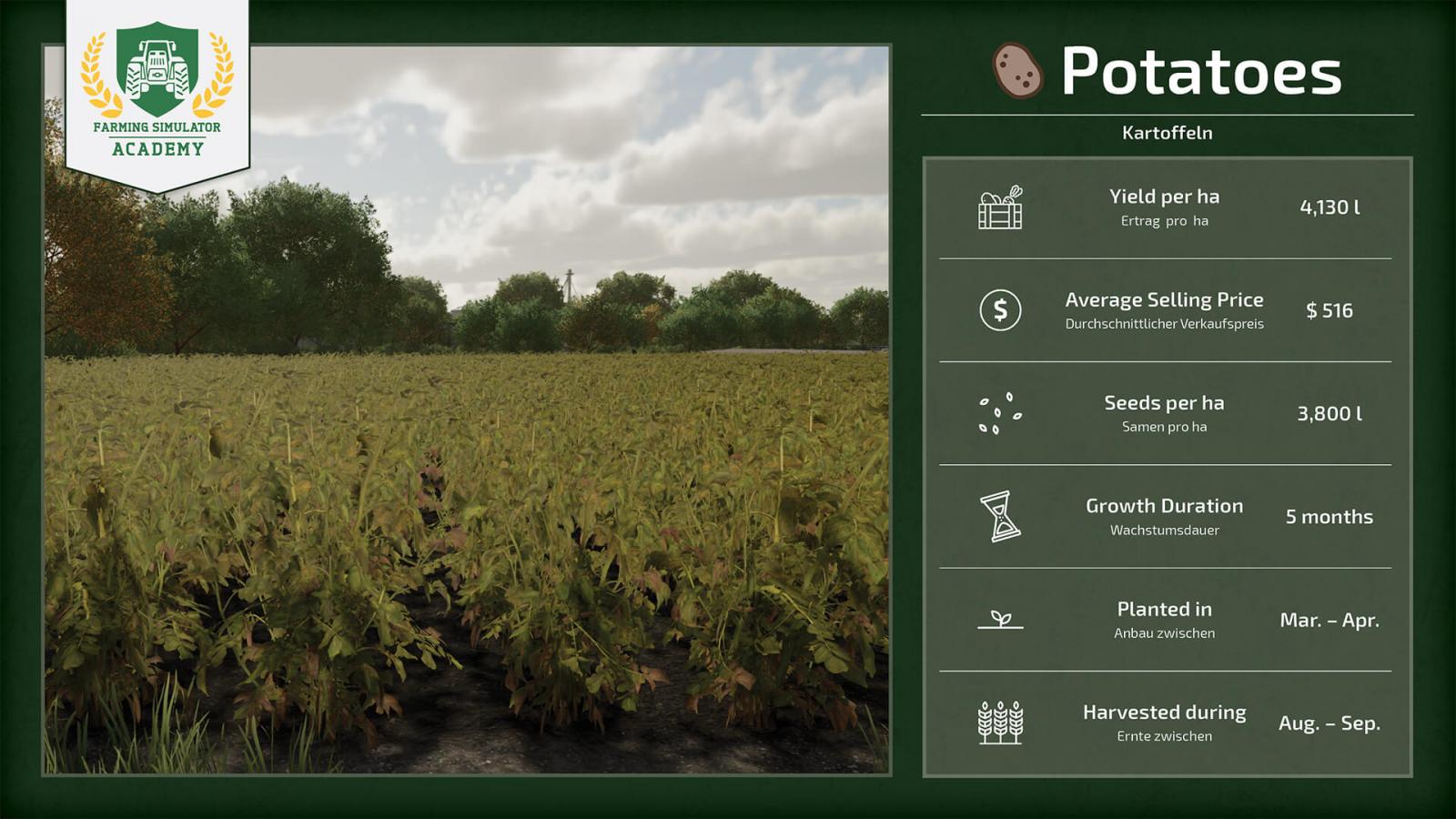
Root crops are a bit more complicated because they require special equipment: a special seeder and a special harvester. There is also more work involved, as the field needs to be plowed each time before planting root crops. The harvested crop must be stored on the ground (in barns, for example). Learn more about the types of root crops from the screenshots below.
Orchards and Vineyards
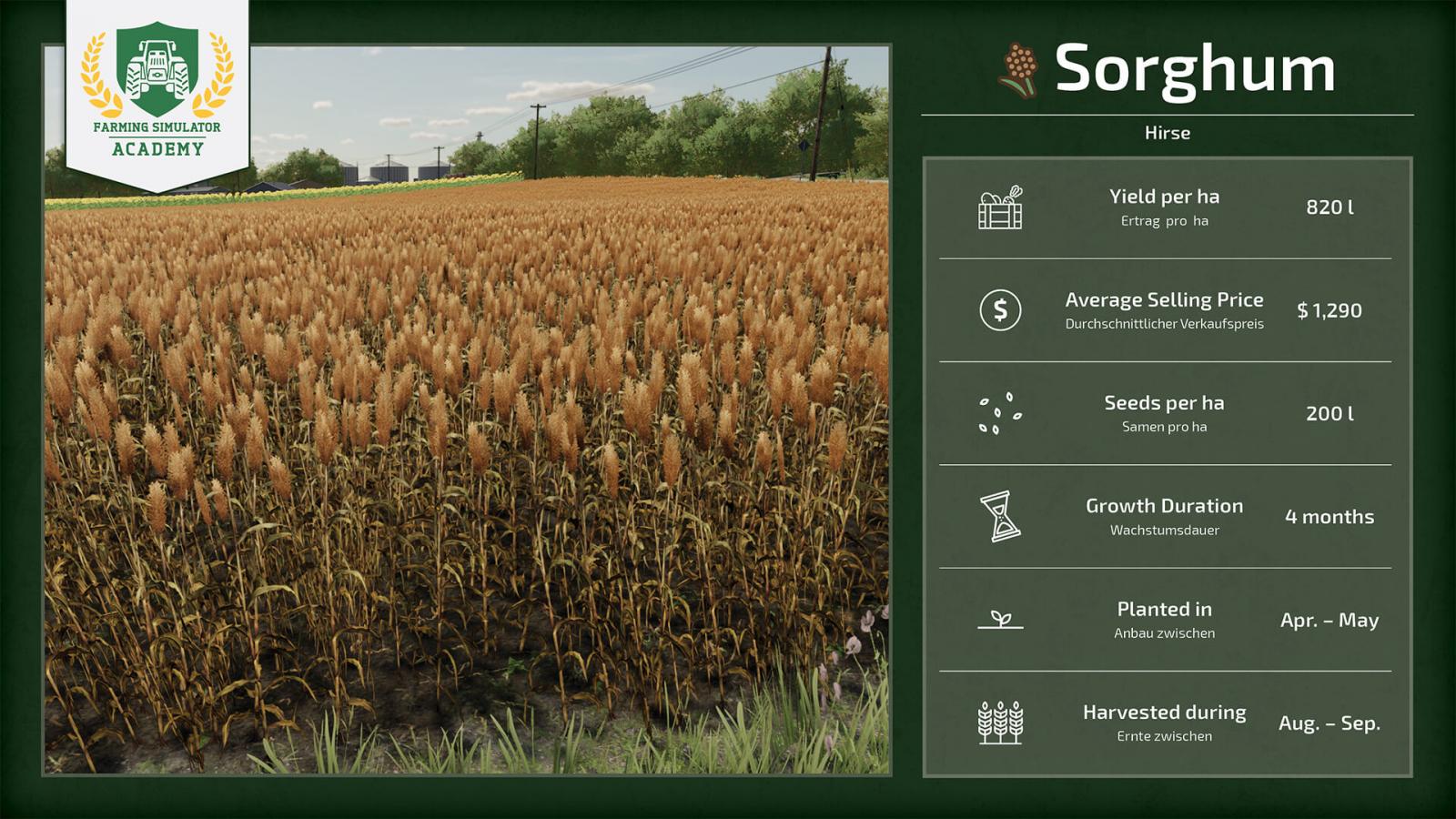
Farming Simulator 22 adds 3 new crops: sorghum, grapes, and olives. If you want to grow grapes and olives, you will need to create an actual orchard or vineyard. This is done in the construction mode. But that’s only part of the process, as special machinery is required to care for these new crops.
Other Crops
Farming Simulator 22 also includes other crops. For example, cotton and corn. They also require special tools, and these tools are not cheap, so it’s clearly not worth starting with them. The best option for starting the game is grain crops, but as your agricultural business develops, you can buy special equipment and grow whatever you want. Let’s take a look at the other crops that do not belong to grains or root crops.
How to Harvest in FS22
We will talk about each crop separately, but the mechanics are quite straightforward. First, use a cultivator to loosen the soil. Then apply lime. This is necessary to reduce soil acidity. Fertilize the soil, then sow or plant. Be sure to monitor for weeds, remove them immediately, and harvest on time to prevent drying out. That’s it!
We will soon provide you with more detailed information about each type of crop and their specifics. The above are just the basic steps, but each crop has its own nuances, which we will discuss in other guides!
Types of Crops in FS22
At the start of the game, it is very important to choose the right crop to grow, as each crop has its own price, yield quantity, and characteristics. If you play with seasonal cycles enabled, you will also need to keep track of the calendar, which significantly complicates the game. We suggest you take a look at the screenshots below to learn more about each crop and make your choice.
Profitability
In the screenshot above, you can see the profitability/profit margin of each crop. This will greatly simplify your choice. Keep in mind that prices constantly fluctuate, so you need to sell your harvest at the most opportune moment if you want to earn enough money and recoup your investments and time.
To achieve maximum yield and get the highest profit, you need to take care of your crops. Monitor whether the field has been plowed, if lime needs to be applied, whether it is sufficiently fertilized, and if there are any weeds. If all indicators are in good condition, you will be able to earn the maximum amount of money, as the harvest will be larger. Keep an eye on price fluctuations and choose the right moment to sell.
It is important to understand that with some additional tools, you can earn even more money. In other words, the more you invest, the more money you can make. For example, if you grow corn and there is straw left after harvesting, you can process this straw into silage and sell it if you have the necessary equipment. Therefore, one crop can generate profit in two directions. Don’t forget to constantly invest in your own farm by purchasing modern and powerful machinery.
Grain Crops
It’s probably best to start the game with grain crops (wheat, barley, oats, etc.), as many of these crops are harvested with the same combine harvester and grain header, so you don’t need to invest heavily in equipment. We suggest you take a look at the screenshots with more detailed information about grain crops in Farming Simulator 22.
Wheat, sorghum, barley, oats, canola, and soybeans are harvested with the same tool, which is quite convenient and fast.
Root Crops
Root crops are a bit more complicated because they require special equipment: a special seeder and a special harvester. There is also more work involved, as the field needs to be plowed each time before planting root crops. The harvested crop must be stored on the ground (in barns, for example). Learn more about the types of root crops from the screenshots below.
Orchards and Vineyards
Farming Simulator 22 adds 3 new crops: sorghum, grapes, and olives. If you want to grow grapes and olives, you will need to create an actual orchard or vineyard. This is done in the construction mode. But that’s only part of the process, as special machinery is required to care for these new crops.
Other Crops
Farming Simulator 22 also includes other crops. For example, cotton and corn. They also require special tools, and these tools are not cheap, so it’s clearly not worth starting with them. The best option for starting the game is grain crops, but as your agricultural business develops, you can buy special equipment and grow whatever you want. Let’s take a look at the other crops that do not belong to grains or root crops.
How to Harvest in FS22
We will talk about each crop separately, but the mechanics are quite straightforward. First, use a cultivator to loosen the soil. Then apply lime. This is necessary to reduce soil acidity. Fertilize the soil, then sow or plant. Be sure to monitor for weeds, remove them immediately, and harvest on time to prevent drying out. That’s it!
We will soon provide you with more detailed information about each type of crop and their specifics. The above are just the basic steps, but each crop has its own nuances, which we will discuss in other guides!
|
|
ARTICLE | ||
|
2.8K
|
0
0 |
||
29 Sep 2025 at 10:01
How to Sow and Harvest Grain Crops
Well, it's time to talk about cereal crops, and learn how to sow and harvest cereals in Farming Simulator 22, and how to sell them. By the way, everything said in this guide also applies to soybeans. Let's get started!
Which crops are considered cereals in FS22
Let's take a look at all the cereal crops in FS22. Below are all the cereal crops in the game (at the time of the game's release):
What you need to sow and harvest cereals
We have already explained where to start (https://stmods.ru/farming_simulator_2022/articles/s_chego_nachat_v_farming_simulator_2022/), and what equipment you will need. In that article, you will learn in more detail what equipment is required, but here is a brief overview. You will need the following devices:
Tractor. Obviously, the most important vehicle for a farmer.Cultivator.Seeder and the cereal seeds themselves.Fertilizer spreader, fertilizers, lime. Note that not all fertilizer spreaders can spread lime. Keep this in mind when purchasing.Weed removal device.Combine harvester, grain header.Trailer. After all, you need to transport the harvest.
Which equipment to choose for cereals
If you have no idea which equipment is best to take at the start – here is a list of recommended equipment from the developers of Farming Simulator 22 themselves. These machines will be available to you for free if you start the game on the easiest difficulty mode. You can choose equipment yourself, just watch your balance carefully to have enough for all purchases.
Tractor: John Deere 7810;Cultivator: RABE MR 250;Seeder: NORDSTEN NS 3030;Weed removal device: Einböck Aerostar-Exact 600;Combine harvester: DEUTZ-FAHR Topliner 4090 HTS + grain header 4090;Fertilizer spreader: BREDAL K105;Trailer: WELGER DK 115.
Keep in mind that some tools perform several tasks at once, so you can buy a multifunctional tool that, for example, will be both a seeder and a fertilizer spreader. Don’t forget that equipment can be rented if you don’t have enough money to buy it.
Let's get to work!
Have you bought everything you need and are ready to start? Let's begin. First, you should decide what you will sow. If seasonal cycles are enabled – it is recommended to start with canola, since the game starts in August, and this is the ideal season for canola.
Step 1: cultivate the field
As a rule, cereals require soil cultivation rather than plowing. Just get to the field, attach the cultivator, and start the cultivation process.
Step 2: sow the crop
First, fill the seeder. To do this, buy seeds, stand next to the pallets, press the refill button. Done! Now take your filled seeder and head to your field. Choose the crop you want to grow (in our case – rapeseed), go to the very corner, lower the seeder, turn it on, and start working.
Important note. Do not speed up time during this process, otherwise the crop will grow unevenly. If you decided to grow canola and there are beehives near the field – the yield will increase.
Step 3: apply fertilizers (and lime, if required)
Buy solid fertilizers in so-called big bags, connect the fertilizer spreader to your tractor, go to the big bags, and refill the spreader. Fertilizers increase yield, so this is an important process.
Now head to the field, turn on the fertilizer spreader, and start working. Once you finish, the field will be fertilized at 50%. If you want to achieve really good yields – after sowing, go over the field with the fertilizer spreader once more to reach 100%. With some types of manure spreaders, as well as with slurry, you can achieve 100% fertilization in one go.
Keep in mind that in some cases you may also need lime.
Step 4: remove weeds
It is very important to remove weeds in time, because the more they grow, the more work you will have to do later. At the initial stage, weeds can be removed with a regular weeding harvester, but if they have grown to the first stage – you will need to purchase a field sprayer separately, and at the start you don’t have much money, so be careful.
Another important point. If you have enabled the crop destruction setting – make sure you choose narrow tires for your tractor, otherwise you risk destroying most of your crop. If the setting is off – no problems.
Step 5: harvest the crop
As soon as the crop is ready for harvest – don’t waste time. Take the combine harvester, don’t forget to take the grain header. Lower the header, start harvesting. If you don’t harvest on time – the crop can dry out and become useless. However, this option can be turned off in the settings.
Step 6: sell the harvest
Starting cheap combines don’t have a large capacity, so the tank will fill up quite quickly. Approach your trailer, extend the combine’s pipe (so that the pipe is right above the trailer), and unload all the harvest into the trailer.
Now the most important part. Check if the selling price is acceptable. If not – you can take the harvest to a bunker for further storage and sell it later when the price is better. Don’t forget about production chains. If there are productions on the map – you can take the harvest there. Drive the trailer to the designated place and unload. That’s it!
Don’t forget that in the special menu you can check price fluctuations and decide whether it’s a good time to sell the harvest or better to wait. Try to sell everything at the best price possible, because you worked hard for it!
Which crops are considered cereals in FS22
Let's take a look at all the cereal crops in FS22. Below are all the cereal crops in the game (at the time of the game's release):
What you need to sow and harvest cereals
We have already explained where to start (https://stmods.ru/farming_simulator_2022/articles/s_chego_nachat_v_farming_simulator_2022/), and what equipment you will need. In that article, you will learn in more detail what equipment is required, but here is a brief overview. You will need the following devices:
Tractor. Obviously, the most important vehicle for a farmer.Cultivator.Seeder and the cereal seeds themselves.Fertilizer spreader, fertilizers, lime. Note that not all fertilizer spreaders can spread lime. Keep this in mind when purchasing.Weed removal device.Combine harvester, grain header.Trailer. After all, you need to transport the harvest.
Which equipment to choose for cereals
If you have no idea which equipment is best to take at the start – here is a list of recommended equipment from the developers of Farming Simulator 22 themselves. These machines will be available to you for free if you start the game on the easiest difficulty mode. You can choose equipment yourself, just watch your balance carefully to have enough for all purchases.
Tractor: John Deere 7810;Cultivator: RABE MR 250;Seeder: NORDSTEN NS 3030;Weed removal device: Einböck Aerostar-Exact 600;Combine harvester: DEUTZ-FAHR Topliner 4090 HTS + grain header 4090;Fertilizer spreader: BREDAL K105;Trailer: WELGER DK 115.
Keep in mind that some tools perform several tasks at once, so you can buy a multifunctional tool that, for example, will be both a seeder and a fertilizer spreader. Don’t forget that equipment can be rented if you don’t have enough money to buy it.
Let's get to work!
Have you bought everything you need and are ready to start? Let's begin. First, you should decide what you will sow. If seasonal cycles are enabled – it is recommended to start with canola, since the game starts in August, and this is the ideal season for canola.
Step 1: cultivate the field
As a rule, cereals require soil cultivation rather than plowing. Just get to the field, attach the cultivator, and start the cultivation process.
Step 2: sow the crop
First, fill the seeder. To do this, buy seeds, stand next to the pallets, press the refill button. Done! Now take your filled seeder and head to your field. Choose the crop you want to grow (in our case – rapeseed), go to the very corner, lower the seeder, turn it on, and start working.
Important note. Do not speed up time during this process, otherwise the crop will grow unevenly. If you decided to grow canola and there are beehives near the field – the yield will increase.
Step 3: apply fertilizers (and lime, if required)
Buy solid fertilizers in so-called big bags, connect the fertilizer spreader to your tractor, go to the big bags, and refill the spreader. Fertilizers increase yield, so this is an important process.
Now head to the field, turn on the fertilizer spreader, and start working. Once you finish, the field will be fertilized at 50%. If you want to achieve really good yields – after sowing, go over the field with the fertilizer spreader once more to reach 100%. With some types of manure spreaders, as well as with slurry, you can achieve 100% fertilization in one go.
Keep in mind that in some cases you may also need lime.
Step 4: remove weeds
It is very important to remove weeds in time, because the more they grow, the more work you will have to do later. At the initial stage, weeds can be removed with a regular weeding harvester, but if they have grown to the first stage – you will need to purchase a field sprayer separately, and at the start you don’t have much money, so be careful.
Another important point. If you have enabled the crop destruction setting – make sure you choose narrow tires for your tractor, otherwise you risk destroying most of your crop. If the setting is off – no problems.
Step 5: harvest the crop
As soon as the crop is ready for harvest – don’t waste time. Take the combine harvester, don’t forget to take the grain header. Lower the header, start harvesting. If you don’t harvest on time – the crop can dry out and become useless. However, this option can be turned off in the settings.
Step 6: sell the harvest
Starting cheap combines don’t have a large capacity, so the tank will fill up quite quickly. Approach your trailer, extend the combine’s pipe (so that the pipe is right above the trailer), and unload all the harvest into the trailer.
Now the most important part. Check if the selling price is acceptable. If not – you can take the harvest to a bunker for further storage and sell it later when the price is better. Don’t forget about production chains. If there are productions on the map – you can take the harvest there. Drive the trailer to the designated place and unload. That’s it!
Don’t forget that in the special menu you can check price fluctuations and decide whether it’s a good time to sell the harvest or better to wait. Try to sell everything at the best price possible, because you worked hard for it!
|
|
ARTICLE | ||
|
2.8K
|
0
0 |
||
29 Sep 2025 at 9:00
How to Enable Flight Mode in Farming Simulator 2022
Want to become a real Superman and get the ability to fly in Farming Simulator 22? Actually, this is done very simply by changing a few settings. Let’s take a closer look at this issue. Follow the instructions, and you will easily be able to enable flight mode in FS22. In fact, this guide enables developer mode, which unlocks not only flight mode but also some other features.
First, go to the game folder. Path: Documents/My Games/FarmingSimulator22;Find the file named game.xml. You need to open this file with any text editor (for greater convenience, we recommend using Notepad++, but any text editor will do);Find the line < controls > false < / controls>, and change the value from False to True. It should look like < controls > true < / controls > . Save the changes in the file;Next, launch Farming Simulator 22 and start the game. While in the game, press the tilde key (the ~ key, located next to the 1 key on the keyboard), and press it again. The developer console will appear.While the console is open, press the TAB key until # gsPlayerFlightMod starts appearing in the console;Once you see this entry, press Enter;Almost done! Close the console (tilde key), then press the J key. Done!
Now you can fly in Farming Simulator 22. It’s also useful to know the flight controls. Press the Q key to ascend higher. The E key will help you descend. It’s all quite easy and simple!
First, go to the game folder. Path: Documents/My Games/FarmingSimulator22;Find the file named game.xml. You need to open this file with any text editor (for greater convenience, we recommend using Notepad++, but any text editor will do);Find the line < controls > false < / controls>, and change the value from False to True. It should look like < controls > true < / controls > . Save the changes in the file;Next, launch Farming Simulator 22 and start the game. While in the game, press the tilde key (the ~ key, located next to the 1 key on the keyboard), and press it again. The developer console will appear.While the console is open, press the TAB key until # gsPlayerFlightMod starts appearing in the console;Once you see this entry, press Enter;Almost done! Close the console (tilde key), then press the J key. Done!
Now you can fly in Farming Simulator 22. It’s also useful to know the flight controls. Press the Q key to ascend higher. The E key will help you descend. It’s all quite easy and simple!
|
|
ARTICLE | ||
|
3.5K
|
0
0 |
||
29 Sep 2025 at 8:53
Types of Fertilizers and Their Use in Farming Simulator 2022
It's time to learn a bit more about fertilizers. This is our next guide for Farming Simulator 22, where we will tell you about the different types of fertilizers and how the whole system works. It will be interesting and informative!
How the Fertilizer System Works
Let's first figure out why fertilizers are needed at all. It is thanks to fertilizers that you can significantly increase your farm's yield, so this is an important part of the game.
Crops can be fertilized twice, which is also important to know. You can apply fertilizer once right after sowing, and the second time after at least one growth stage. But there are some nuances. If you use solid or liquid manure as fertilizer, some fertilizer spreaders have a double rate function. By activating this function, you only need to fertilize once – that is sufficient.
But there is an exception. If you are fertilizing grass, one application is enough; you do not need to fertilize grass a second time. Other crops need to be fertilized twice if you are not using the double rate function.
Types of Fertilizers
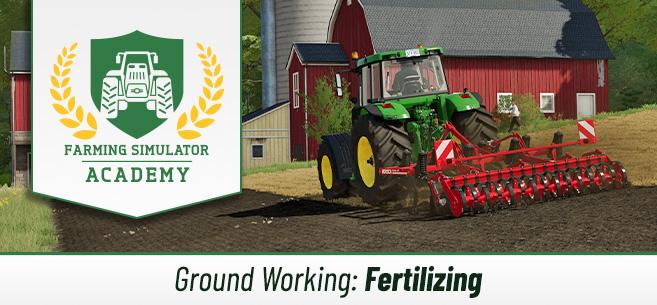
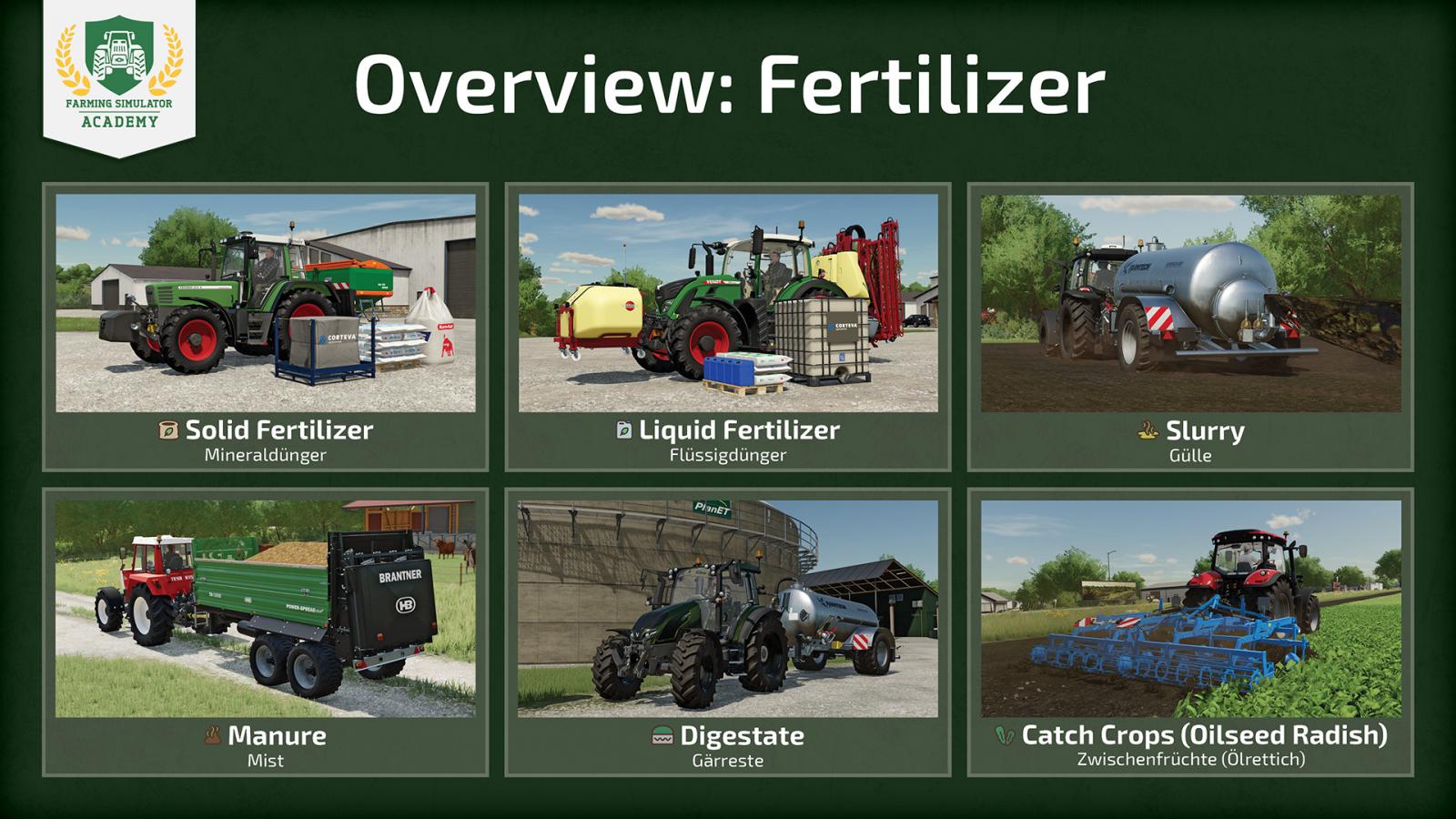
There are several types of fertilizers in the game, and some require special equipment. Let's look at the types of fertilizers in Farming Simulator 22.
Solid Fertilizers. A fairly common type of fertilizer. Used in combination with a regular fertilizer spreader. Since fertilizer spreaders are quite inexpensive, this is an ideal option for beginners, as you don’t need to buy a sprayer, which is much more expensive. Purchased in big bags or pallets.Liquid Fertilizers work using a sprayer rather than a fertilizer spreader. You need to buy liquid fertilizers in the Pallets category in the store. Liquid Manure is produced by your pigs and cows. This manure is stored in an underground tank. Be sure to provide your animals with fresh water to produce liquid manure. You will also need to purchase a special tank trailer for liquid manure separately. Manure is produced by the same animals (pigs and cows), and all manure goes into the manure pit. Straw bedding is required + don’t forget to provide your animals with water. Manure is applied using regular manure spreaders. You can get digestate as a byproduct when selling silage or manure at biogas plants. Digestate can be used as fertilizer, for which you will need a tank trailer just like with liquid manure.The so-called “catch crop” can also fertilize your farm. The most notable example is oil radish.
Keep in mind that manure, liquid manure, and digestate are really cheap but effective types of fertilizers, especially if you are involved in animal husbandry. Additionally, some types of fertilizer spreaders can apply lime, which also increases yield.
How the Fertilizer System Works
Let's first figure out why fertilizers are needed at all. It is thanks to fertilizers that you can significantly increase your farm's yield, so this is an important part of the game.
Crops can be fertilized twice, which is also important to know. You can apply fertilizer once right after sowing, and the second time after at least one growth stage. But there are some nuances. If you use solid or liquid manure as fertilizer, some fertilizer spreaders have a double rate function. By activating this function, you only need to fertilize once – that is sufficient.
But there is an exception. If you are fertilizing grass, one application is enough; you do not need to fertilize grass a second time. Other crops need to be fertilized twice if you are not using the double rate function.
Types of Fertilizers
There are several types of fertilizers in the game, and some require special equipment. Let's look at the types of fertilizers in Farming Simulator 22.
Solid Fertilizers. A fairly common type of fertilizer. Used in combination with a regular fertilizer spreader. Since fertilizer spreaders are quite inexpensive, this is an ideal option for beginners, as you don’t need to buy a sprayer, which is much more expensive. Purchased in big bags or pallets.Liquid Fertilizers work using a sprayer rather than a fertilizer spreader. You need to buy liquid fertilizers in the Pallets category in the store. Liquid Manure is produced by your pigs and cows. This manure is stored in an underground tank. Be sure to provide your animals with fresh water to produce liquid manure. You will also need to purchase a special tank trailer for liquid manure separately. Manure is produced by the same animals (pigs and cows), and all manure goes into the manure pit. Straw bedding is required + don’t forget to provide your animals with water. Manure is applied using regular manure spreaders. You can get digestate as a byproduct when selling silage or manure at biogas plants. Digestate can be used as fertilizer, for which you will need a tank trailer just like with liquid manure.The so-called “catch crop” can also fertilize your farm. The most notable example is oil radish.
Keep in mind that manure, liquid manure, and digestate are really cheap but effective types of fertilizers, especially if you are involved in animal husbandry. Additionally, some types of fertilizer spreaders can apply lime, which also increases yield.
The most popular mods

 Spintires: MudRunner
 SnowRunner
 Euro Truck Simulator 2
 American Truck Simulator
 Farming Simulator 2017
 Farming Simulator 2019
 Farming Simulator 2022
 BeamNG.drive
 City Car Driving
 Farming Simulator 20
 OMSI 2
 Assetto Corsa
 MXB
MXB

by downloads per week
by downloads per month
There are no mods yet
by downloads per week
by downloads per month
There are no mods yet
by downloads per week
by downloads per month
There are no mods yet
by downloads per week
by downloads per month
There are no mods yet
by downloads per week
by downloads per month
There are no mods yet
by downloads per week
by downloads per month
There are no mods yet
by downloads per week
by downloads per month
There are no mods yet
by downloads per week
by downloads per month
There are no mods yet
by downloads per week
by downloads per month
There are no mods yet
by downloads per week
by downloads per month
There are no mods yet
by downloads per week
by downloads per month
There are no mods yet
by downloads per week
by downloads per month
There are no mods yet
by downloads per week
by downloads per month
There are no mods yet
by downloads per week
by downloads per month
There are no mods yet