Farming Simulator 2022 8345
|
|
ARTICLE | ||
|
5.3K
|
0
0 |
||
29 Sep 2025 at 8:48
Plowing and Cultivation in FS 22
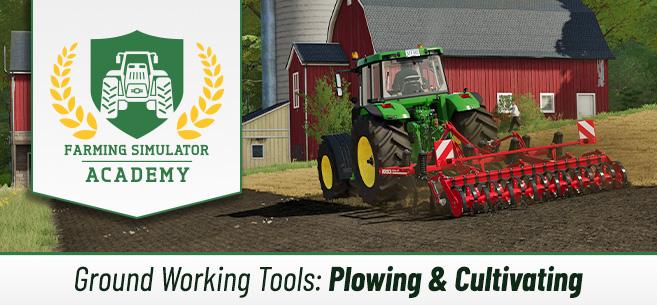
Let's take a closer look at plowing and cultivating. This is an important process in the game. You will constantly use the plow and cultivator in Farming Simulator 22, so the information in this tutorial may help answer some questions.
The difference between plowing and cultivating
During plowing, the lower part of the soil is lifted up using a plow. Simply put, the earth is turned over, with the lower part brought to the surface. When using a cultivator, it is the top layer of soil that is loosened. In Farming Simulator 22, in most cases, regular cultivation is required.
When using a plow or cultivator, stones may appear on the field after soil treatment. They need to be removed quickly to avoid damaging your equipment. Stones come in different sizes, and larger stones require special tools for removal. Remember that plows and cultivators increase the yield of your crops.
Plowing
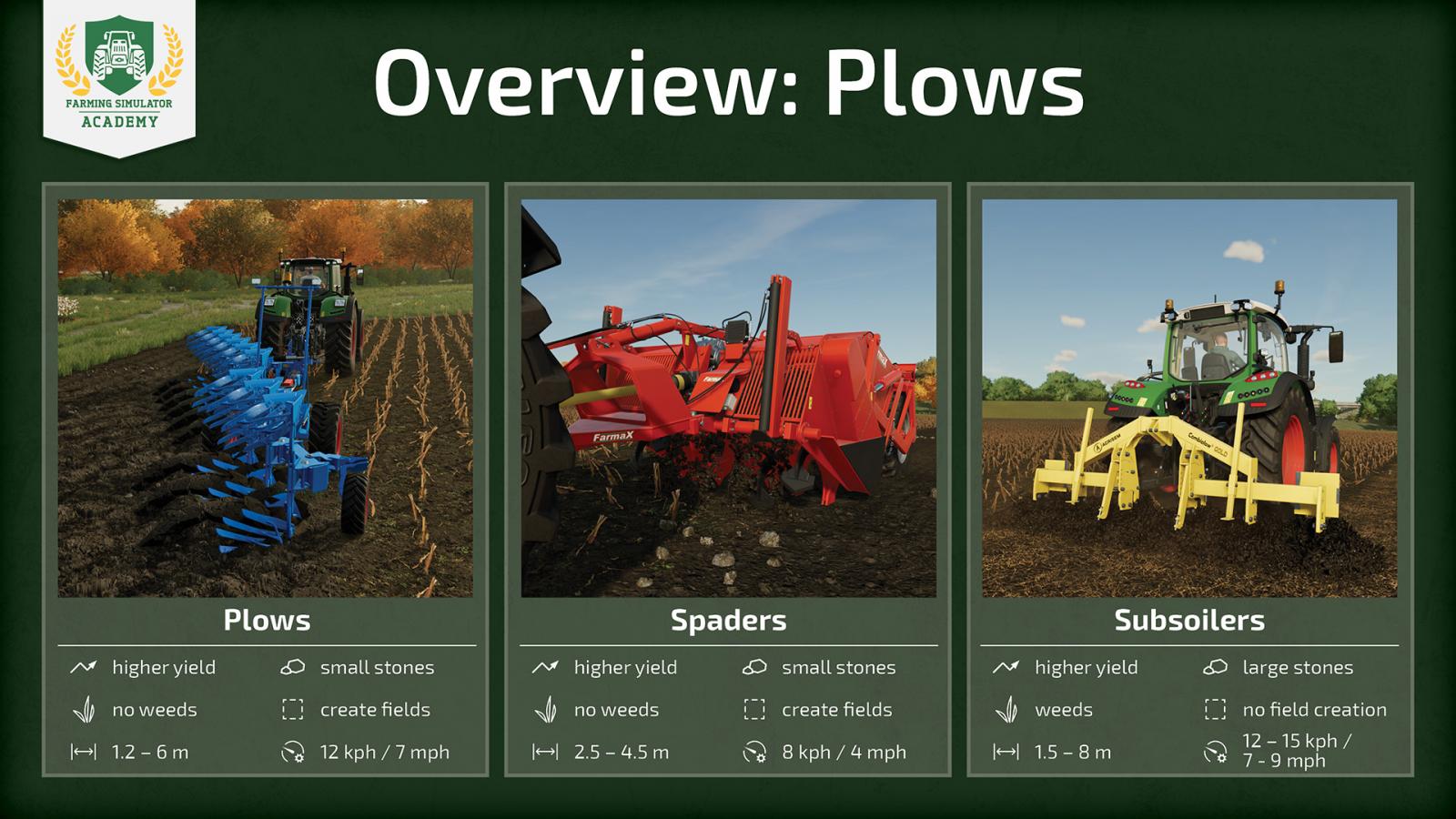
Plowing with plows is required after harvesting certain crops – root crops. Examples: corn, potatoes, sugar beets, and others. Don't forget another feature of plows – the ability to create fields. Thanks to this function, you can combine several fields into one, expand your existing fields, or even create new ones. Overall, a very useful tool.
Standard plow. The first type of plow you encounter in the store. Generally, working with these plows requires a fairly powerful tractor, and the working speed is quite low. The standard plow can be used to create fields. This is a useful tool that prevents weed growth and also increases yield, although small stones appear after soil treatment that need to be removed. The average speed is about 12 km/h.The next type of plows are the so-called Spaders, which perform the same functions as the standard plow: they increase the yield of the next sowing, prevent weed growth, and can also dig up small stones. Subsoiler – an ideal tool to replace the plow, a great alternative. You can find them in a separate section for subsoilers. They differ from plows in that they require less power, so you don’t need an especially expensive and powerful tractor. Their working speed is higher than that of plows. However, they also have drawbacks. Subsoilers do not prevent weed growth, and instead of small stones, larger ones appear. Also, these tools lack the field creation function.
Cultivating
Now let's understand the cultivation process. This work is done before sowing to allow crops to grow properly. However, cultivators, while increasing yield, do not prevent weed growth. Compared to plows, cultivators generally work faster, and the process goes much quicker.
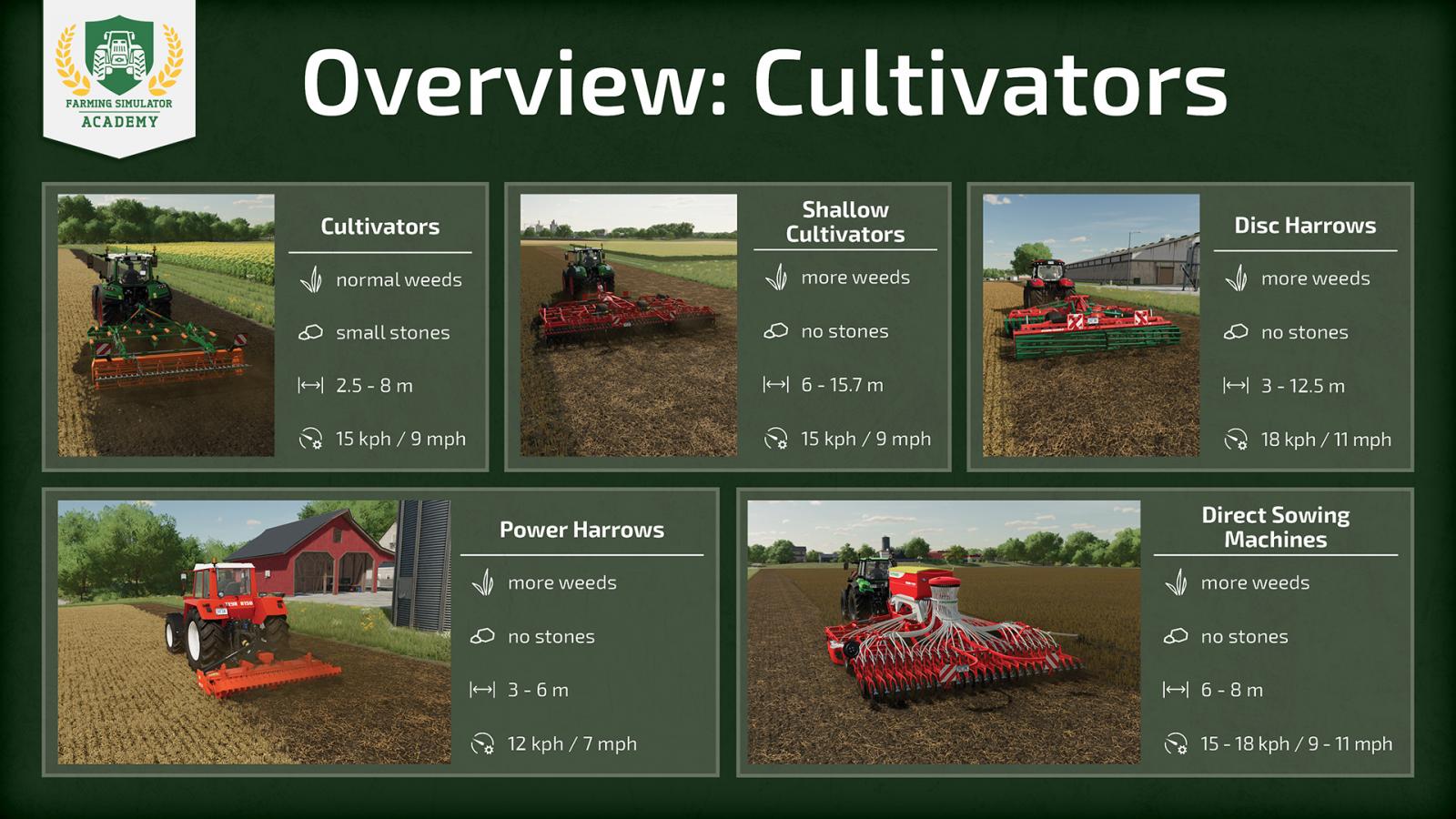
Standard and small cultivators can be found in the corresponding store section. These are regular tools that attach to a tractor, do not require very high power, and differ from each other in working width. Naturally, more powerful tools require more powerful tractors. Such cultivators are more effective against weeds, although they do not prevent their growth.Surface cultivators stand out with their large working width relative to the required power. They cost more than standard cultivators. Stones are not dug up, and the field is not contaminated. However, these are extremely ineffective devices against weeds.Disc harrows and power harrows are also useful tools for soil treatment. Disc harrows are quite inexpensive (of course, depending on the model), require little tractor power, and work faster than standard cultivators. Stones do not appear after soil treatment. However, after treatment with harrows, weeds grow faster, so this method has its drawbacks. Power harrows are relatively inexpensive but require a more powerful tractor.
The average working speed of disc harrows is 17 km/h, and power harrows about 12 km/h.
There are also special seeders available in the store under the "Seeders" category. They are called Direct Sowing Machines and can simultaneously handle cultivation/soil treatment, sowing, and fertilizing. Naturally, such tools require quite a powerful tractor and are not cheap, but you save a lot of time, and sooner or later it pays off. Also, stones are not dug up, so you don’t need to remove them afterward. The main downside is accelerated weed growth.
So, we have figured out what types of cultivators and plows exist in Farming Simulator 22, what alternatives there are, and the advantages and disadvantages of each type. Now you know a bit more about soil treatment in FS22.
The difference between plowing and cultivating
During plowing, the lower part of the soil is lifted up using a plow. Simply put, the earth is turned over, with the lower part brought to the surface. When using a cultivator, it is the top layer of soil that is loosened. In Farming Simulator 22, in most cases, regular cultivation is required.
When using a plow or cultivator, stones may appear on the field after soil treatment. They need to be removed quickly to avoid damaging your equipment. Stones come in different sizes, and larger stones require special tools for removal. Remember that plows and cultivators increase the yield of your crops.
Plowing
Plowing with plows is required after harvesting certain crops – root crops. Examples: corn, potatoes, sugar beets, and others. Don't forget another feature of plows – the ability to create fields. Thanks to this function, you can combine several fields into one, expand your existing fields, or even create new ones. Overall, a very useful tool.
Standard plow. The first type of plow you encounter in the store. Generally, working with these plows requires a fairly powerful tractor, and the working speed is quite low. The standard plow can be used to create fields. This is a useful tool that prevents weed growth and also increases yield, although small stones appear after soil treatment that need to be removed. The average speed is about 12 km/h.The next type of plows are the so-called Spaders, which perform the same functions as the standard plow: they increase the yield of the next sowing, prevent weed growth, and can also dig up small stones. Subsoiler – an ideal tool to replace the plow, a great alternative. You can find them in a separate section for subsoilers. They differ from plows in that they require less power, so you don’t need an especially expensive and powerful tractor. Their working speed is higher than that of plows. However, they also have drawbacks. Subsoilers do not prevent weed growth, and instead of small stones, larger ones appear. Also, these tools lack the field creation function.
Cultivating
Now let's understand the cultivation process. This work is done before sowing to allow crops to grow properly. However, cultivators, while increasing yield, do not prevent weed growth. Compared to plows, cultivators generally work faster, and the process goes much quicker.
Standard and small cultivators can be found in the corresponding store section. These are regular tools that attach to a tractor, do not require very high power, and differ from each other in working width. Naturally, more powerful tools require more powerful tractors. Such cultivators are more effective against weeds, although they do not prevent their growth.Surface cultivators stand out with their large working width relative to the required power. They cost more than standard cultivators. Stones are not dug up, and the field is not contaminated. However, these are extremely ineffective devices against weeds.Disc harrows and power harrows are also useful tools for soil treatment. Disc harrows are quite inexpensive (of course, depending on the model), require little tractor power, and work faster than standard cultivators. Stones do not appear after soil treatment. However, after treatment with harrows, weeds grow faster, so this method has its drawbacks. Power harrows are relatively inexpensive but require a more powerful tractor.
The average working speed of disc harrows is 17 km/h, and power harrows about 12 km/h.
There are also special seeders available in the store under the "Seeders" category. They are called Direct Sowing Machines and can simultaneously handle cultivation/soil treatment, sowing, and fertilizing. Naturally, such tools require quite a powerful tractor and are not cheap, but you save a lot of time, and sooner or later it pays off. Also, stones are not dug up, so you don’t need to remove them afterward. The main downside is accelerated weed growth.
So, we have figured out what types of cultivators and plows exist in Farming Simulator 22, what alternatives there are, and the advantages and disadvantages of each type. Now you know a bit more about soil treatment in FS22.
|
|
ARTICLE | ||
|
3.7K
|
0
0 |
||
29 Sep 2025 at 7:54
Rolling and Leveling in FS 22
In this tutorial, we will cover some questions regarding soil and grass rollers in Farming Simulator 22. We will understand what they are intended for in the game and how to use them. How Soil and Grass Rollers Work in FS22
The main question is – what are rollers intended for in the game, and why are they used at all? There are several types of rollers in the game. The first type is designed for soil and can be found in the "Rollers" section of the store, while the second type of rollers is meant for grass, for your meadows and gardens.
First, let's look at soil rollers. They are used after sowing. That is, first the sowing process takes place, then you need to pass over the field with a roller to compact the soil. This increases soil quality and boosts the yield of your crops. If there are small stones left on your field that you didn’t remove – the soil roller will press them back in, so keep this in mind while working.
Grass rollers are used after mowing the grass. If the grass has already been collected, you just need to pass over the field with the roller to prepare it for the next growth cycle. After you roll the grass with the grass roller, the fertilizing stage will immediately begin. However, if the grass is already at a certain growth stage and you roll over the already grown grass – the growth stage will simply reset. This can also be used to your advantage.
How to Use Rollers
Using agricultural rollers is a fairly simple process. You just need to attach it to a tractor with sufficient power (this should not be a problem), then lower the implement and start working. If there are two hitch points – the second point becomes available after unfolding. This point is intended for attaching on the other side for maximum efficiency in the field.
The main question is – what are rollers intended for in the game, and why are they used at all? There are several types of rollers in the game. The first type is designed for soil and can be found in the "Rollers" section of the store, while the second type of rollers is meant for grass, for your meadows and gardens.
First, let's look at soil rollers. They are used after sowing. That is, first the sowing process takes place, then you need to pass over the field with a roller to compact the soil. This increases soil quality and boosts the yield of your crops. If there are small stones left on your field that you didn’t remove – the soil roller will press them back in, so keep this in mind while working.
Grass rollers are used after mowing the grass. If the grass has already been collected, you just need to pass over the field with the roller to prepare it for the next growth cycle. After you roll the grass with the grass roller, the fertilizing stage will immediately begin. However, if the grass is already at a certain growth stage and you roll over the already grown grass – the growth stage will simply reset. This can also be used to your advantage.
How to Use Rollers
Using agricultural rollers is a fairly simple process. You just need to attach it to a tractor with sufficient power (this should not be a problem), then lower the implement and start working. If there are two hitch points – the second point becomes available after unfolding. This point is intended for attaching on the other side for maximum efficiency in the field.
|
|
ARTICLE | ||
|
2.2K
|
0
0 |
||
29 Sep 2025 at 7:08
Mulching in FS 22
In previous articles, we have already figured out how to increase crop yields, what types of fertilizers exist, and covered the basics of plowing, cultivating, rolling, and leveling. Now it's time to learn more about mulching, as it is also an important process in Farming Simulator 22.
How Mulching Works
First of all, it’s worth discussing the benefits of mulching. Because mulching improves the quality of your soil, it increases the yield of your crops by 2.5% for the next sowing (next harvest). By the way, mulching is an optional process, so it’s just a small nice bonus to your yield.
Special tools are used for mulching, and there are 3 types of mulching in the game.
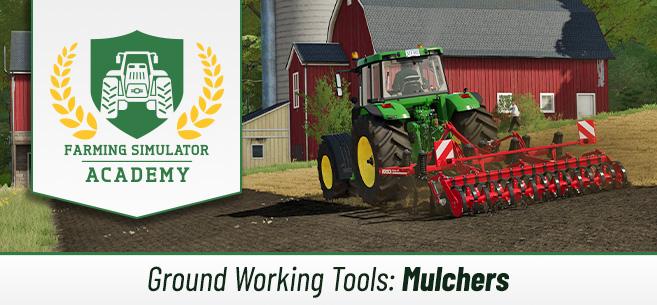
A mulcher is used after crops that leave stubble behind: wheat, barley, sorghum, soybeans, corn, and other similar crops. Mulching should be done before cultivating the field, after the harvest. In the case of growing olives or grapes, mulching should be done after cultivation. For these crops, mulching helps prevent weed growth, so the yield will not decrease, and your vineyards and olive groves will look much nicer. There is also another category of mulchers – they are specifically suited for forestry work and help remove bushes, branches, stumps, and the like. This way, you clear the area.
We have covered the three types of mulching.
How to Use a Mulcher in FS22
Now it’s time to understand how to use a mulcher in Farming Simulator 22. Actually, it’s very easy. You only need a tractor and a mulcher. Attach the appropriate type of mulcher (depending on the type of work, we covered the mulcher options above), lower the tool, and drive over the field. The work is done automatically.
By the way, there is a trick you can use here. You can attach the mulcher to the front of the tractor and the cultivator to the back. This way, you can perform two tasks simultaneously, saving a lot of time and effort.
After mulching, the 2.5% yield bonus will be applied to the next harvest.
How Mulching Works
First of all, it’s worth discussing the benefits of mulching. Because mulching improves the quality of your soil, it increases the yield of your crops by 2.5% for the next sowing (next harvest). By the way, mulching is an optional process, so it’s just a small nice bonus to your yield.
Special tools are used for mulching, and there are 3 types of mulching in the game.
A mulcher is used after crops that leave stubble behind: wheat, barley, sorghum, soybeans, corn, and other similar crops. Mulching should be done before cultivating the field, after the harvest. In the case of growing olives or grapes, mulching should be done after cultivation. For these crops, mulching helps prevent weed growth, so the yield will not decrease, and your vineyards and olive groves will look much nicer. There is also another category of mulchers – they are specifically suited for forestry work and help remove bushes, branches, stumps, and the like. This way, you clear the area.
We have covered the three types of mulching.
How to Use a Mulcher in FS22
Now it’s time to understand how to use a mulcher in Farming Simulator 22. Actually, it’s very easy. You only need a tractor and a mulcher. Attach the appropriate type of mulcher (depending on the type of work, we covered the mulcher options above), lower the tool, and drive over the field. The work is done automatically.
By the way, there is a trick you can use here. You can attach the mulcher to the front of the tractor and the cultivator to the back. This way, you can perform two tasks simultaneously, saving a lot of time and effort.
After mulching, the 2.5% yield bonus will be applied to the next harvest.
|
|
ARTICLE | ||
|
3K
|
0
0 |
||
29 Sep 2025 at 7:07
How to Plant and Harvest Olives in FS 22
Olives are a new addition to Farming Simulator 22. This crop is grown in a unique way (similar to grapes) and requires a special approach. In this guide, we will figure out how to plant and harvest olives in FS22, what is needed for this, which equipment is recommended, and what features this process has.
What You Need for Olives
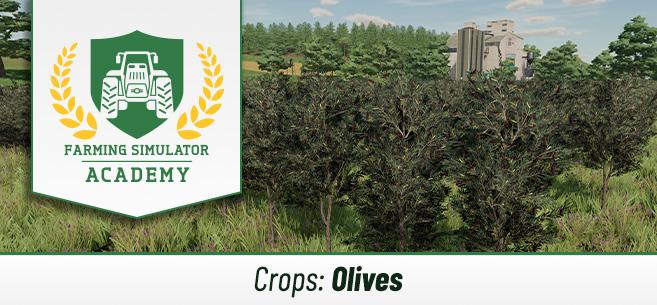
To grow olives, you will need olive trees (similar to grapevines). As with grapevines, there must be a certain distance between olive trees so that all trees receive enough sunlight, air, and water. At the same time, the spacing must allow special equipment to perform its work. The game automatically helps you place the olive trees correctly. Now let's figure out what you will need to work with this crop.
Free space. Olives require quite a lot of space. It is not necessary to choose a flat field; you can select a plot on a hill. The main thing is to have plenty of free space. Choose the location wisely so you don’t complicate your work later.Of course, you will need a tractor to operate the tools.The soil between olive trees needs to be loosened, for which you will need a subsoiler.Grass will grow between the olive trees. To cut this grass, you will need a special mulcher.If you want to significantly increase yield (which is very important, since you don’t want to work at a loss) – you will need to fertilize everything. For this, you will need a special fertilizer spreader and a liquid fertilizer tank.Harvesting machine, combine. To harvest olives, you need a special combine harvester, which you can purchase in the store.And finally – a trailer. Using a trailer, you can transport the harvest to the desired location: to some production facility or directly to the selling point.
Recommended Equipment
Giants Software has their own recommendations on this matter. They have recommended equipment specifically for working with this crop. However, this is only a suggestion from the developers for the early stage of the game, and nothing prevents you from using completely different equipment. Here is the recommended equipment from the developers themselves for harvesting olives in FS22.
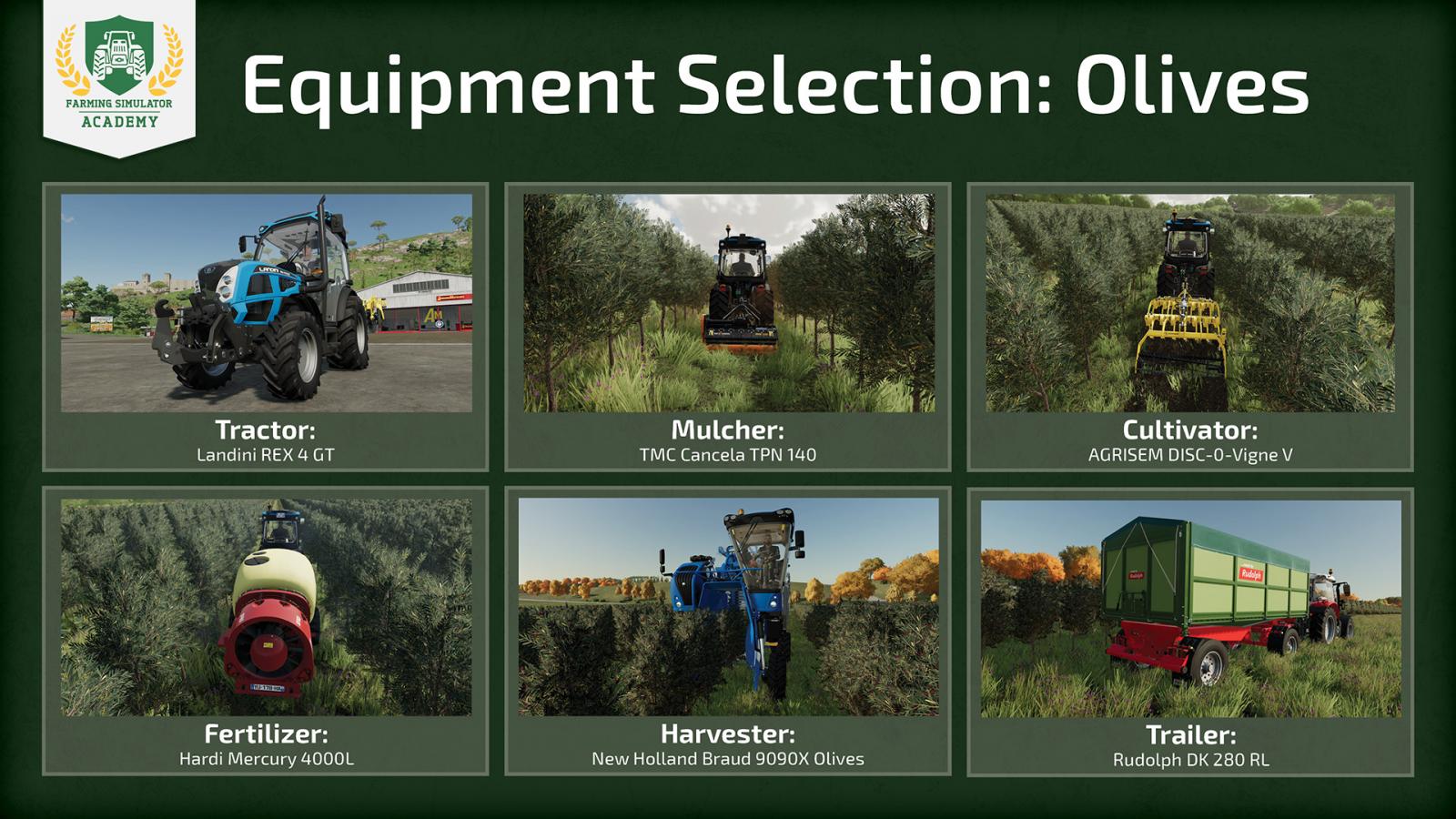
Tractor: Landini REX 4 GT;Cultivator/Subsoiler: AGRISEM DISC-0-Vigne V;Mulcher: TMC Cancela TPN 140;Harvesting machine, combine: Braud 9090X Olive;Fertilizer spreader: Hardi Mercury 4000L;Trailer: Rudolph DK 280 RL.
Let's get to work!
So, we have figured out everything needed to work with this crop. It’s time to get started and finally understand how to plant and harvest olives in FS22. There are a couple of important points to remember here. First of all, olive trees must be planted in construction mode. Turn on this mode, go to the production section, then select the "Orchards" tab, where olive trees and grapevines are located. Choose olive trees and start planting them according to the recommendations above.
By the way, if you are playing with seasonal settings enabled, you can only plant olive trees from August to September (until the end of that month). Now let's get to work.
Step 1: Placing Olive Trees
Choose the place where you will plant the trees, select the olive tree, and click on the free space (which belongs to you). The first tree is planted. Then, simply drag the line to the place where you want to plant the last tree, and olive trees will be planted along this entire line. You don’t need to plant each tree individually; everything happens automatically, you just need to select the start and end points.
Repeat this process several times to create several rows of olive trees. It all depends on your preferences. Create as many rows as you need. The more rows – the more work you will have to do, but in this case, the profit will be higher.
Step 2: Mulching
Now move on to the mulching process. It is important to keep the space between olive trees clean, so as soon as the grass grows a bit, take the special mulcher, attach the device to the tractor, lower the tool, and go through all the rows. Once the mulching process is complete – proceed to the third step.
Step 3: Soil Cultivation
Proceed to the next important stage – soil cultivation using a special narrow subsoiler, since the trees are quite close to each other and regular equipment won’t work here. This process improves the soil, allowing it to absorb more nutrients and water, which greatly affects yield. Just attach the special subsoiler to the tractor and start working row by row. But be careful not to damage the trees.
Step 4: Fertilizing
If you want to significantly increase yield – you can’t do without fertilizers. For olive trees, you will need a special fertilizer spreader and a liquid manure tank. Fertilize the trees as soon as they reach the first growth stage. First, attach the spreader to your tractor, approach the liquid fertilizer tank, and fill your tool. Then, carefully drive between the rows, performing the fertilizing process.
Step 5: Harvesting
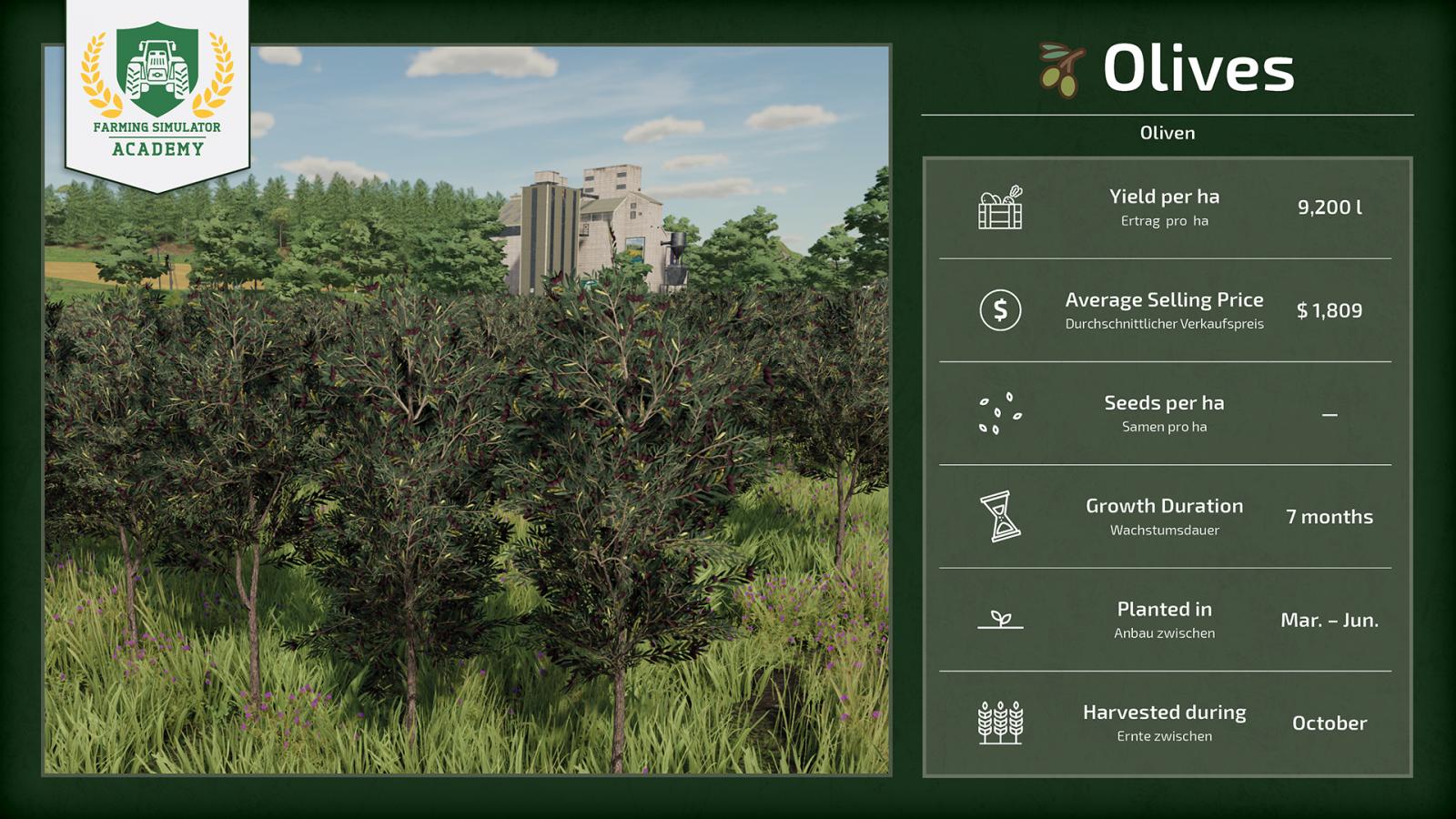
It’s time to harvest. Watch the calendar to harvest on time, because by the end of October the crop may spoil. Take your special olive harvesting combine. Position the combine right in the middle of the first row. Carefully drive between the rows, exactly in the center, and collect the harvest until the combine’s tank is full. Unload the olives into the trailer (back the combine up to the trailer, since the combine unloads from the rear), and repeat the process until the entire harvest is collected.
Step 6: Using the Olives
All done, the olives are harvested. Now you just need to decide what to do with them. You can sell them immediately to make a profit, but there are other options for interacting with this crop. If you decide to sell the olives – check the price screen to determine where your harvest will be bought at the best price, since our goal is to make a profit. However, if you don’t want to sell – you can take the olives to an oil mill to get olive oil, which sells for a higher price. Just decide what to do with the harvest and transport the trailer with the harvest to the desired location, where you unload it.
You can find our other Farming Simulator 22 guides at this link.
What You Need for Olives
To grow olives, you will need olive trees (similar to grapevines). As with grapevines, there must be a certain distance between olive trees so that all trees receive enough sunlight, air, and water. At the same time, the spacing must allow special equipment to perform its work. The game automatically helps you place the olive trees correctly. Now let's figure out what you will need to work with this crop.
Free space. Olives require quite a lot of space. It is not necessary to choose a flat field; you can select a plot on a hill. The main thing is to have plenty of free space. Choose the location wisely so you don’t complicate your work later.Of course, you will need a tractor to operate the tools.The soil between olive trees needs to be loosened, for which you will need a subsoiler.Grass will grow between the olive trees. To cut this grass, you will need a special mulcher.If you want to significantly increase yield (which is very important, since you don’t want to work at a loss) – you will need to fertilize everything. For this, you will need a special fertilizer spreader and a liquid fertilizer tank.Harvesting machine, combine. To harvest olives, you need a special combine harvester, which you can purchase in the store.And finally – a trailer. Using a trailer, you can transport the harvest to the desired location: to some production facility or directly to the selling point.
Recommended Equipment
Giants Software has their own recommendations on this matter. They have recommended equipment specifically for working with this crop. However, this is only a suggestion from the developers for the early stage of the game, and nothing prevents you from using completely different equipment. Here is the recommended equipment from the developers themselves for harvesting olives in FS22.
Tractor: Landini REX 4 GT;Cultivator/Subsoiler: AGRISEM DISC-0-Vigne V;Mulcher: TMC Cancela TPN 140;Harvesting machine, combine: Braud 9090X Olive;Fertilizer spreader: Hardi Mercury 4000L;Trailer: Rudolph DK 280 RL.
Let's get to work!
So, we have figured out everything needed to work with this crop. It’s time to get started and finally understand how to plant and harvest olives in FS22. There are a couple of important points to remember here. First of all, olive trees must be planted in construction mode. Turn on this mode, go to the production section, then select the "Orchards" tab, where olive trees and grapevines are located. Choose olive trees and start planting them according to the recommendations above.
By the way, if you are playing with seasonal settings enabled, you can only plant olive trees from August to September (until the end of that month). Now let's get to work.
Step 1: Placing Olive Trees
Choose the place where you will plant the trees, select the olive tree, and click on the free space (which belongs to you). The first tree is planted. Then, simply drag the line to the place where you want to plant the last tree, and olive trees will be planted along this entire line. You don’t need to plant each tree individually; everything happens automatically, you just need to select the start and end points.
Repeat this process several times to create several rows of olive trees. It all depends on your preferences. Create as many rows as you need. The more rows – the more work you will have to do, but in this case, the profit will be higher.
Step 2: Mulching
Now move on to the mulching process. It is important to keep the space between olive trees clean, so as soon as the grass grows a bit, take the special mulcher, attach the device to the tractor, lower the tool, and go through all the rows. Once the mulching process is complete – proceed to the third step.
Step 3: Soil Cultivation
Proceed to the next important stage – soil cultivation using a special narrow subsoiler, since the trees are quite close to each other and regular equipment won’t work here. This process improves the soil, allowing it to absorb more nutrients and water, which greatly affects yield. Just attach the special subsoiler to the tractor and start working row by row. But be careful not to damage the trees.
Step 4: Fertilizing
If you want to significantly increase yield – you can’t do without fertilizers. For olive trees, you will need a special fertilizer spreader and a liquid manure tank. Fertilize the trees as soon as they reach the first growth stage. First, attach the spreader to your tractor, approach the liquid fertilizer tank, and fill your tool. Then, carefully drive between the rows, performing the fertilizing process.
Step 5: Harvesting
It’s time to harvest. Watch the calendar to harvest on time, because by the end of October the crop may spoil. Take your special olive harvesting combine. Position the combine right in the middle of the first row. Carefully drive between the rows, exactly in the center, and collect the harvest until the combine’s tank is full. Unload the olives into the trailer (back the combine up to the trailer, since the combine unloads from the rear), and repeat the process until the entire harvest is collected.
Step 6: Using the Olives
All done, the olives are harvested. Now you just need to decide what to do with them. You can sell them immediately to make a profit, but there are other options for interacting with this crop. If you decide to sell the olives – check the price screen to determine where your harvest will be bought at the best price, since our goal is to make a profit. However, if you don’t want to sell – you can take the olives to an oil mill to get olive oil, which sells for a higher price. Just decide what to do with the harvest and transport the trailer with the harvest to the desired location, where you unload it.
You can find our other Farming Simulator 22 guides at this link.
|
|
NEWS | ||
|
7.9K
|
0
0 |
||
29 Sep 2025 at 6:35
Free Content in FS 22 Update 1.2
The developers have released the free 1.2 update for Farming Simulator 22, which has brought a lot of interesting additions to the game. The update includes a large amount of new machinery as well as a number of fixes and improvements, which we will discuss in this article. To begin with, it is worth noting that the free content update adds 16 new pieces of machinery, namely:
ABI 1600ABI 550Amazone T-Pack UBomech Trac-PackCase IH Steiger Quadtrac AFS Connect SeriesCase IH Steiger Rowtrac AFS Connect SeriesCase IH Steiger Wheeled AFS Connect SeriesFliegl Agrartechnik Noah TTW 140Kongskilde GXF 3605 PKongskilde GXT 13005 PKrone BiG Pack 1290 HDP VCKrone GX 520KUHN PRIMOR 15070 MLandini Series 7 Robo-SixSamasz Tornado 252Vervaet Hydro Trike 5x5
It is particularly noteworthy that not only new machinery but also new brands, which were not present before this update, have been added. The game becomes more diverse, and now you have a much wider choice. But the changes do not end there, as there are actually a huge number of them. Let’s take a look at the other changes. Here you will find both gameplay changes and fixes, as well as some other features.
Fixes and Improvements
Fixed a bug where during work with the equipment rental function, the system selected the wrong tool, making it impossible to complete the contract.Improvements made to the pricing of used machinery as well as repairs.Now the price fluctuation display shows the price history for the last 12 months.Due to a bug, your helpers (AI) could not properly use the plow. The issue has been resolved.Rented machinery no longer disappears immediately after accepting a contract.Fixed an issue with incorrect weather forecasts that appeared when playing with custom season length settings. Fixed a serious bug that made some contracts impossible to complete.Due to a bug, AI could receive payment even when the game was paused. This error has been fixed.Some Intel graphics processors caused a crash that prevented the game from launching. The issue has been fixed.A number of fixes related to DLSS.Fixed a bug with big bag lifters. These tools could cause the game to crash. This will no longer happen.Fixed a bug causing vehicle duplication when performing a reset.Fixed a bug where animals appeared and wandered in places they shouldn’t be.Fixed an error that confused the values "plowing required" and "lime required," causing players to receive incorrect information about their farm.Fixed issues related to manure piles.Fixed an error related to resetting already collected collectible items.Improved the pricing system at selling points + enhanced price fluctuation system.Fixed several bugs related to the Logitech G920.Fixed errors with tractors that have manual gear shifting.Improved the operation of combine headers on sloped terrain.Improved loading of cotton bales.Enhanced control of multi-axle trucks.Reduced helper costs, making the early game easier. AI now requires less money.A number of other fixes and improvements.
New Features
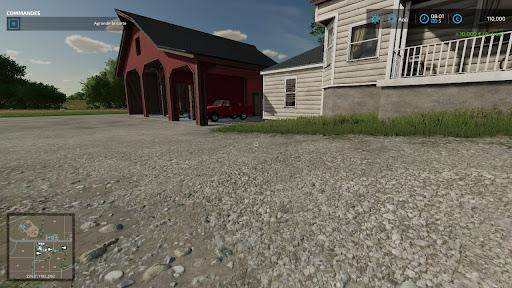
Added the ability to remove buildings on all four farms on the Elmcreek map.Added a mobile home.Added a new building – an old barn. Now there is the option to place objects on the map for free.Don’t like that machinery consumes too little fuel? A new option has been added that increases fuel consumption and makes the game more challenging.Option to place grapevines and olive trees with parallel snapping.New values added in the "Field Information" tab. Other new features.
The update is already available; owners of licensed copies of Farming Simulator 22 already have full access to the update, which will install automatically.
ABI 1600ABI 550Amazone T-Pack UBomech Trac-PackCase IH Steiger Quadtrac AFS Connect SeriesCase IH Steiger Rowtrac AFS Connect SeriesCase IH Steiger Wheeled AFS Connect SeriesFliegl Agrartechnik Noah TTW 140Kongskilde GXF 3605 PKongskilde GXT 13005 PKrone BiG Pack 1290 HDP VCKrone GX 520KUHN PRIMOR 15070 MLandini Series 7 Robo-SixSamasz Tornado 252Vervaet Hydro Trike 5x5
It is particularly noteworthy that not only new machinery but also new brands, which were not present before this update, have been added. The game becomes more diverse, and now you have a much wider choice. But the changes do not end there, as there are actually a huge number of them. Let’s take a look at the other changes. Here you will find both gameplay changes and fixes, as well as some other features.
Fixes and Improvements
Fixed a bug where during work with the equipment rental function, the system selected the wrong tool, making it impossible to complete the contract.Improvements made to the pricing of used machinery as well as repairs.Now the price fluctuation display shows the price history for the last 12 months.Due to a bug, your helpers (AI) could not properly use the plow. The issue has been resolved.Rented machinery no longer disappears immediately after accepting a contract.Fixed an issue with incorrect weather forecasts that appeared when playing with custom season length settings. Fixed a serious bug that made some contracts impossible to complete.Due to a bug, AI could receive payment even when the game was paused. This error has been fixed.Some Intel graphics processors caused a crash that prevented the game from launching. The issue has been fixed.A number of fixes related to DLSS.Fixed a bug with big bag lifters. These tools could cause the game to crash. This will no longer happen.Fixed a bug causing vehicle duplication when performing a reset.Fixed a bug where animals appeared and wandered in places they shouldn’t be.Fixed an error that confused the values "plowing required" and "lime required," causing players to receive incorrect information about their farm.Fixed issues related to manure piles.Fixed an error related to resetting already collected collectible items.Improved the pricing system at selling points + enhanced price fluctuation system.Fixed several bugs related to the Logitech G920.Fixed errors with tractors that have manual gear shifting.Improved the operation of combine headers on sloped terrain.Improved loading of cotton bales.Enhanced control of multi-axle trucks.Reduced helper costs, making the early game easier. AI now requires less money.A number of other fixes and improvements.
New Features
Added the ability to remove buildings on all four farms on the Elmcreek map.Added a mobile home.Added a new building – an old barn. Now there is the option to place objects on the map for free.Don’t like that machinery consumes too little fuel? A new option has been added that increases fuel consumption and makes the game more challenging.Option to place grapevines and olive trees with parallel snapping.New values added in the "Field Information" tab. Other new features.
The update is already available; owners of licensed copies of Farming Simulator 22 already have full access to the update, which will install automatically.
|
|
ARTICLE | ||
|
4.8K
|
0
0 |
||
29 Sep 2025 at 6:12
Best Mod Packs from FS 19 for FS 22
The long-awaited continuation of the Farming Simulator series has finally arrived. Many fans of the series were quite pessimistic about this project. However, it can be confidently said that FS22 is a pretty good game, which has received a large number of positive reviews on the Steam store (over 11,000 reviews, the vast majority of which are positive). Users have massively started converting mods from FS19 to FS22, and today we will look at several very cool gameplay mods that were converted specifically from previous parts of the series.
Keep in mind that this selection is our subjective opinion. If you disagree with our selection, you can write in the comments which mods you would personally add to this list. Also, this selection includes only gameplay mods; an article about the best equipment and maps will be published separately!
Place Anywhere
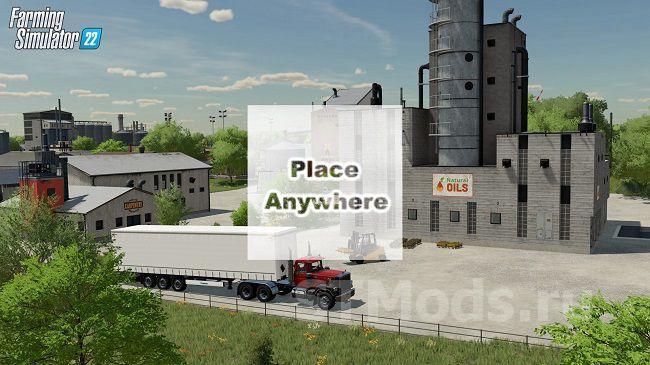
One of the most popular mods for FS19, which has been converted for FS22. Essentially, this is a simple gameplay plugin that allows you to place objects anywhere, ignoring the standard restrictions of Farming Simulator 22. Since the developers added a new construction mode, and there are now quite a few placeable objects in the game, Place Anywhere greatly simplifies the building process.
Note that with this mod, objects can be placed even at the same point and overlap each other. This can cause certain issues in some cases, so use the mod wisely, or bugs are inevitable.
Refresh Contracts
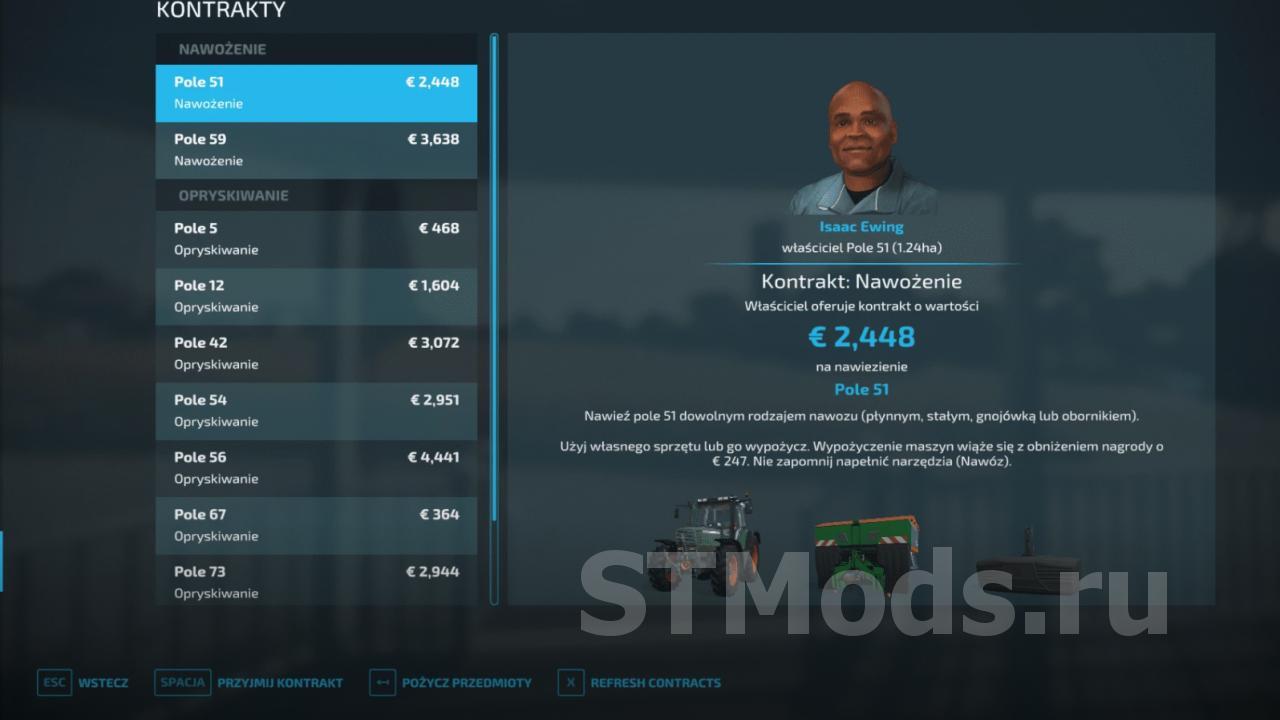
In Farming Simulator 22, there are contracts that you can complete to earn money. This is a very important part of the game, but often you will face the problem that the current contracts are not suitable for you: they are simply unprofitable, and the standard contract refresh time is quite long.
No problem, with the Refresh Contracts mod you will have the ability to refresh the list of contracts at any time, allowing you to choose something truly profitable to complete. Just press a key and that's it!
Additional Currencies
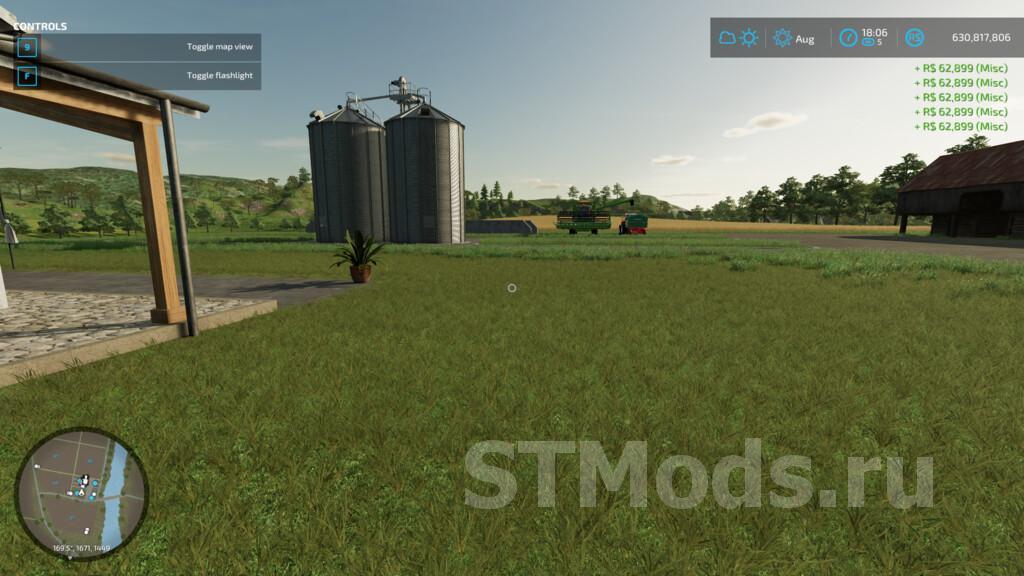
You loved this mod! The developers did not foresee that players would want to use various currencies, not just dollars and euros. But modders found a solution. With this mod, Farming Simulator 22 will feature new types of currencies (13 in the initial version). This list includes the ruble, hryvnia, yuan, krona, and other currencies. Yes, it doesn't significantly affect gameplay, but it's still quite nice to play using your native currency!
LumberJack
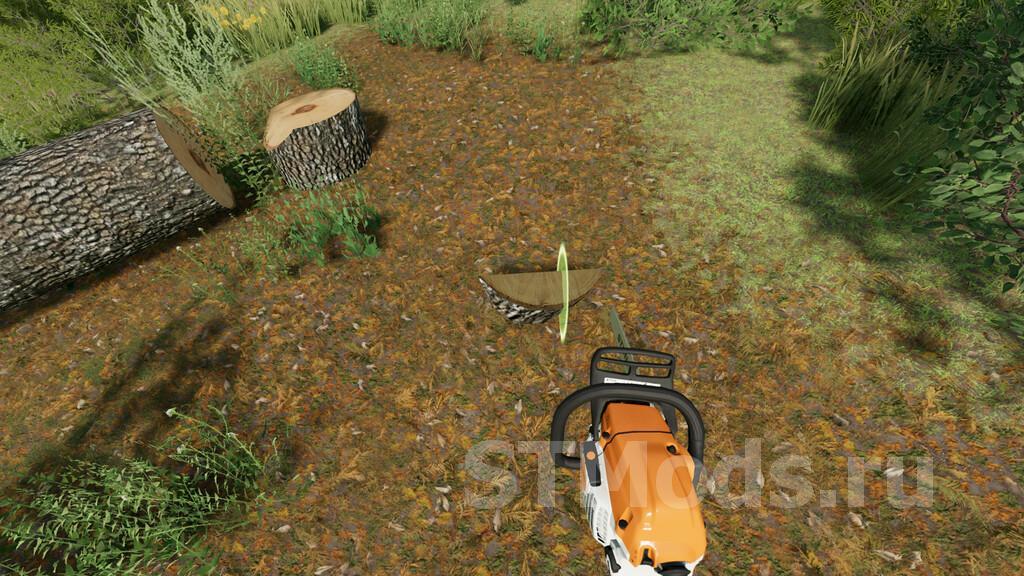
If you often use a chainsaw in FS22, the LumberJack mod will become your indispensable assistant. Logging is an important part of the Farming Simulator series, and FS22 is no exception. The mod adds some new features when working with the chainsaw, allowing you to remove stumps using this tool. The tool itself is also improved: double working radius, double pickup radius, a special aiming reticle added, the chainsaw works faster, and other changes. Overall, a very useful mod converted from FS19.
DashTime
A small plugin that adds a new gameplay feature to the game – time acceleration up to 12,000 times at any moment. Thanks to this, you can easily skip time. It works simply: press the default key, time speeds up. When you want to cancel the effect, just press the key again.
FS22 Money Tool
A cheat mod that was present in previous parts of the Farming Simulator series. If you want to start the game immediately with good equipment, or if you are testing something but don't have enough money, with the Money Tool you can instantly get a lot of dollars. Pressing the key combination (listed on the mod page) instantly gives you one million $. A few presses, and you become a multimillionaire.
Strong Farmer
In the original game, your farmer is quite weak and cannot lift heavy objects. With this mod, he becomes a real strongman who easily lifts the heaviest items (even agricultural tools and equipment) from a great distance. Thanks to this, you can transport the items you need while spending minimal time and effort. This mod has several analogs. One of the most popular is Player Super Strength.
Full Stop
Farming Simulator 22 has a very annoying problem when working with combines. When the combine's bunker fills up, the tool continues to operate and destroys the crop. This is quite a serious problem, but it was also present in Farming Simulator 19, and a modder fixed it, and this mod was converted to FS22. Now, if the combine's bunker is full, the device will automatically stop working and will not destroy the crop. The change is minor but extremely useful.
Player Walk Speed
The farmer walks too slowly? Yes, this is a serious problem that can be solved with the Player Walk Speed mod (an adaptation for FS22 of the Player Speed mod for FS19). The author added the ability to speed up your character, and you choose how much to speed up. You can speed up the farmer by 2 times, 3 times, or even 5 times (which is a bit much, but the option is there). Quite useful and saves a lot of time.
Park Vehicle
And the last mod in our selection is Park Vehicle. A small script that allows you to disable switching between certain vehicles when pressing TAB. That is, if you do not use a certain tractor, for example, you can disable switching to it when pressing TAB.
What mods would you add to this list yourself? Write your answer in the comments. Remember, this is a selection of mods that were converted from FS19. As soon as enough unique mods that were not in previous parts of the series are released for FS22, we will write a separate selection with the best mods.
Keep in mind that this selection is our subjective opinion. If you disagree with our selection, you can write in the comments which mods you would personally add to this list. Also, this selection includes only gameplay mods; an article about the best equipment and maps will be published separately!
Place Anywhere
One of the most popular mods for FS19, which has been converted for FS22. Essentially, this is a simple gameplay plugin that allows you to place objects anywhere, ignoring the standard restrictions of Farming Simulator 22. Since the developers added a new construction mode, and there are now quite a few placeable objects in the game, Place Anywhere greatly simplifies the building process.
Note that with this mod, objects can be placed even at the same point and overlap each other. This can cause certain issues in some cases, so use the mod wisely, or bugs are inevitable.
Refresh Contracts
In Farming Simulator 22, there are contracts that you can complete to earn money. This is a very important part of the game, but often you will face the problem that the current contracts are not suitable for you: they are simply unprofitable, and the standard contract refresh time is quite long.
No problem, with the Refresh Contracts mod you will have the ability to refresh the list of contracts at any time, allowing you to choose something truly profitable to complete. Just press a key and that's it!
Additional Currencies
You loved this mod! The developers did not foresee that players would want to use various currencies, not just dollars and euros. But modders found a solution. With this mod, Farming Simulator 22 will feature new types of currencies (13 in the initial version). This list includes the ruble, hryvnia, yuan, krona, and other currencies. Yes, it doesn't significantly affect gameplay, but it's still quite nice to play using your native currency!
LumberJack
If you often use a chainsaw in FS22, the LumberJack mod will become your indispensable assistant. Logging is an important part of the Farming Simulator series, and FS22 is no exception. The mod adds some new features when working with the chainsaw, allowing you to remove stumps using this tool. The tool itself is also improved: double working radius, double pickup radius, a special aiming reticle added, the chainsaw works faster, and other changes. Overall, a very useful mod converted from FS19.
DashTime
A small plugin that adds a new gameplay feature to the game – time acceleration up to 12,000 times at any moment. Thanks to this, you can easily skip time. It works simply: press the default key, time speeds up. When you want to cancel the effect, just press the key again.
FS22 Money Tool
A cheat mod that was present in previous parts of the Farming Simulator series. If you want to start the game immediately with good equipment, or if you are testing something but don't have enough money, with the Money Tool you can instantly get a lot of dollars. Pressing the key combination (listed on the mod page) instantly gives you one million $. A few presses, and you become a multimillionaire.
Strong Farmer
In the original game, your farmer is quite weak and cannot lift heavy objects. With this mod, he becomes a real strongman who easily lifts the heaviest items (even agricultural tools and equipment) from a great distance. Thanks to this, you can transport the items you need while spending minimal time and effort. This mod has several analogs. One of the most popular is Player Super Strength.
Full Stop
Farming Simulator 22 has a very annoying problem when working with combines. When the combine's bunker fills up, the tool continues to operate and destroys the crop. This is quite a serious problem, but it was also present in Farming Simulator 19, and a modder fixed it, and this mod was converted to FS22. Now, if the combine's bunker is full, the device will automatically stop working and will not destroy the crop. The change is minor but extremely useful.
Player Walk Speed
The farmer walks too slowly? Yes, this is a serious problem that can be solved with the Player Walk Speed mod (an adaptation for FS22 of the Player Speed mod for FS19). The author added the ability to speed up your character, and you choose how much to speed up. You can speed up the farmer by 2 times, 3 times, or even 5 times (which is a bit much, but the option is there). Quite useful and saves a lot of time.
Park Vehicle
And the last mod in our selection is Park Vehicle. A small script that allows you to disable switching between certain vehicles when pressing TAB. That is, if you do not use a certain tractor, for example, you can disable switching to it when pressing TAB.
What mods would you add to this list yourself? Write your answer in the comments. Remember, this is a selection of mods that were converted from FS19. As soon as enough unique mods that were not in previous parts of the series are released for FS22, we will write a separate selection with the best mods.
|
|
ARTICLE | ||
|
6K
|
0
0 |
||
29 Sep 2025 at 6:04
Activation Keys for Vehicles and Items in FS 22
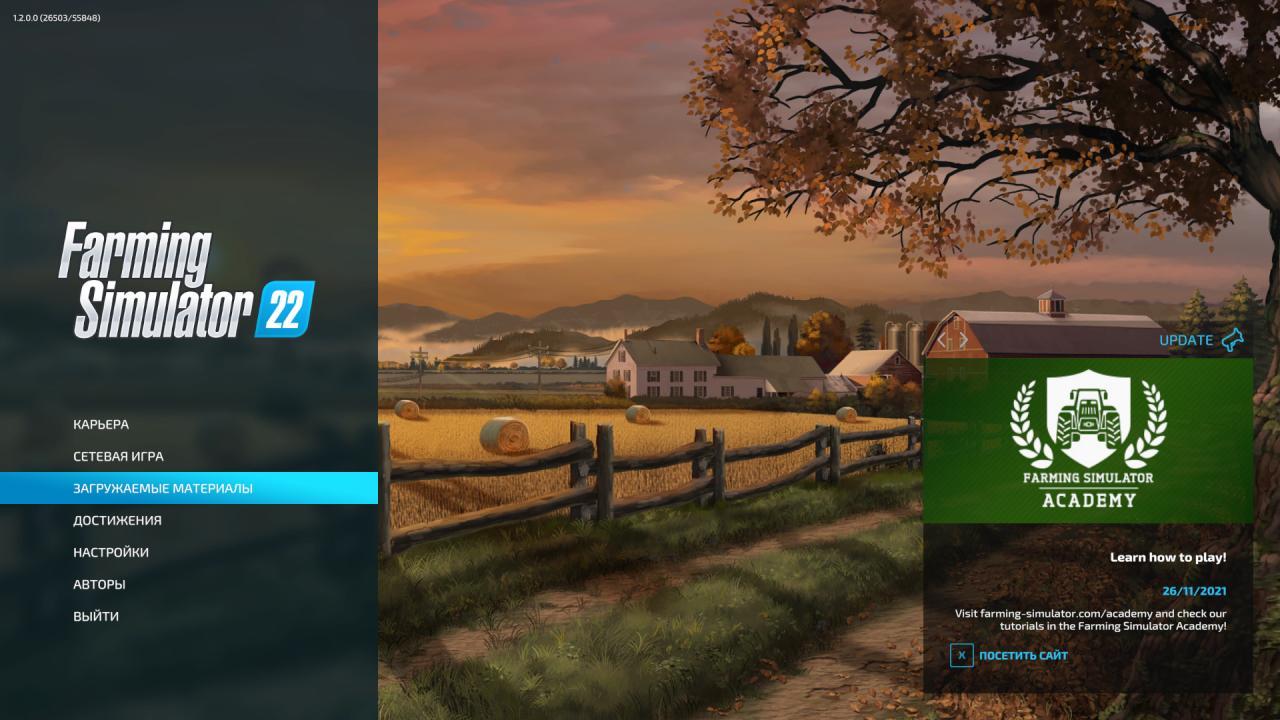
Already have a licensed copy of Farming Simulator 22? The game allows you to enter special codes that add various items and equipment to the game. They can only be activated once. First, let's figure out how to activate codes in Farming Simulator 22, and below you will find the current codes.
Launch the game and go to the main menu;Go to the "Downloadable Content" tab;
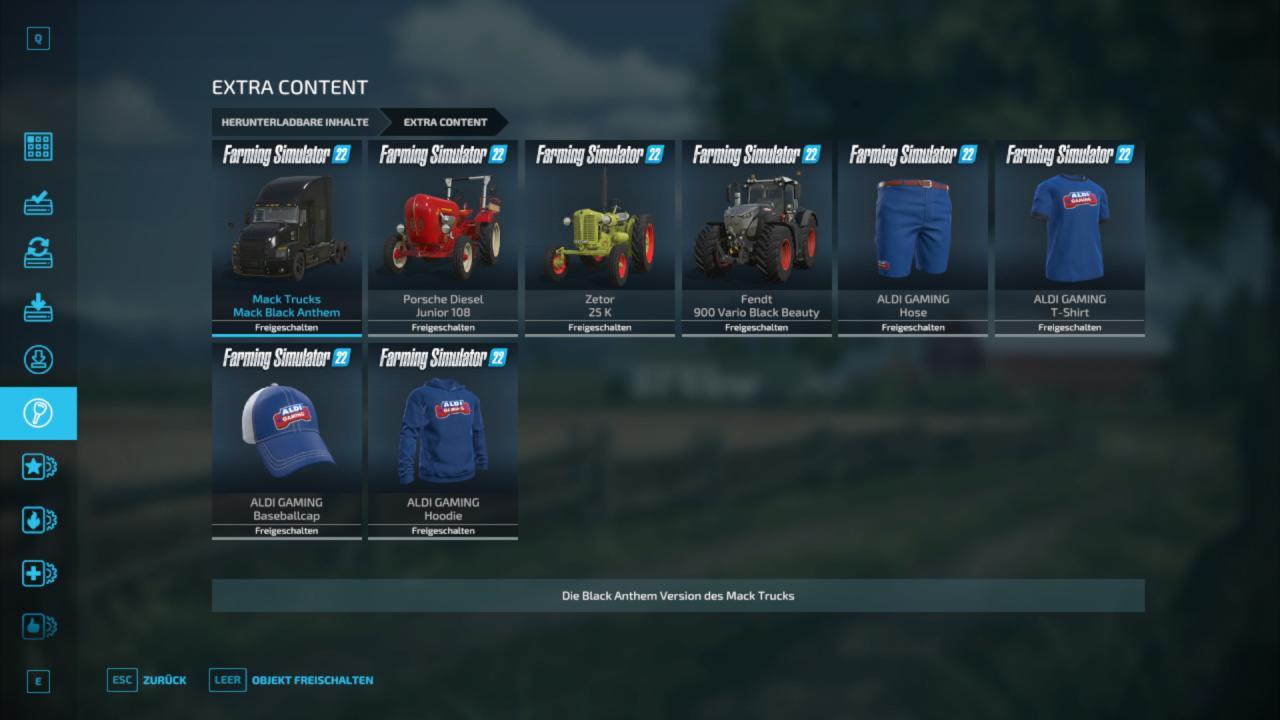
Next, click on the key icon (the "additional content" section);
In this section, press the "space" key to activate the key input field;
Enter the key and activate it!
Note that codes cannot be copied in FS22, so all input must be done manually. Below are the current codes for equipment and items in FS22:
Mack Trucks Mack Black Antehem: RCNL1ZEEPorsche Diesel Junior 108: RNRWJZFEZetor 25 K: AN4TWLHFFendt 900 Vario Black Beauty: B8ZETFNPALDI GAMING pants: DTPACSS6ALDI GAMING T-Shirt: T7XAHSTXALDI GAMING BaseBallcap: HYNTQAN4ALDI GAMING sweater: AJ3H7E2F
Launch the game and go to the main menu;Go to the "Downloadable Content" tab;
Next, click on the key icon (the "additional content" section);
In this section, press the "space" key to activate the key input field;
Enter the key and activate it!
Note that codes cannot be copied in FS22, so all input must be done manually. Below are the current codes for equipment and items in FS22:
Mack Trucks Mack Black Antehem: RCNL1ZEEPorsche Diesel Junior 108: RNRWJZFEZetor 25 K: AN4TWLHFFendt 900 Vario Black Beauty: B8ZETFNPALDI GAMING pants: DTPACSS6ALDI GAMING T-Shirt: T7XAHSTXALDI GAMING BaseBallcap: HYNTQAN4ALDI GAMING sweater: AJ3H7E2F
The most popular mods

 Spintires: MudRunner
 SnowRunner
 Euro Truck Simulator 2
 American Truck Simulator
 Farming Simulator 2017
 Farming Simulator 2019
 Farming Simulator 2022
 BeamNG.drive
 City Car Driving
 Farming Simulator 20
 OMSI 2
 Assetto Corsa
 MXB
MXB


by downloads per week
by downloads per month
There are no mods yet
by downloads per week
by downloads per month
There are no mods yet
by downloads per week
by downloads per month
There are no mods yet
by downloads per week
by downloads per month
There are no mods yet
by downloads per week
by downloads per month
There are no mods yet
by downloads per week
by downloads per month
There are no mods yet
by downloads per week
by downloads per month
There are no mods yet
by downloads per week
by downloads per month
There are no mods yet
by downloads per week
by downloads per month
There are no mods yet
by downloads per week
by downloads per month
There are no mods yet
by downloads per week
by downloads per month
There are no mods yet
by downloads per week
by downloads per month
There are no mods yet
by downloads per week
by downloads per month
There are no mods yet
by downloads per week
by downloads per month
There are no mods yet