Farming Simulator 2022 8345
|
|
ARTICLE | ||
|
1.4K
|
0
0 |
||
29 Sep 2025 at 10:09
HUD and Menu in Farming Simulator 2022
We continue our guides for beginners. Today, we will take a closer look at how to navigate Farming Simulator 22 more easily, explore various menus and HUD details, and review useful menus that will become your indispensable assistant.
HUD Elements
Perhaps we should start with an overview of the various HUD elements – the interface. Some of the listed elements will be used constantly throughout the game.
In the upper right corner, useful information is displayed that you will use constantly, namely: the time of day, your current balance, the current time acceleration (which can be adjusted in the game settings), the month, and weather conditions. In general, all the basic information you will need.Moving to the upper left corner. Pay attention to the icons located below the control block. You can track how many tools are currently attached to your vehicle. The control block highlights certain actions that can be performed at this moment. This list changes depending on the zone you have visited. For example, when visiting a unloading zone, you will find the trailer unload button in the control block. In the lower right corner, different information is displayed depending on whether you are currently in a vehicle or on foot. If you are on foot, information about the field’s condition will be shown. For example, you can find out whether fertilizers or lime are needed, or if everything is fine. If you are in a vehicle, information about the vehicle itself will be displayed. Inside the vehicle, other useful information is available: speedometer, fuel level, vehicle condition. To the left of the speedometer, there is another indicator showing the fill level of the attached seeder, the harvested crops in the combine harvester’s tank, and so on. And, of course, the mini-map, located in the lower left corner. It contains a lot of useful information: your current location, your vehicles, various fields, shops, and more. You can mark a route, and this route will be displayed on the mini-map, allowing you to quickly reach the desired location.
Map and Menu
Now let’s look at the individual features of the map and the menu as a whole. The menu opens with the ESC/Pause key. This menu contains everything you need.
Map. You will use the map constantly. The thing is, it shows all the important game information. You can see various fields, the condition of each, the growth stage of crops, and so on. In other words, you can track which crops are ready for harvest and which require care. Very useful information.There is another useful function on the map. Click on the vehicle icon and select the Reset option to return the vehicle to its original location.
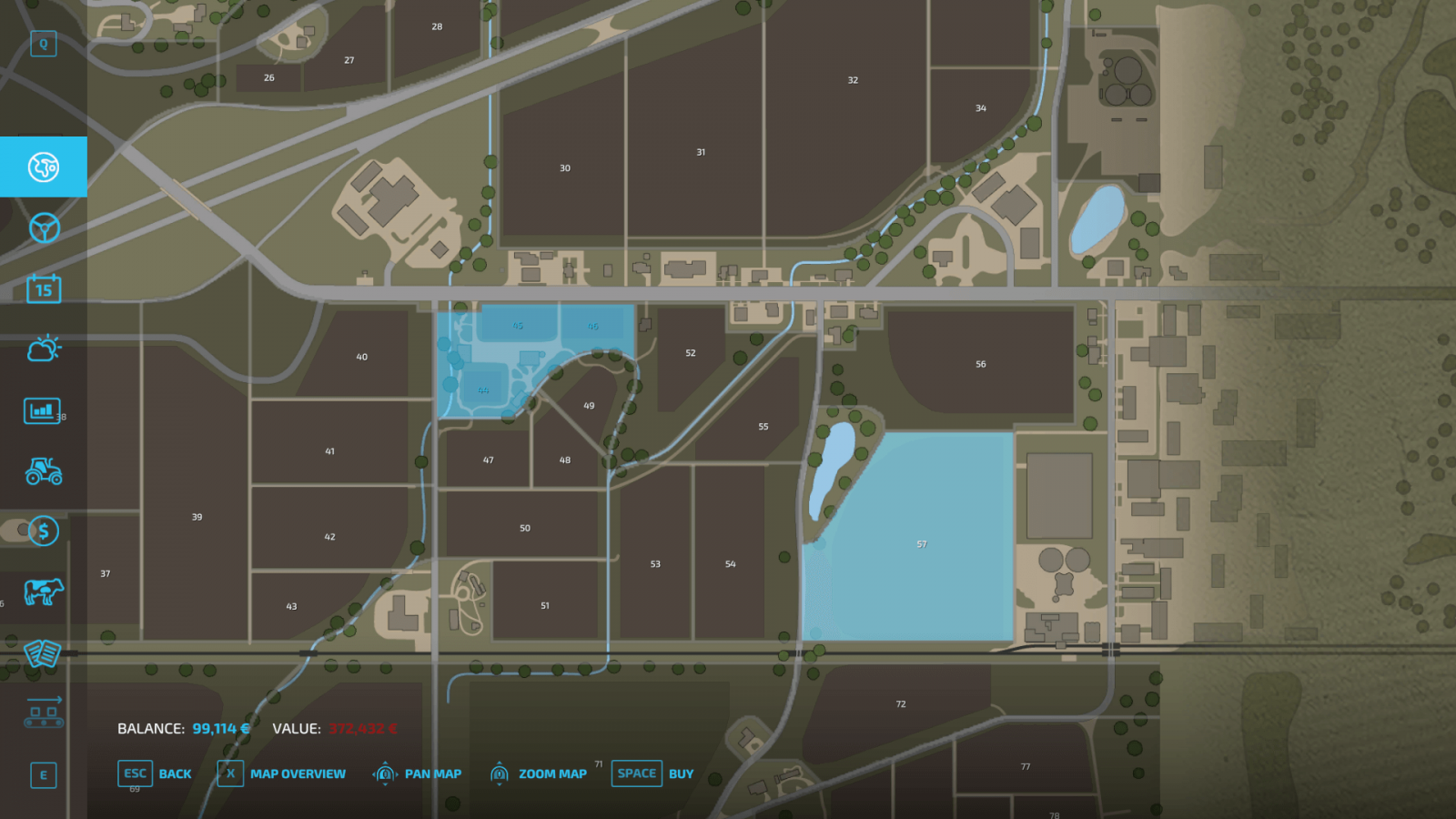
With the Farmland View option, you can see which fields are available for purchase and how much they cost. Therefore, you don’t need to go to the field itself; you can check the price from anywhere.
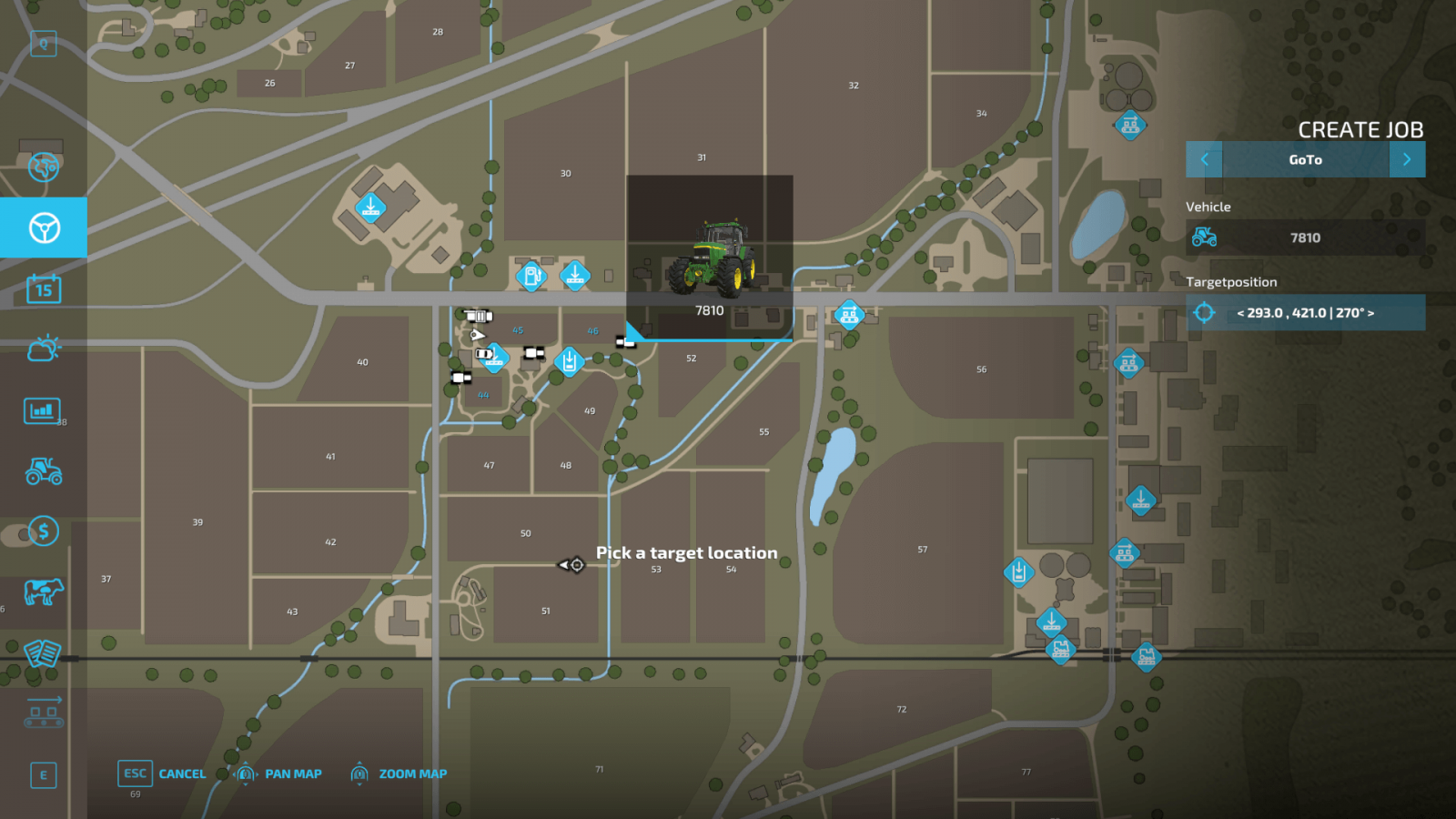
The Active Workers option allows you to remotely manage your workers and helpers by assigning them various tasks. For example, you can assign them to deliver and unload a specific product, and you don’t need to be distracted from your own tasks, as everything is done through a convenient menu. Click on a vehicle or tool to create a new task. Additionally, you can choose their route yourself and make their tasks cyclical. That is, workers will continuously perform the same task – loading and delivering goods, or whatever else. Convenient and efficient!
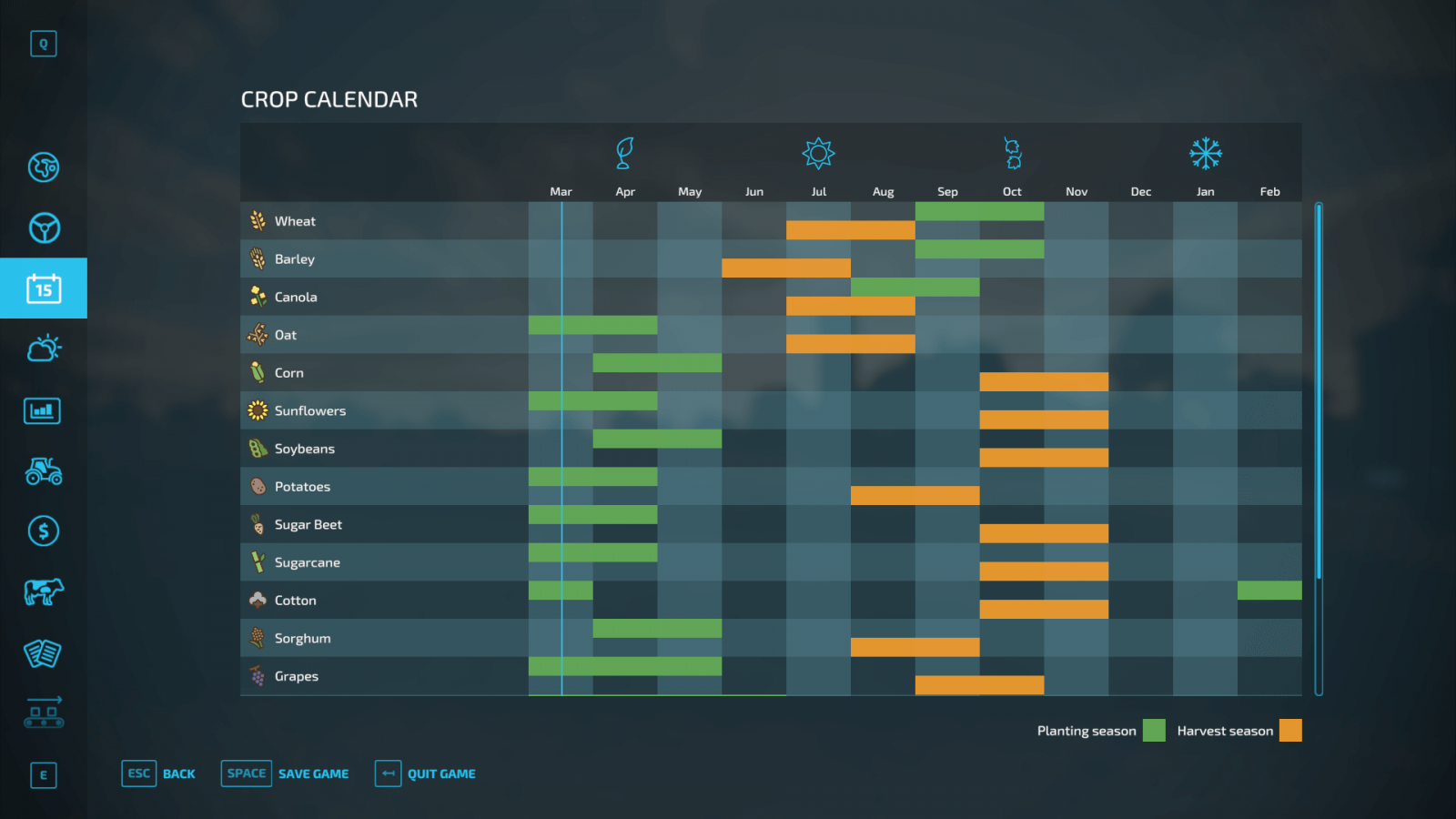
The "Calendar" tab will help you if you play with seasonal cycles. In this tab, you can find out when to plant and harvest certain crops.
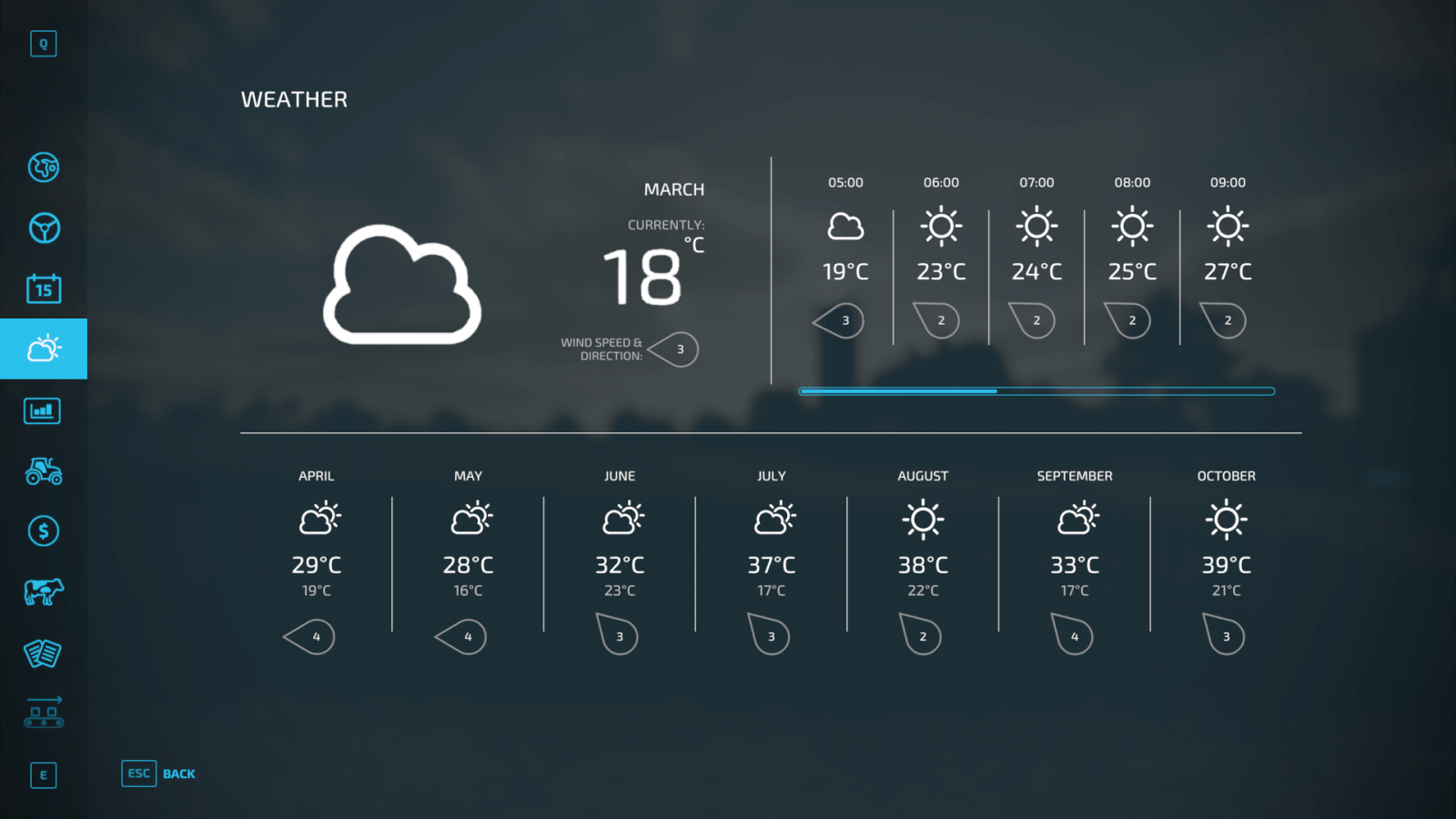
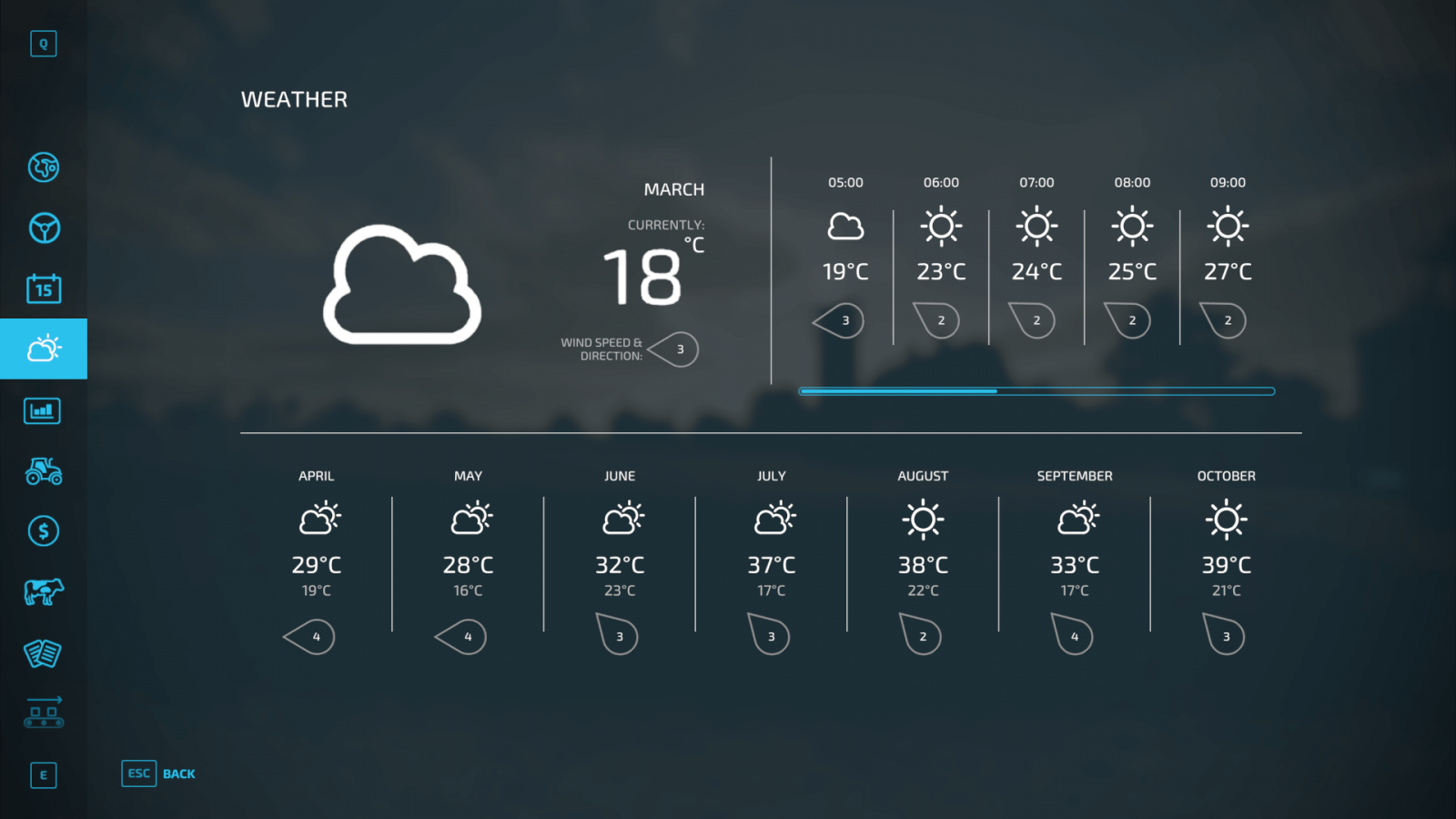
The "Weather" tab shows the weather forecast for several days. Plan everything in advance, as you cannot harvest during rain.
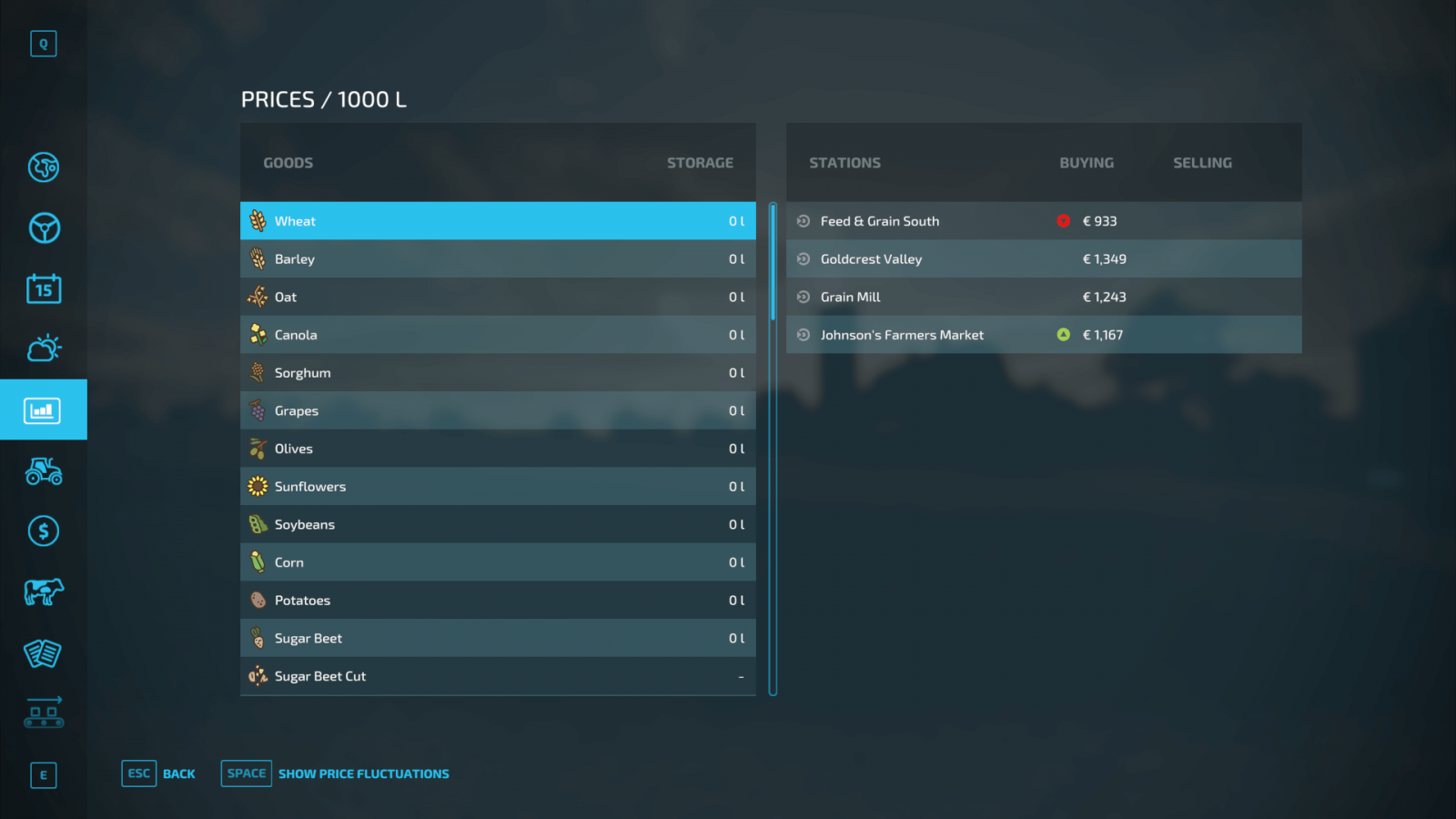
A very useful menu is "Price." As you might guess, here you can check prices for various products. This is the amount that selling points are willing to pay you for your harvest. Pay attention to price fluctuations throughout the year to understand whether it is a good time to sell your harvest or if you should wait a bit.
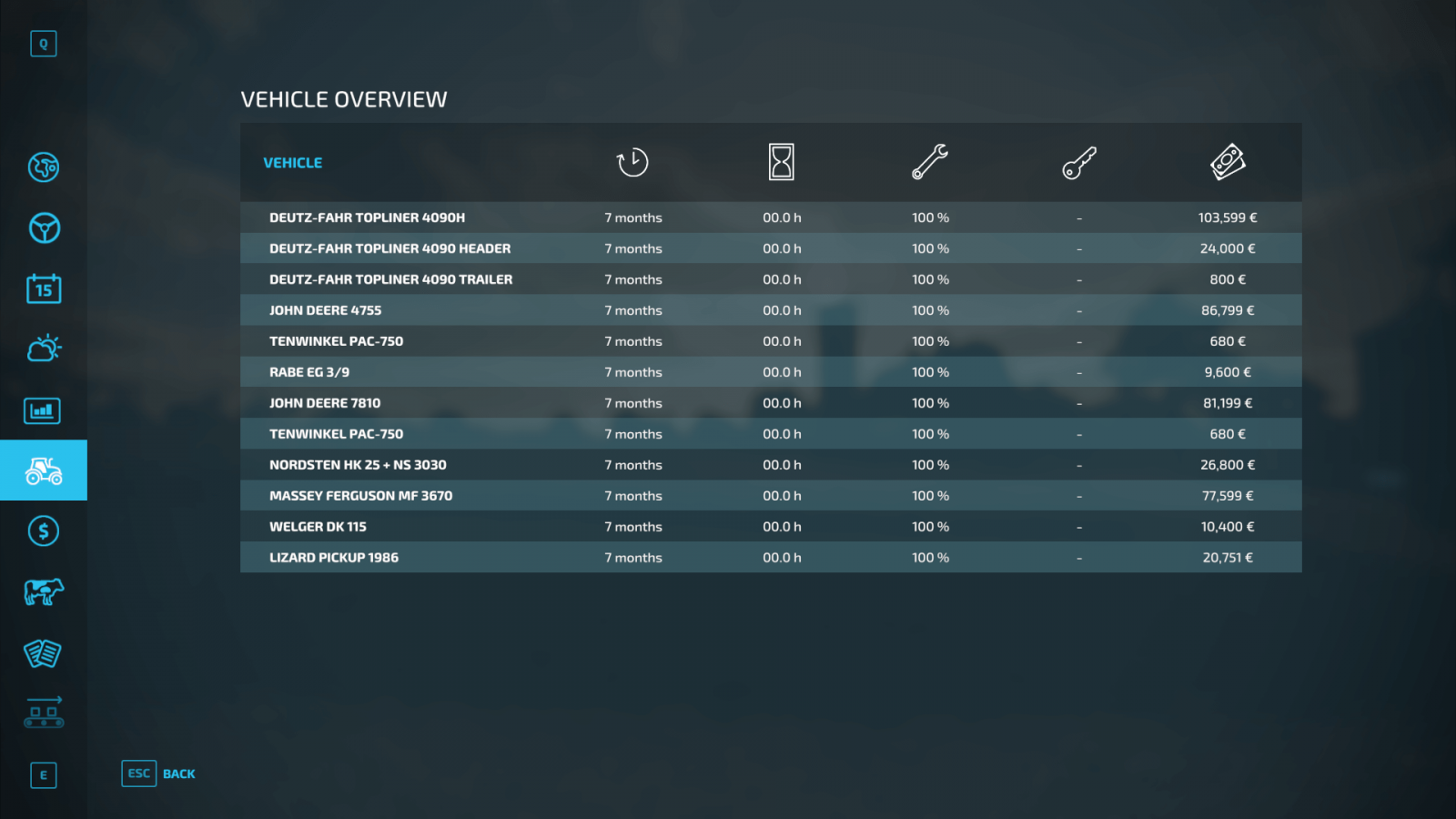
In the Vehicle Overview tab, all useful information about the vehicles you own is displayed. That is, this menu shows all machines and tools, hours worked on each, wear level, leasing cost, and resale value.
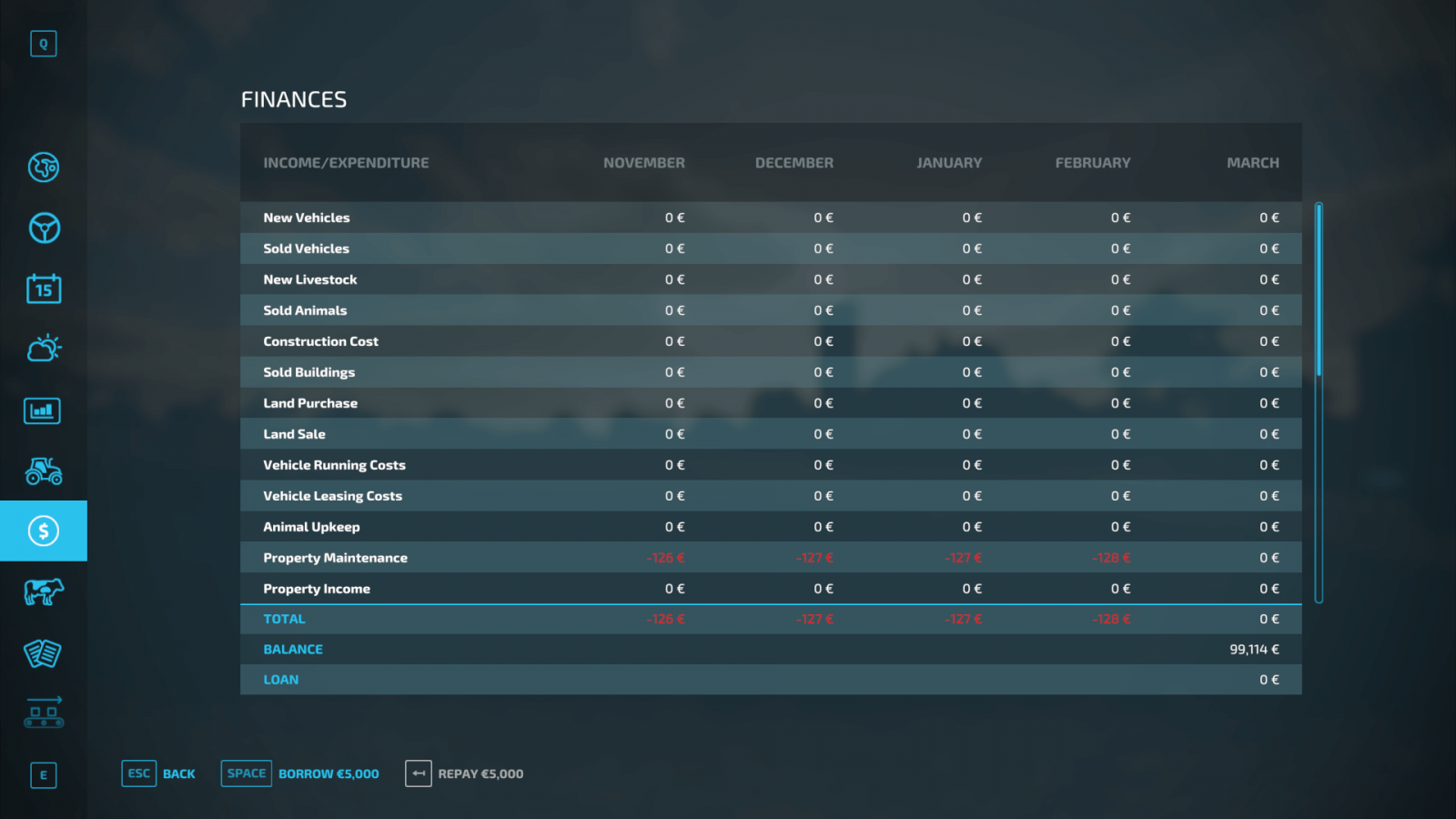
And the Finances tab is your indispensable assistant, as it allows you to track all your financial activities: how much you have spent, how much you have earned, whether you are in profit or loss, what exactly you paid for, and so on. Information is displayed about everything: from rent to animal care. The game also allows you to take out loans from the bank, and you can repay debts directly in the Finances tab.
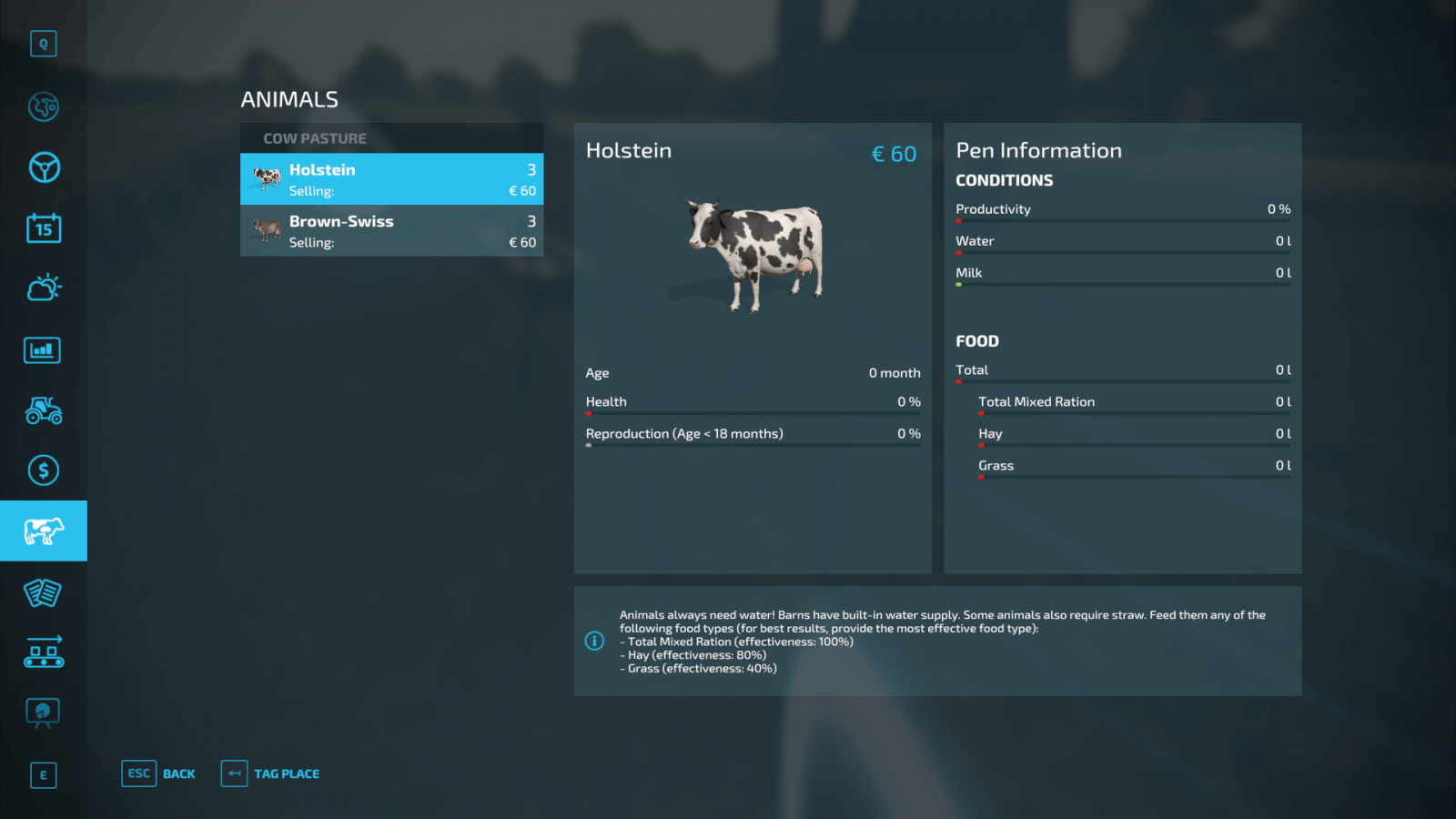
In the "Animals" tab, you can simply track information about your animals and livestock.
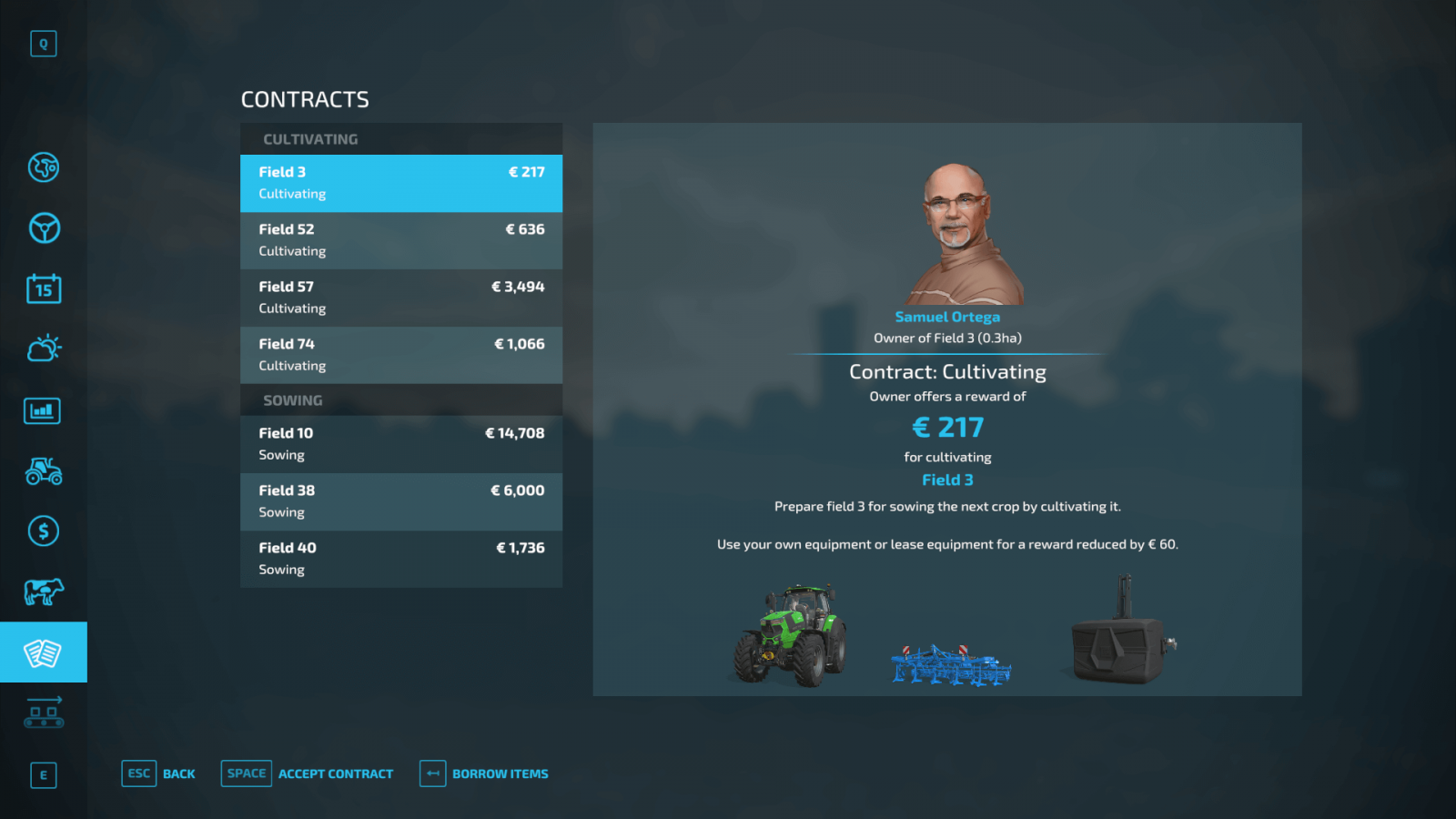
Contracts are an indispensable part of Farming Simulator 22. In the corresponding tab, you can see which contracts are currently available and take them on. If you don’t have the necessary tools and vehicles to complete a contract, you can click the borrow all the necessary items button and accept the contract by renting the equipment.
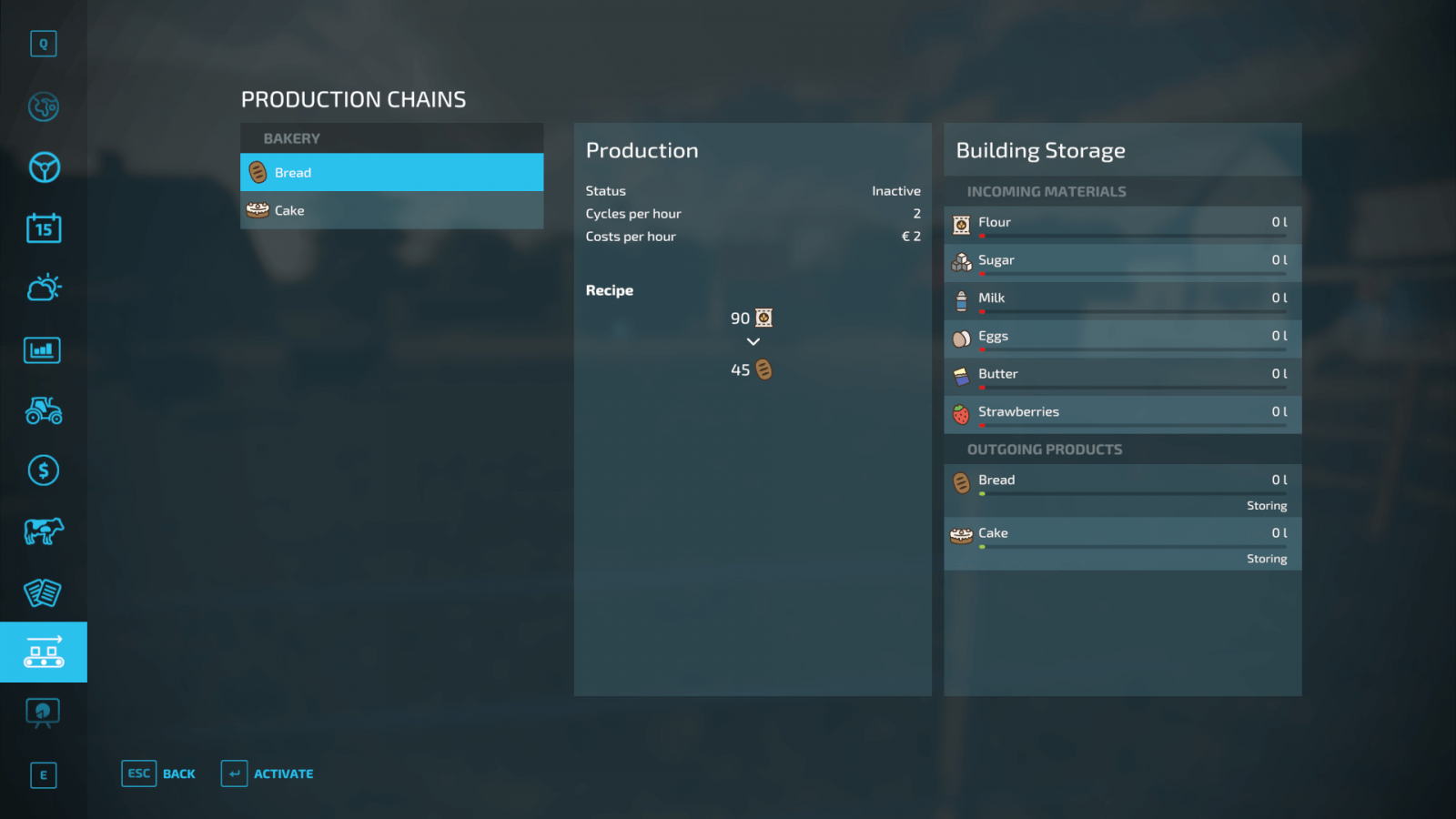
FS22 features production chains, which you can track in the corresponding tab – Production Chain.
If you like various statistics, there is good news for you as well, since in a separate menu you can track the number of hectares worked, how much time you spent plowing, how many trees you planted, and other interesting information.
HUD Elements
Perhaps we should start with an overview of the various HUD elements – the interface. Some of the listed elements will be used constantly throughout the game.
In the upper right corner, useful information is displayed that you will use constantly, namely: the time of day, your current balance, the current time acceleration (which can be adjusted in the game settings), the month, and weather conditions. In general, all the basic information you will need.Moving to the upper left corner. Pay attention to the icons located below the control block. You can track how many tools are currently attached to your vehicle. The control block highlights certain actions that can be performed at this moment. This list changes depending on the zone you have visited. For example, when visiting a unloading zone, you will find the trailer unload button in the control block. In the lower right corner, different information is displayed depending on whether you are currently in a vehicle or on foot. If you are on foot, information about the field’s condition will be shown. For example, you can find out whether fertilizers or lime are needed, or if everything is fine. If you are in a vehicle, information about the vehicle itself will be displayed. Inside the vehicle, other useful information is available: speedometer, fuel level, vehicle condition. To the left of the speedometer, there is another indicator showing the fill level of the attached seeder, the harvested crops in the combine harvester’s tank, and so on. And, of course, the mini-map, located in the lower left corner. It contains a lot of useful information: your current location, your vehicles, various fields, shops, and more. You can mark a route, and this route will be displayed on the mini-map, allowing you to quickly reach the desired location.
Map and Menu
Now let’s look at the individual features of the map and the menu as a whole. The menu opens with the ESC/Pause key. This menu contains everything you need.
Map. You will use the map constantly. The thing is, it shows all the important game information. You can see various fields, the condition of each, the growth stage of crops, and so on. In other words, you can track which crops are ready for harvest and which require care. Very useful information.There is another useful function on the map. Click on the vehicle icon and select the Reset option to return the vehicle to its original location.
With the Farmland View option, you can see which fields are available for purchase and how much they cost. Therefore, you don’t need to go to the field itself; you can check the price from anywhere.
The Active Workers option allows you to remotely manage your workers and helpers by assigning them various tasks. For example, you can assign them to deliver and unload a specific product, and you don’t need to be distracted from your own tasks, as everything is done through a convenient menu. Click on a vehicle or tool to create a new task. Additionally, you can choose their route yourself and make their tasks cyclical. That is, workers will continuously perform the same task – loading and delivering goods, or whatever else. Convenient and efficient!
The "Calendar" tab will help you if you play with seasonal cycles. In this tab, you can find out when to plant and harvest certain crops.
The "Weather" tab shows the weather forecast for several days. Plan everything in advance, as you cannot harvest during rain.
A very useful menu is "Price." As you might guess, here you can check prices for various products. This is the amount that selling points are willing to pay you for your harvest. Pay attention to price fluctuations throughout the year to understand whether it is a good time to sell your harvest or if you should wait a bit.
In the Vehicle Overview tab, all useful information about the vehicles you own is displayed. That is, this menu shows all machines and tools, hours worked on each, wear level, leasing cost, and resale value.
And the Finances tab is your indispensable assistant, as it allows you to track all your financial activities: how much you have spent, how much you have earned, whether you are in profit or loss, what exactly you paid for, and so on. Information is displayed about everything: from rent to animal care. The game also allows you to take out loans from the bank, and you can repay debts directly in the Finances tab.
In the "Animals" tab, you can simply track information about your animals and livestock.
Contracts are an indispensable part of Farming Simulator 22. In the corresponding tab, you can see which contracts are currently available and take them on. If you don’t have the necessary tools and vehicles to complete a contract, you can click the borrow all the necessary items button and accept the contract by renting the equipment.
FS22 features production chains, which you can track in the corresponding tab – Production Chain.
If you like various statistics, there is good news for you as well, since in a separate menu you can track the number of hectares worked, how much time you spent plowing, how many trees you planted, and other interesting information.
|
|
ARTICLE | ||
|
3.5K
|
0
0 |
||
29 Sep 2025 at 10:08
Where to Start in Farming Simulator 2022?
So you’ve launched Farming Simulator 22, but where to start? What should you do first? Let’s figure it out together and find out which equipment and tools you need at the very beginning of the game.
What kind of farmer do you want to be?
Farming Simulator 22 offers different specializations, so you can decide for yourself what kind of farmer you want to become. Maybe you just want to focus on agriculture and crop growing? No problem! Or perhaps animal husbandry is more your style? The game has plenty of animals for that. No one forbids you from getting into forestry either, which is also a profitable and interesting business.
Of course, you can combine all of these, but it’s best to choose one specialization at the start and only later, once you start making a profit, branch out into other areas.
Agriculture
Beginners are recommended to start the game with classic agriculture, as this is the core of the Farming Simulator series. You’ll have a lot to learn because farming is complex. There are dozens of crops that require special care. A large variety of vehicles and tools are needed to perform different tasks. You’ll face many everyday challenges that you’ll need to learn to complete quickly and efficiently, and we’ll help you with that—guides on growing various crops in FS22 will be coming soon.
Animal Husbandry
This is also a very important part of the game—animal husbandry. You have a wide range of animals. If you take care of them, feed them, and manage animal husbandry properly, you can earn a good profit. In the easiest game mode, New Farmer, you start with animals already. However, if you don’t plan to engage in animal husbandry, don’t worry—the animals won’t suffer. They will simply stop producing any goods, so it only affects your profit.
Forestry
This job is a bit more challenging but pays well. You’ll need to learn how to properly use forestry equipment. The work is quite repetitive, but if you want to earn a large profit, this is a good option.
Where to start
First, you should familiarize yourself with the equipment needed for work. Below, we list the equipment you should definitely acquire. However, if you’re playing in the easiest mode—New Farmer—you will already have everything you need at the start, namely:
John Deere 7810 tractor;RABE MR 250 cultivator;NORDSTEN NS 3030 seeder;Einböck Aerostar-Exact 600 for weed control;BREDAL K105 fertilizer spreader;DEUTZ-FAHR Topliner 4090 HTS combine harvester + tool for it - 4090;WELGER DK 115 trailer.
If you’re playing on more difficult modes and don’t have all the necessary equipment, here’s a list of categories you will definitely need:
You absolutely need a tractor. Each tool has its own power requirements. Therefore, the more powerful the tractor, the more tools it can use, making work easier and faster.A good cultivator. It’s the cultivator that prepares the soil for sowing.You can’t do without a seeder. Don’t forget to buy seeds to fill the seeder. Of course, weeds need to be removed, so you’ll need equipment like the Einböck Aerostar-Exact 600 for that.Don’t forget to get a fertilizer spreader.A harvester – a combine. Buy a good combine + header to harvest crops. It’s recommended to get a grain header at the start to collect more yield.You also can’t do without a trailer, since you need something to transport the harvested crops. As your farm develops, you’ll need larger trailers.
Contracts
Contracts will make the game much easier because you’ll always clearly know what you need to do, which crops to deliver, and which equipment is suitable. Contracts change over time, so if you don’t see anything suitable, don’t worry—just wait for the list to update. Another notable aspect of contracts is that even if you don’t have the right equipment, you can easily rent everything. If you decide to rent equipment from the employer, you’ll pay a small commission, but it will cost you much less than buying new equipment. If rented, all the equipment will appear in front of the store.
That’s it, now you know where to start playing Farming Simulator 22!
What kind of farmer do you want to be?
Farming Simulator 22 offers different specializations, so you can decide for yourself what kind of farmer you want to become. Maybe you just want to focus on agriculture and crop growing? No problem! Or perhaps animal husbandry is more your style? The game has plenty of animals for that. No one forbids you from getting into forestry either, which is also a profitable and interesting business.
Of course, you can combine all of these, but it’s best to choose one specialization at the start and only later, once you start making a profit, branch out into other areas.
Agriculture
Beginners are recommended to start the game with classic agriculture, as this is the core of the Farming Simulator series. You’ll have a lot to learn because farming is complex. There are dozens of crops that require special care. A large variety of vehicles and tools are needed to perform different tasks. You’ll face many everyday challenges that you’ll need to learn to complete quickly and efficiently, and we’ll help you with that—guides on growing various crops in FS22 will be coming soon.
Animal Husbandry
This is also a very important part of the game—animal husbandry. You have a wide range of animals. If you take care of them, feed them, and manage animal husbandry properly, you can earn a good profit. In the easiest game mode, New Farmer, you start with animals already. However, if you don’t plan to engage in animal husbandry, don’t worry—the animals won’t suffer. They will simply stop producing any goods, so it only affects your profit.
Forestry
This job is a bit more challenging but pays well. You’ll need to learn how to properly use forestry equipment. The work is quite repetitive, but if you want to earn a large profit, this is a good option.
Where to start
First, you should familiarize yourself with the equipment needed for work. Below, we list the equipment you should definitely acquire. However, if you’re playing in the easiest mode—New Farmer—you will already have everything you need at the start, namely:
John Deere 7810 tractor;RABE MR 250 cultivator;NORDSTEN NS 3030 seeder;Einböck Aerostar-Exact 600 for weed control;BREDAL K105 fertilizer spreader;DEUTZ-FAHR Topliner 4090 HTS combine harvester + tool for it - 4090;WELGER DK 115 trailer.
If you’re playing on more difficult modes and don’t have all the necessary equipment, here’s a list of categories you will definitely need:
You absolutely need a tractor. Each tool has its own power requirements. Therefore, the more powerful the tractor, the more tools it can use, making work easier and faster.A good cultivator. It’s the cultivator that prepares the soil for sowing.You can’t do without a seeder. Don’t forget to buy seeds to fill the seeder. Of course, weeds need to be removed, so you’ll need equipment like the Einböck Aerostar-Exact 600 for that.Don’t forget to get a fertilizer spreader.A harvester – a combine. Buy a good combine + header to harvest crops. It’s recommended to get a grain header at the start to collect more yield.You also can’t do without a trailer, since you need something to transport the harvested crops. As your farm develops, you’ll need larger trailers.
Contracts
Contracts will make the game much easier because you’ll always clearly know what you need to do, which crops to deliver, and which equipment is suitable. Contracts change over time, so if you don’t see anything suitable, don’t worry—just wait for the list to update. Another notable aspect of contracts is that even if you don’t have the right equipment, you can easily rent everything. If you decide to rent equipment from the employer, you’ll pay a small commission, but it will cost you much less than buying new equipment. If rented, all the equipment will appear in front of the store.
That’s it, now you know where to start playing Farming Simulator 22!
|
|
ARTICLE | ||
|
1.1K
|
0
0 |
||
29 Sep 2025 at 10:07
Introduction to Shops and Dealers
In this guide, we will explore how to make purchases in Farming Simulator 22 and how to sell old equipment that is no longer used. We will look at the in-game store and dealers available in FS22.
Store Menu
The store menu has quite a few tabs, and it may seem complicated to a newcomer. However, it’s actually quite simple. Let’s figure out what’s what.
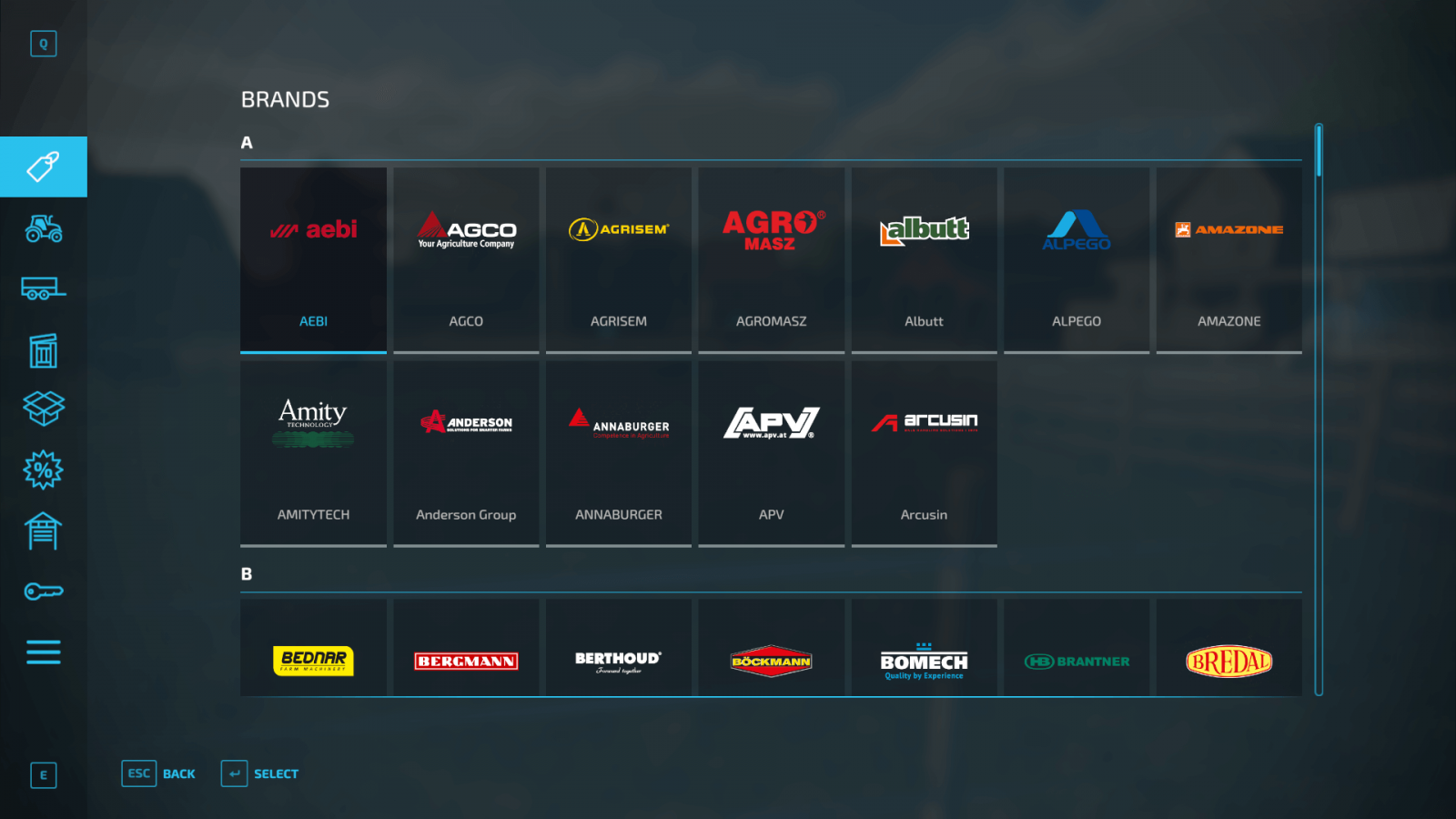
The first thing to pay attention to is the Brands tab. If your goal is to use equipment from only one brand, you have that option, and the store has a convenient feature for this.
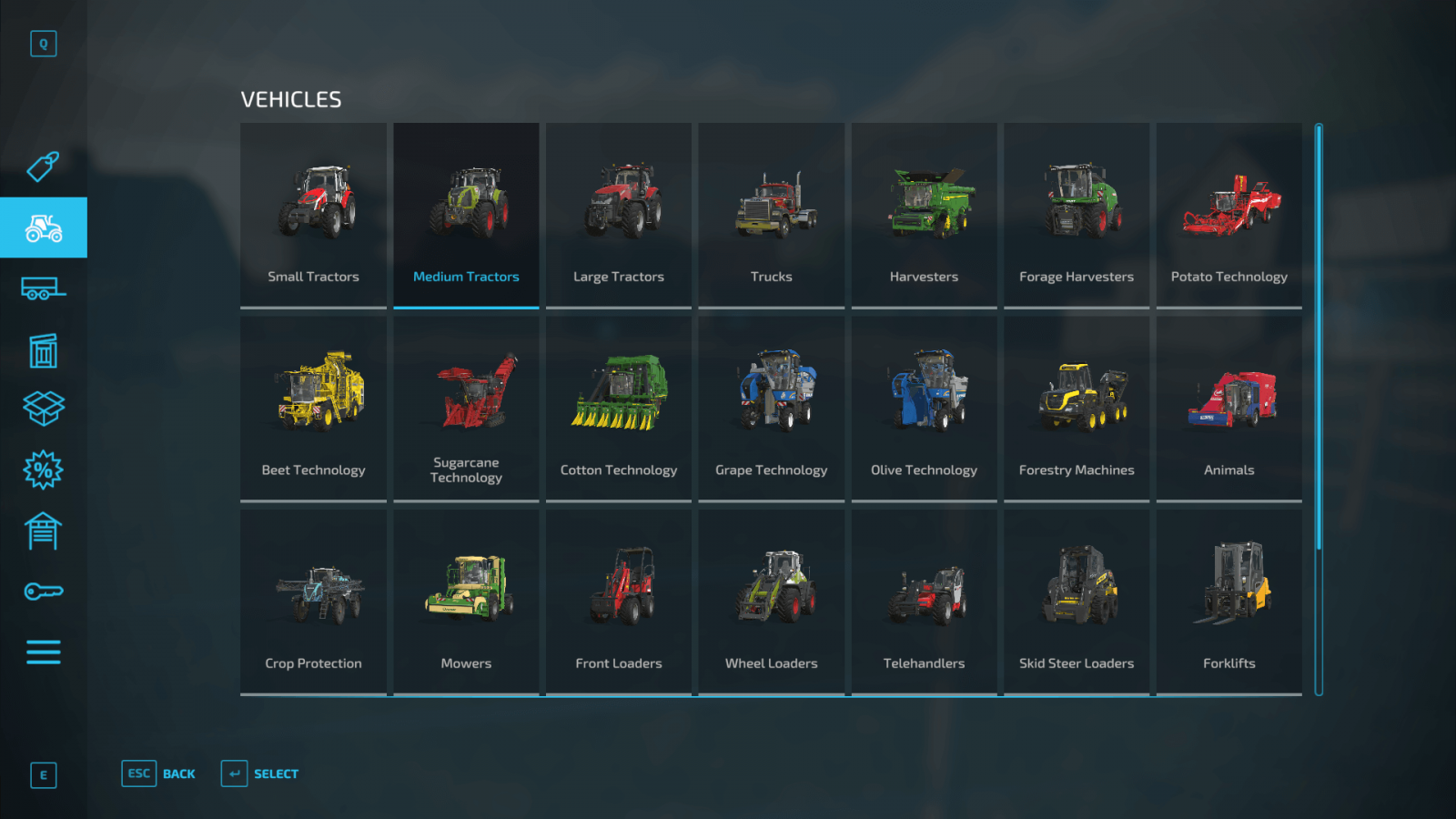
In the Vehicles tab, you can select different categories. If you are looking for a light tractor, you can filter to show only light ones; if a medium tractor, only medium, and so on. Just select the appropriate category, and only the vehicles you need will appear automatically.
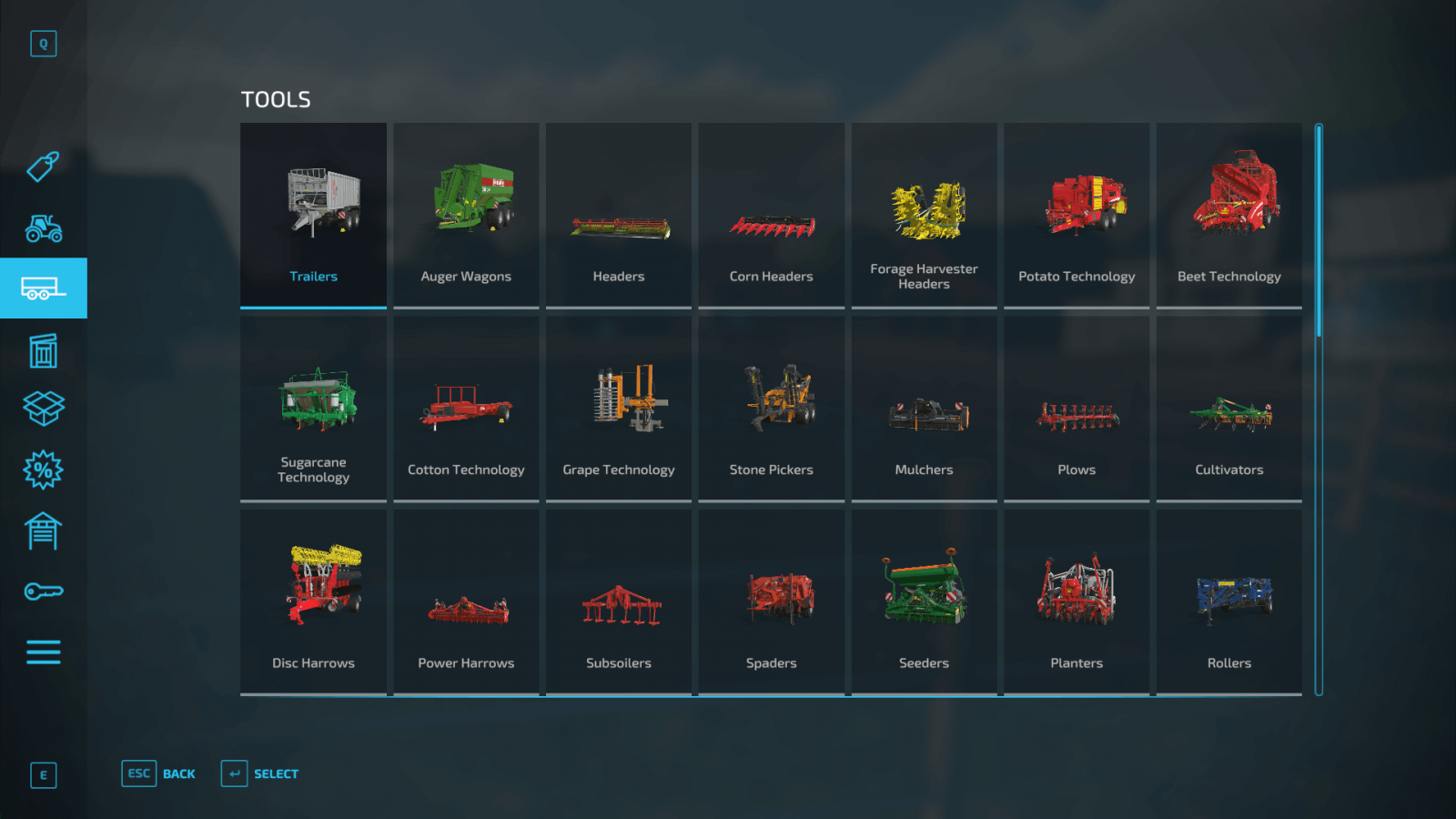
There is a separate Tools tab, where tools that work in conjunction with your vehicles are displayed separately: cultivators, mowers, seeders. Naturally, you can select all these categories separately and view cultivators, mowers, and other tools individually.
Moving on to the Objects section, which displays important items: pallets, bales, large bags (big bags), animal feed, various fertilizers, and more. Note that this category includes the so-called Seed Bigbag – a bag containing seeds of all types of crops you want to plant. Additionally, there are large bags containing wheat and oats. These bags are ideal as animal feed.
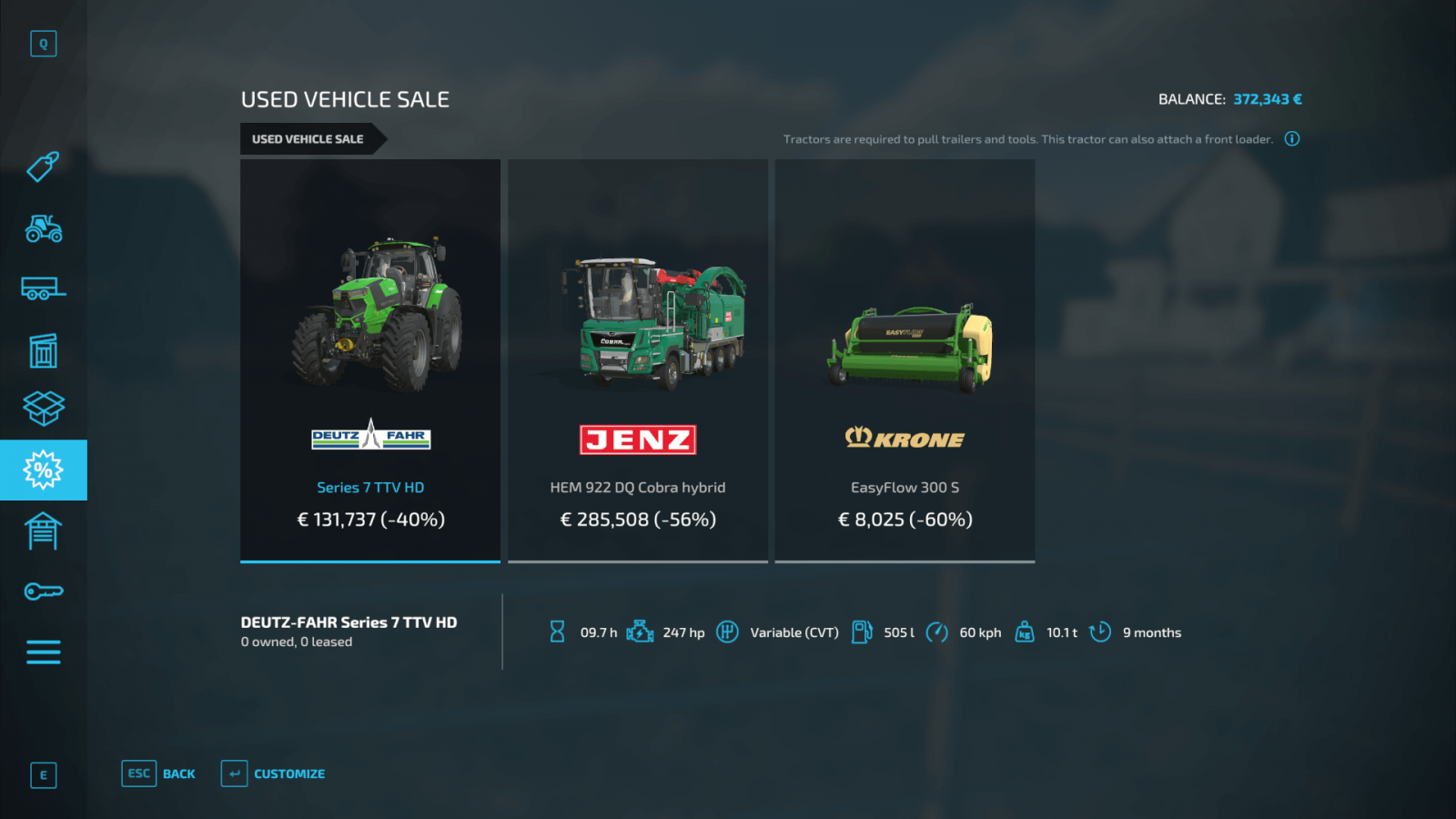
A very interesting tab is the Used Vehicles Sale. This category is constantly updated. New offers are added, old ones removed. If you want to save money and buy used equipment, Farming Simulator 22 offers this option. However, this equipment may have some drawbacks both technically and visually (https://stmods.ru/farming_simu...).
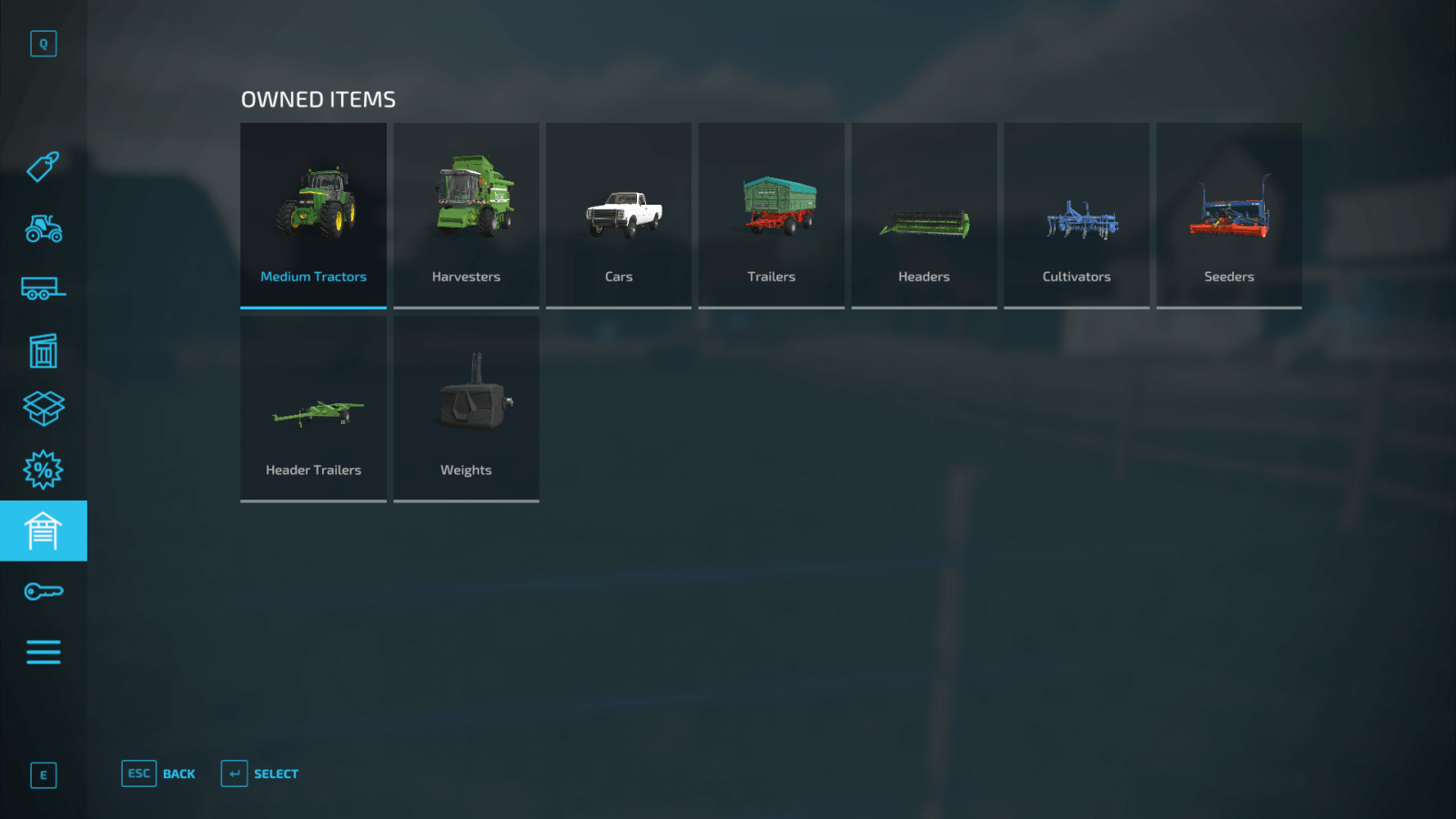
If you want to see all the tools and equipment you have already purchased, there is a separate category called Owned Items. From this tab, you can sell equipment. Simply click on the desired equipment and show its current location on the map.
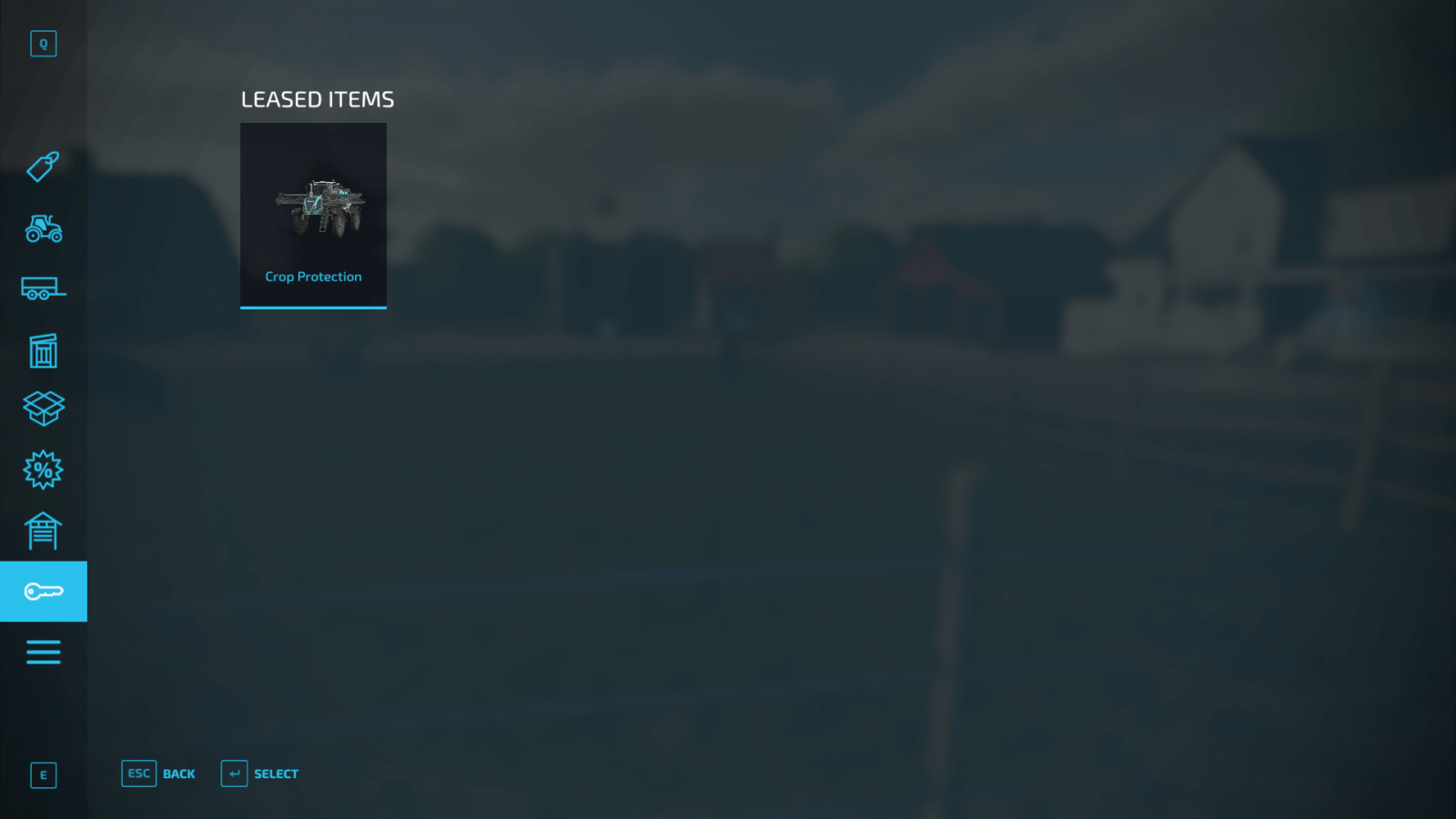
FS22 also allows you to rent equipment. But you have to pay for the rental. You can keep track of all rented equipment in the Leased Items section. From this menu, you can return all rented equipment and stop paying for it.
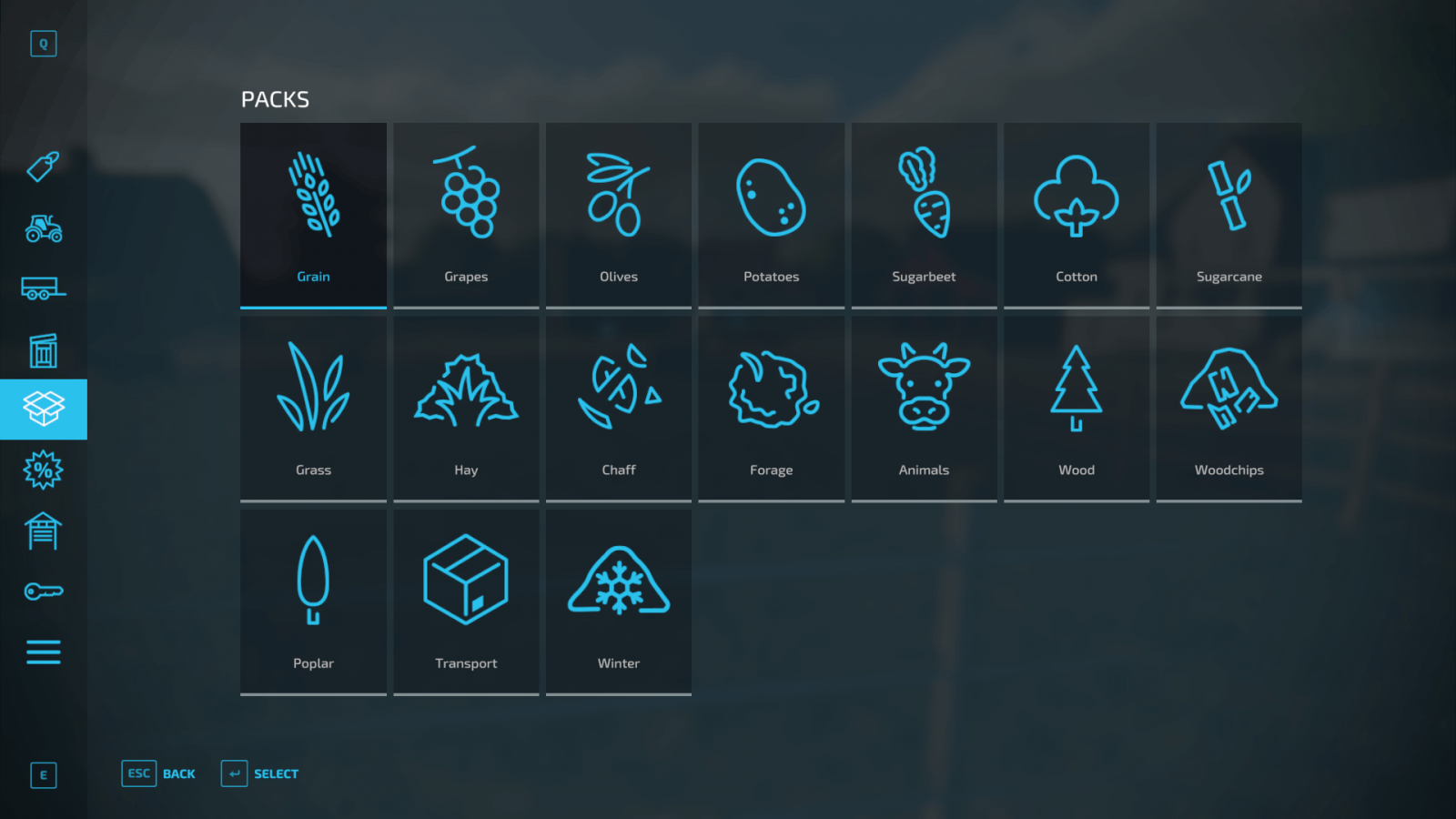
You can also purchase equipment or item packs directly in the Packs tab. Packs contain various items and equipment you will need for a specific type of work. If you need everything for sowing, it’s much easier and more cost-effective to buy the corresponding pack rather than purchasing everything separately. Moreover, if you already own a tractor or cultivator included in the pack, you can skip buying those, and the pack will cost less.
Buying Equipment
Now let’s look at an example. Say you want to buy a tractor and a cultivator. Let’s do it!
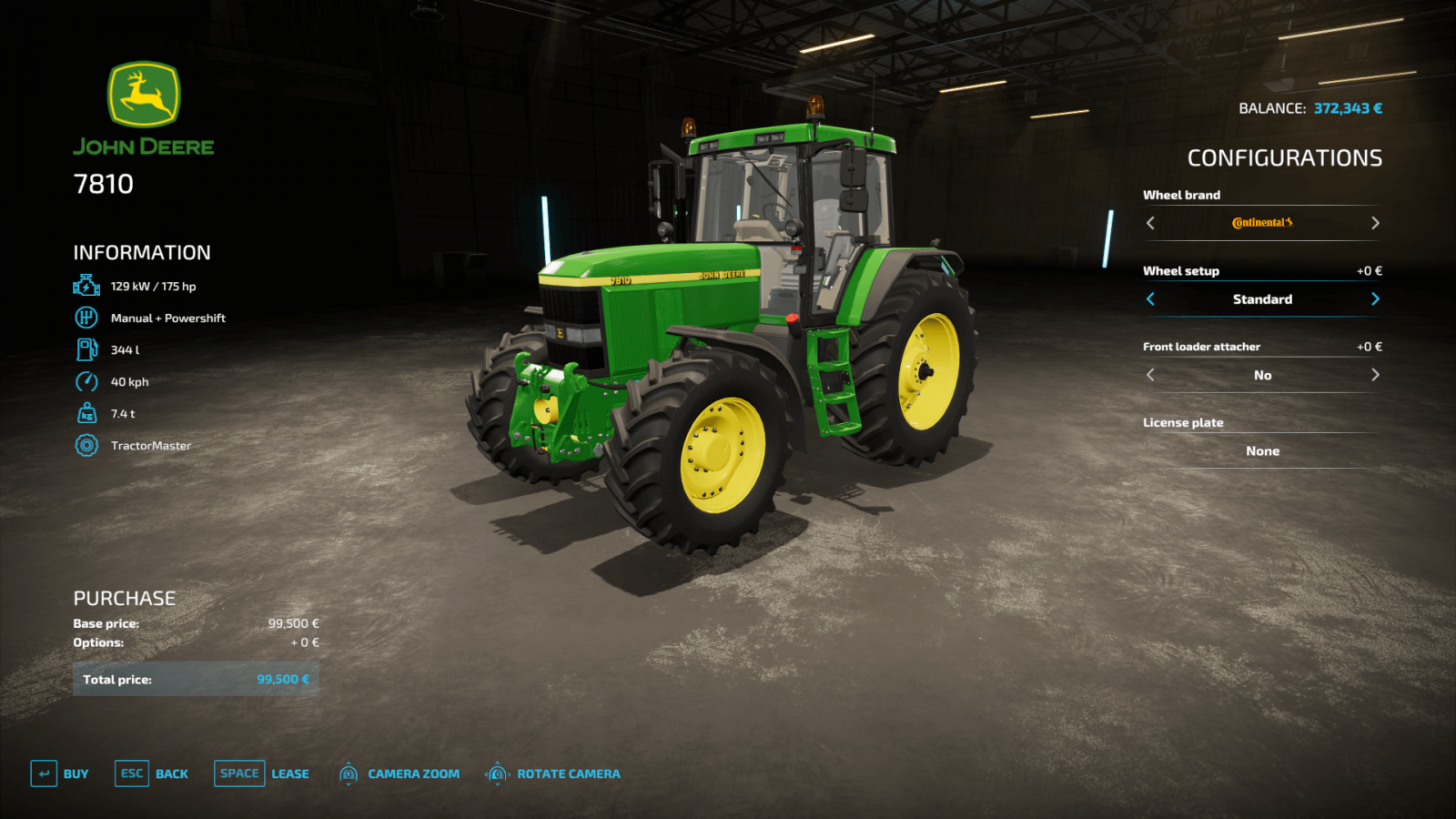
Go to the Medium Tractors section and select the tractor you want. In our case, it will be the John Deere 7810, as it is a powerful tractor of good quality and power, suitable for most farm tasks.Check the information on the left, where the tractor’s power is displayed. All important information about the vehicle or tool is shown on the left, and you need to make sure the tractor and tool you buy are compatible (the tractor has enough power to use the tool). Now you can choose configurations. Want to swap the wheels for branded ones? No problem, but the price may differ, and you’ll have to pay a bit more for higher-quality wheels. Note that some brands offer narrow wheel options, which are very useful if you have crop destruction settings enabled. You don’t need to buy all available upgrades at once. You can always return to the store later and upgrade your vehicle.That’s it, just click the Buy button and confirm your purchase. Congratulations on your purchase! If you want to rent the vehicle instead, you can do that in the same menu.
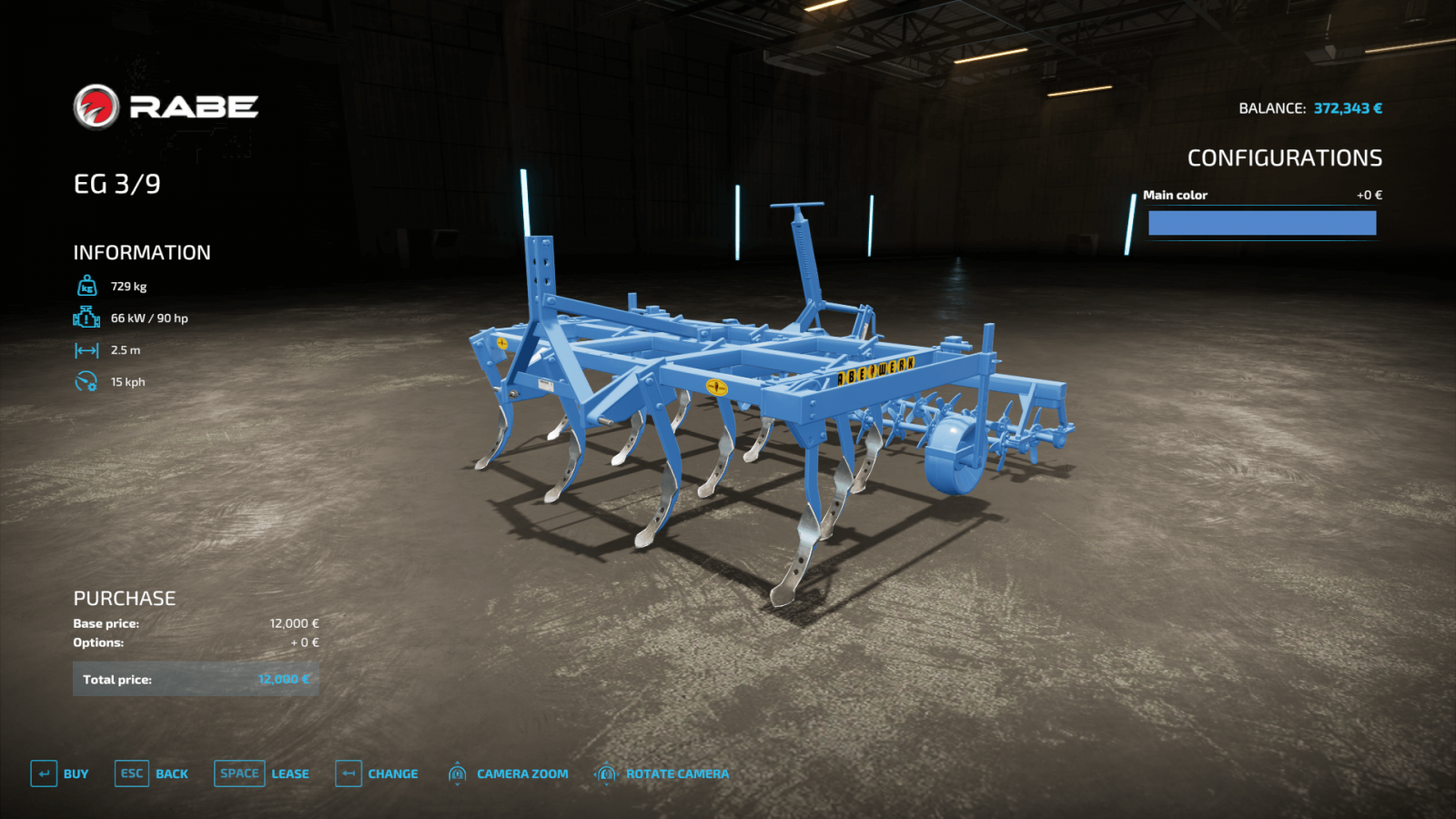
Now buy the tool. Let’s buy the RABE EG cultivator. Go to the Tools section and select the corresponding cultivator. Check the information on the left and see that this tool requires at least 90 horsepower (hp). The John Deere 7810 we bought has just enough power for this. So, buy it without hesitation. Click the Buy button. Done, you just bought your first cultivator!
Visiting the Dealership
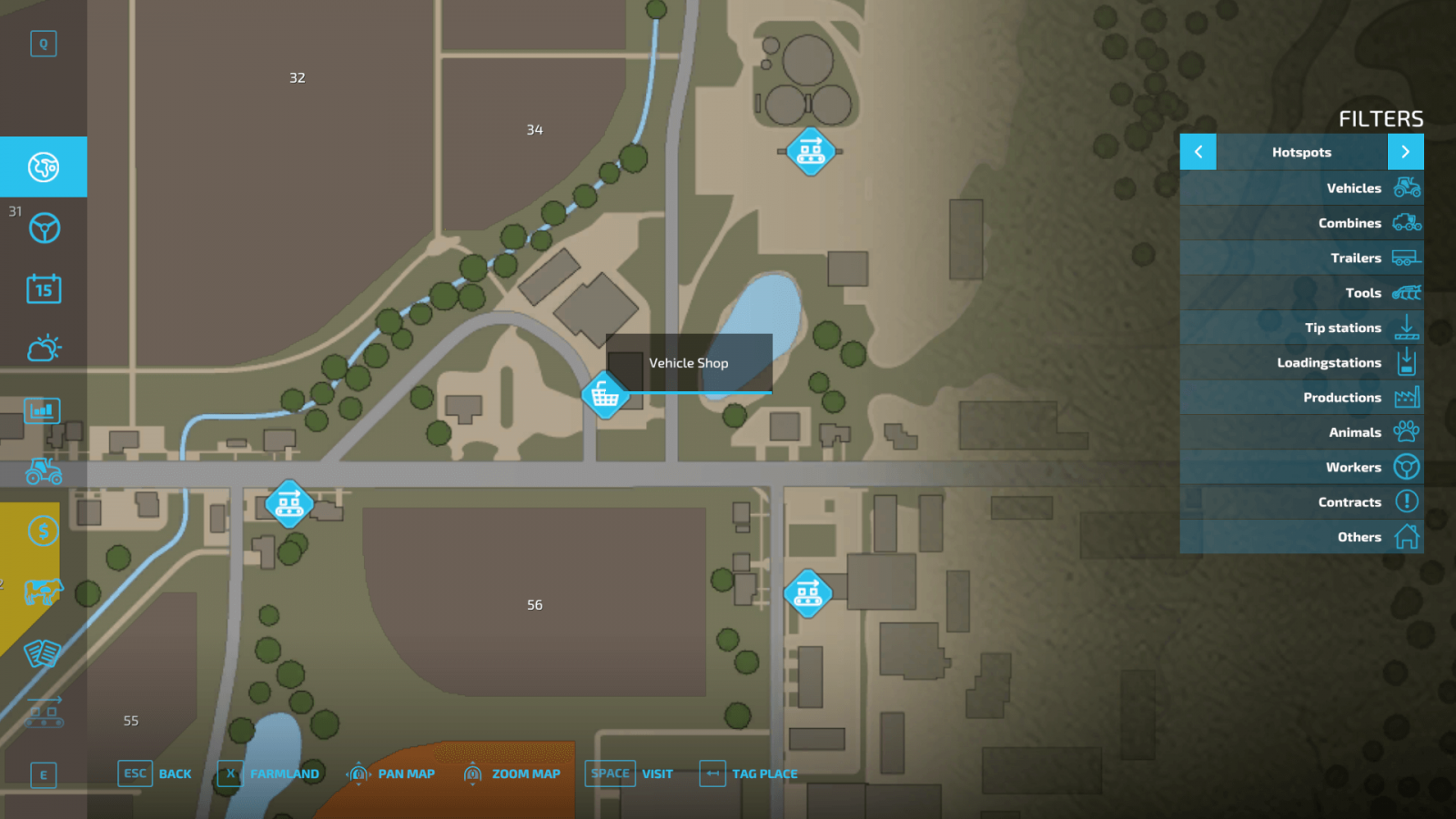
All purchased equipment appears in front of the local store. You can quickly teleport to the store using the standard map. If you prefer not to teleport, you can drive there yourself—just place a marker on the map, and the route will be shown on your mini-map.
When you arrive, you will see your purchased equipment. Also, you will notice two glowing signs. The first sign is for entering the store, the second is for the dealer. There, you can view the specs of your purchased equipment, repair it, and even change its color if that option is available.
Done! Now you know how to buy equipment in Farming Simulator 22!
Store Menu
The store menu has quite a few tabs, and it may seem complicated to a newcomer. However, it’s actually quite simple. Let’s figure out what’s what.
The first thing to pay attention to is the Brands tab. If your goal is to use equipment from only one brand, you have that option, and the store has a convenient feature for this.
In the Vehicles tab, you can select different categories. If you are looking for a light tractor, you can filter to show only light ones; if a medium tractor, only medium, and so on. Just select the appropriate category, and only the vehicles you need will appear automatically.
There is a separate Tools tab, where tools that work in conjunction with your vehicles are displayed separately: cultivators, mowers, seeders. Naturally, you can select all these categories separately and view cultivators, mowers, and other tools individually.
Moving on to the Objects section, which displays important items: pallets, bales, large bags (big bags), animal feed, various fertilizers, and more. Note that this category includes the so-called Seed Bigbag – a bag containing seeds of all types of crops you want to plant. Additionally, there are large bags containing wheat and oats. These bags are ideal as animal feed.
A very interesting tab is the Used Vehicles Sale. This category is constantly updated. New offers are added, old ones removed. If you want to save money and buy used equipment, Farming Simulator 22 offers this option. However, this equipment may have some drawbacks both technically and visually (https://stmods.ru/farming_simu...).
If you want to see all the tools and equipment you have already purchased, there is a separate category called Owned Items. From this tab, you can sell equipment. Simply click on the desired equipment and show its current location on the map.
FS22 also allows you to rent equipment. But you have to pay for the rental. You can keep track of all rented equipment in the Leased Items section. From this menu, you can return all rented equipment and stop paying for it.
You can also purchase equipment or item packs directly in the Packs tab. Packs contain various items and equipment you will need for a specific type of work. If you need everything for sowing, it’s much easier and more cost-effective to buy the corresponding pack rather than purchasing everything separately. Moreover, if you already own a tractor or cultivator included in the pack, you can skip buying those, and the pack will cost less.
Buying Equipment
Now let’s look at an example. Say you want to buy a tractor and a cultivator. Let’s do it!
Go to the Medium Tractors section and select the tractor you want. In our case, it will be the John Deere 7810, as it is a powerful tractor of good quality and power, suitable for most farm tasks.Check the information on the left, where the tractor’s power is displayed. All important information about the vehicle or tool is shown on the left, and you need to make sure the tractor and tool you buy are compatible (the tractor has enough power to use the tool). Now you can choose configurations. Want to swap the wheels for branded ones? No problem, but the price may differ, and you’ll have to pay a bit more for higher-quality wheels. Note that some brands offer narrow wheel options, which are very useful if you have crop destruction settings enabled. You don’t need to buy all available upgrades at once. You can always return to the store later and upgrade your vehicle.That’s it, just click the Buy button and confirm your purchase. Congratulations on your purchase! If you want to rent the vehicle instead, you can do that in the same menu.
Now buy the tool. Let’s buy the RABE EG cultivator. Go to the Tools section and select the corresponding cultivator. Check the information on the left and see that this tool requires at least 90 horsepower (hp). The John Deere 7810 we bought has just enough power for this. So, buy it without hesitation. Click the Buy button. Done, you just bought your first cultivator!
Visiting the Dealership
All purchased equipment appears in front of the local store. You can quickly teleport to the store using the standard map. If you prefer not to teleport, you can drive there yourself—just place a marker on the map, and the route will be shown on your mini-map.
When you arrive, you will see your purchased equipment. Also, you will notice two glowing signs. The first sign is for entering the store, the second is for the dealer. There, you can view the specs of your purchased equipment, repair it, and even change its color if that option is available.
Done! Now you know how to buy equipment in Farming Simulator 22!
|
|
ARTICLE | ||
|
2K
|
0
0 |
||
29 Sep 2025 at 10:06
All About Build Mode
We have already talked about the fact that Farming Simulator 22 will feature a construction mode. This is an important part of the game, as there are production chains, and the feature itself is very useful. Today, we will take a closer look at how to properly use the construction mode in FS22.
Construction Mode
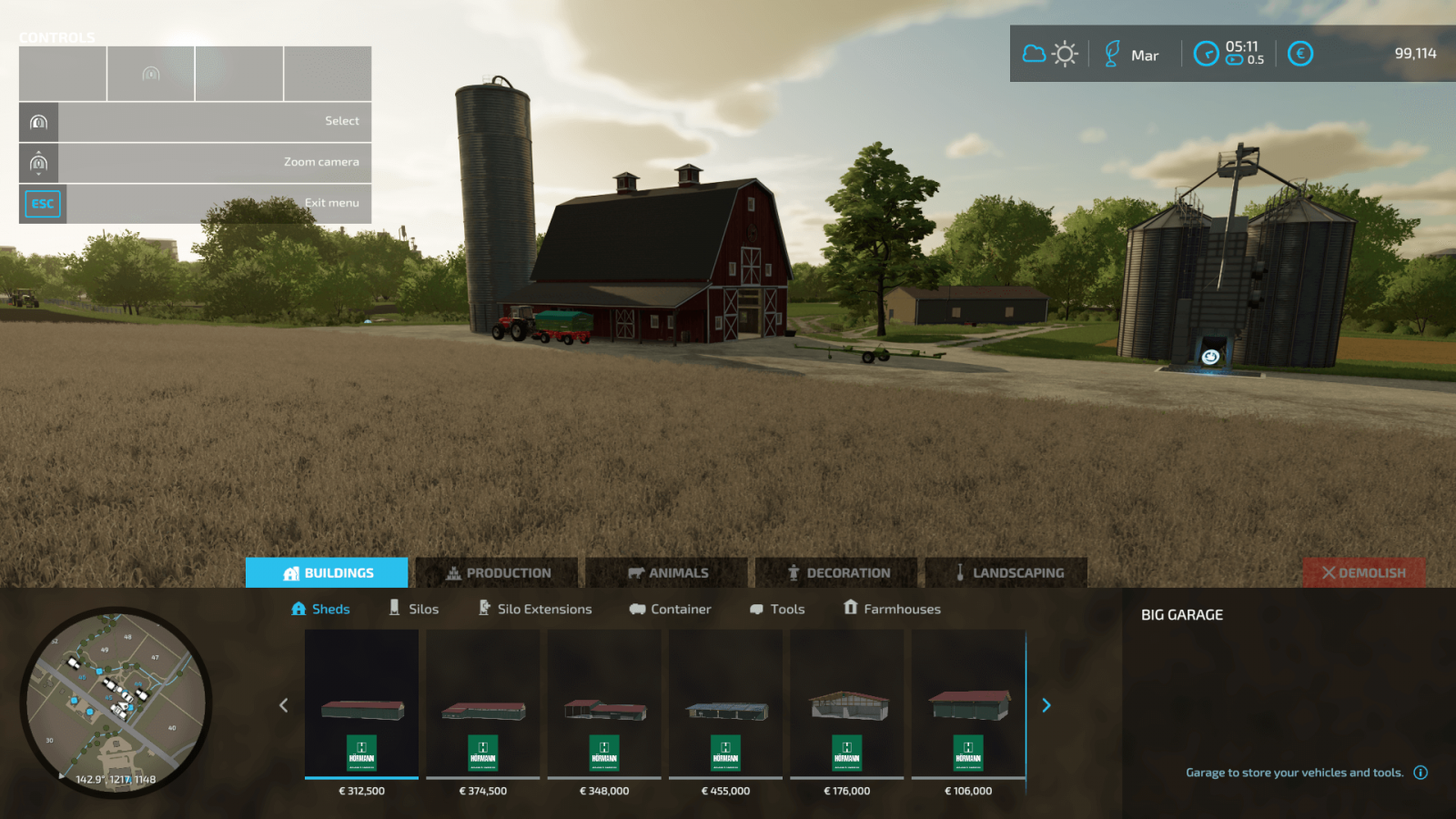
In construction mode, we see 5 separate tabs. Let’s find out what they are for. The first tab is the category with buildings, which is further divided into 6 subcategories.
Here you can find various buildings: farmhouses, garages for storing agricultural machinery, sheds that are also perfect for storing machinery, tools, and even bulk materials!In addition to the above, you can find silos for storing crops and various containers for storing liquids: water, liquid fertilizers, fuel.And, of course, high-pressure washers, auto repair shops, charging stations, and other useful buildings.
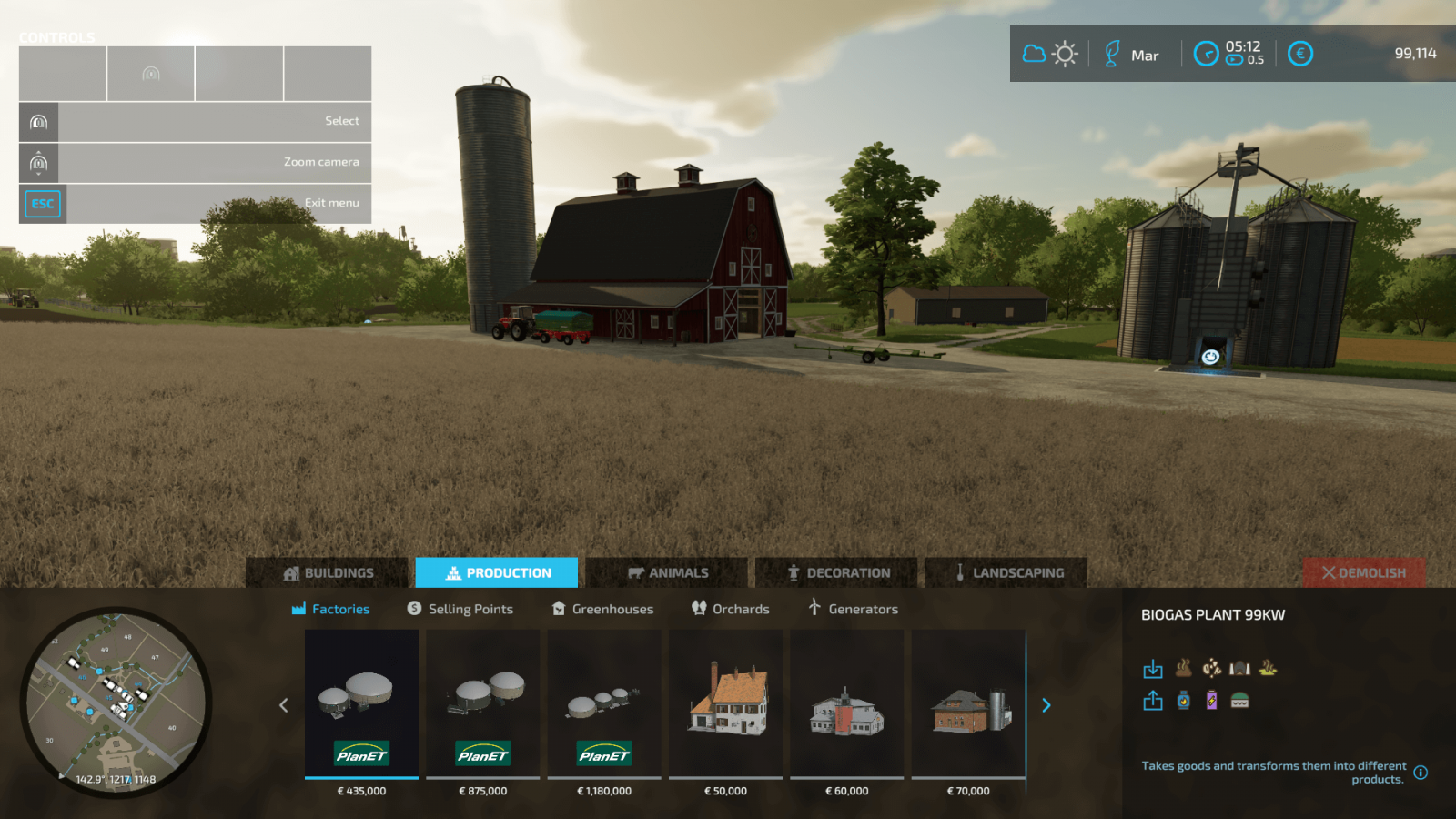
Now let’s visit the “Production” tab, where you can find various buildings that generate profit for you.
First of all, it’s worth noting the factories, thanks to which you can create real production chains. That is, you can process your harvest into something more expensive and profitable. Wheat can be turned into flour, flour into bread, and so on.Sales points. At these locations, you can sell crops and goods, earning good money.Greenhouses are intended for growing specific crops like strawberries and tomatoes. Greenhouses are very helpful if you play with seasonal cycles and snow enabled. You can build your own vineyards and olive groves. These two new crops were not available in previous Farming Simulator games, so this is a completely new experience. Generators for electricity production.
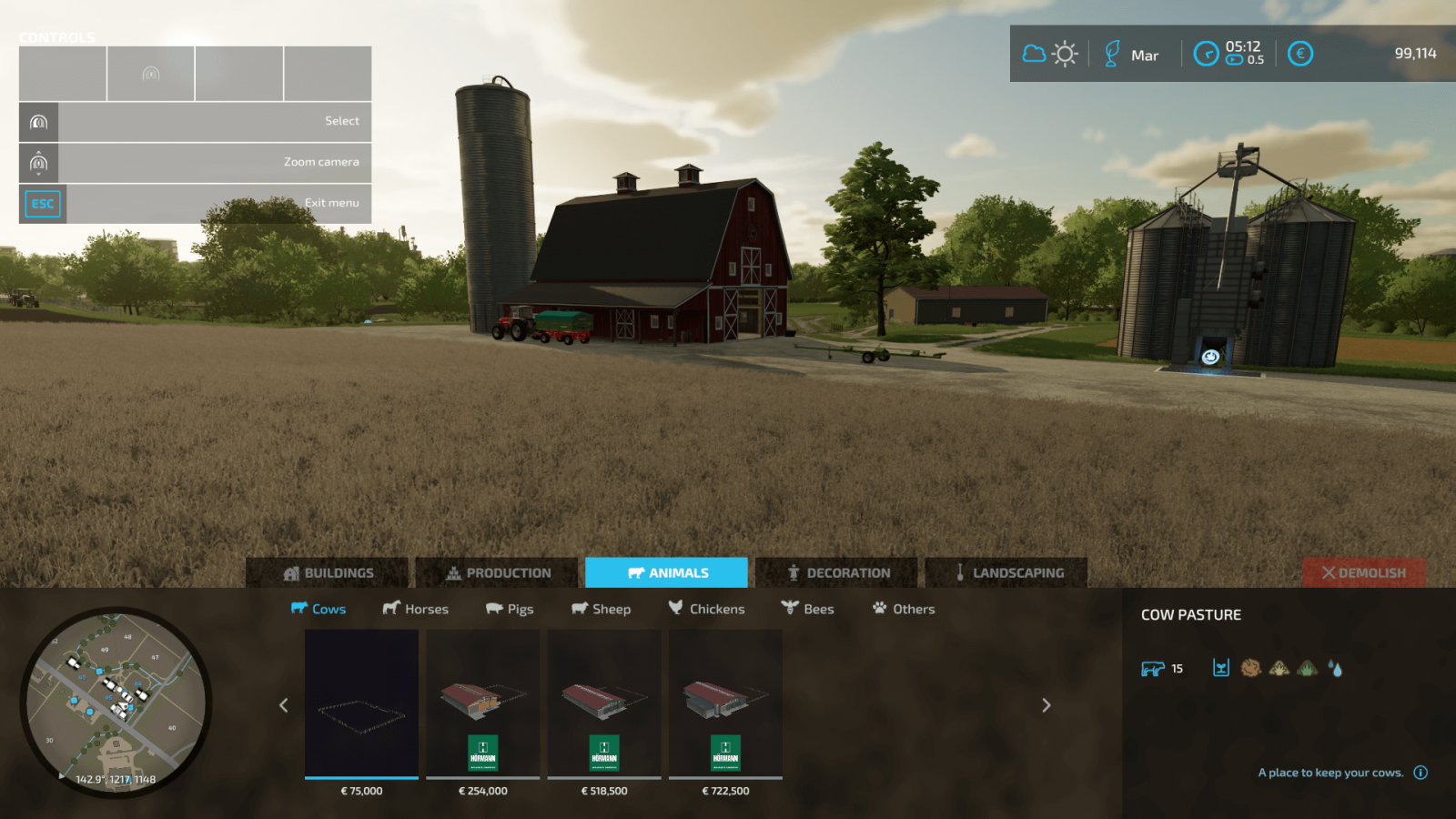
Moving on to the animal category. It’s quite interesting there as well!
Want to get into animal husbandry? In construction mode, go to the “Animals” category, which also has its own subcategories and everything needed for all types of animals. You can buy pens for various animals, special items designed for beekeeping, and even a doghouse for your pet.
How could we forget about decorations? Let’s move to the corresponding section!
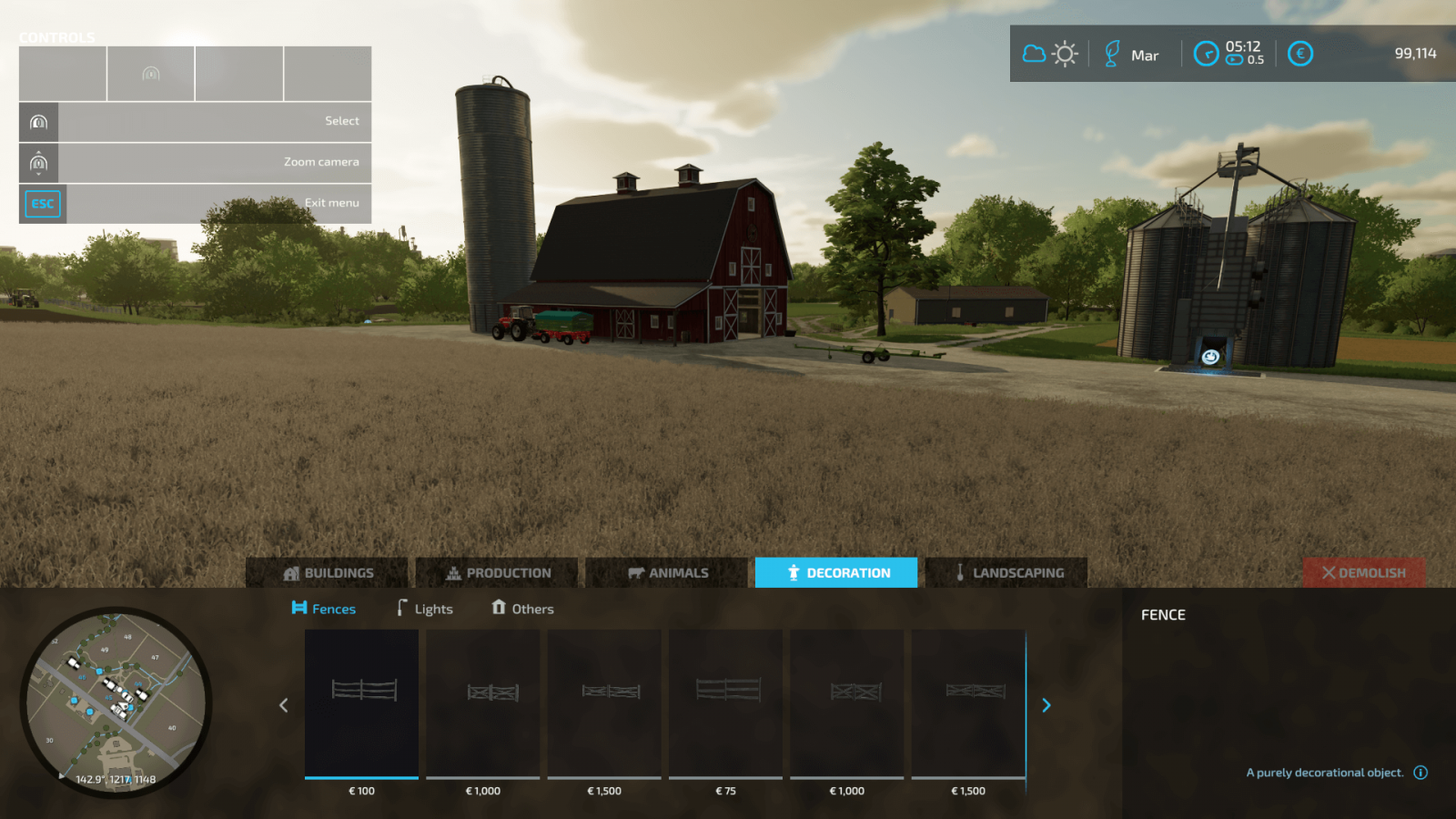
No one forbids you from decorating your farm. In the decorations section, you can find various light sources like lamps, garden sheds, fences, and other decorative elements that will make your farm much more beautiful.
And let’s not forget the incredibly important tool – landscape design in FS22!
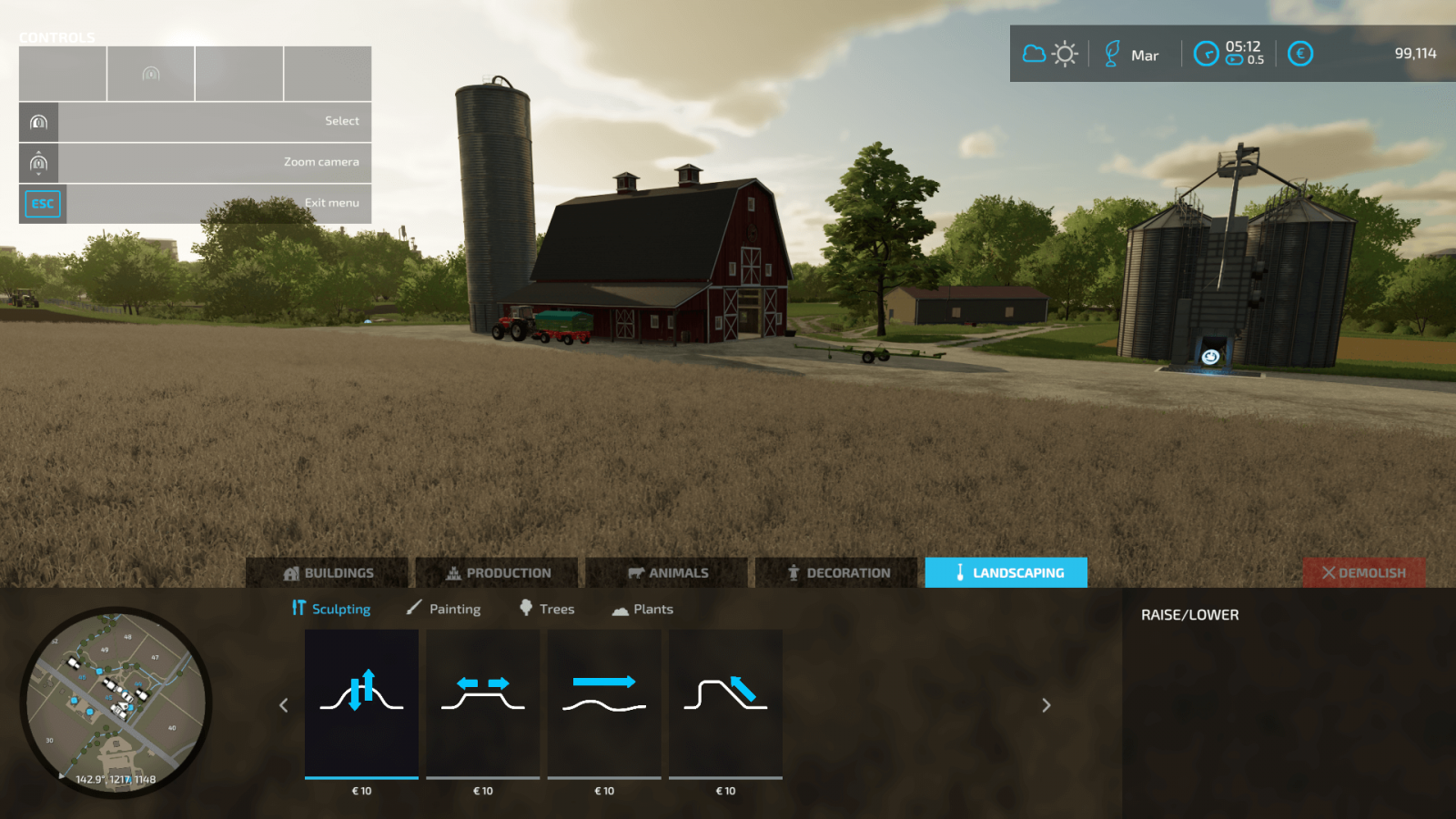
Yes, by using the landscape design tools, you can change the terrain relief, change ground textures, add asphalt, gravel, forest soil, and more, build your own roads. Of course, you can place trees and other plants on your land, turning your farm into a true paradise.
Construction Mode
In construction mode, we see 5 separate tabs. Let’s find out what they are for. The first tab is the category with buildings, which is further divided into 6 subcategories.
Here you can find various buildings: farmhouses, garages for storing agricultural machinery, sheds that are also perfect for storing machinery, tools, and even bulk materials!In addition to the above, you can find silos for storing crops and various containers for storing liquids: water, liquid fertilizers, fuel.And, of course, high-pressure washers, auto repair shops, charging stations, and other useful buildings.
Now let’s visit the “Production” tab, where you can find various buildings that generate profit for you.
First of all, it’s worth noting the factories, thanks to which you can create real production chains. That is, you can process your harvest into something more expensive and profitable. Wheat can be turned into flour, flour into bread, and so on.Sales points. At these locations, you can sell crops and goods, earning good money.Greenhouses are intended for growing specific crops like strawberries and tomatoes. Greenhouses are very helpful if you play with seasonal cycles and snow enabled. You can build your own vineyards and olive groves. These two new crops were not available in previous Farming Simulator games, so this is a completely new experience. Generators for electricity production.
Moving on to the animal category. It’s quite interesting there as well!
Want to get into animal husbandry? In construction mode, go to the “Animals” category, which also has its own subcategories and everything needed for all types of animals. You can buy pens for various animals, special items designed for beekeeping, and even a doghouse for your pet.
How could we forget about decorations? Let’s move to the corresponding section!
No one forbids you from decorating your farm. In the decorations section, you can find various light sources like lamps, garden sheds, fences, and other decorative elements that will make your farm much more beautiful.
And let’s not forget the incredibly important tool – landscape design in FS22!
Yes, by using the landscape design tools, you can change the terrain relief, change ground textures, add asphalt, gravel, forest soil, and more, build your own roads. Of course, you can place trees and other plants on your land, turning your farm into a true paradise.
|
|
ARTICLE | ||
|
2.3K
|
0
0 |
||
29 Sep 2025 at 10:05
All About Seasonal Cycles
It's time to get acquainted with the seasonal cycles and understand how they affect your farm in Farming Simulator 22.
Four Seasons
The seasons differ not only visually but also in gameplay. The game starts in August, following this cycle: summer, autumn, winter, spring. Let's take a look at each of these seasons.
Spring. This season is ideal for sowing the majority of available crops in Farming Simulator 22. Summer. This season is also suitable for sowing (since the cycle for most crops starts in March and ends in June). But summer brings other tasks as well, as it’s the perfect time to manage pastures and prepare for winter (for example, by gathering feed for your animals).Autumn. If you didn’t start preparing for winter during summer, you should do so immediately in autumn. However, this season is busy enough on its own, as from September to November you need to focus on harvesting. Winter. The most challenging period in Farming Simulator 22, since growing crops is impossible during winter (except in greenhouses). You will need to clear snow from roads, feed your animals, manage production chains, and if you have greenhouses, you can grow other crops.
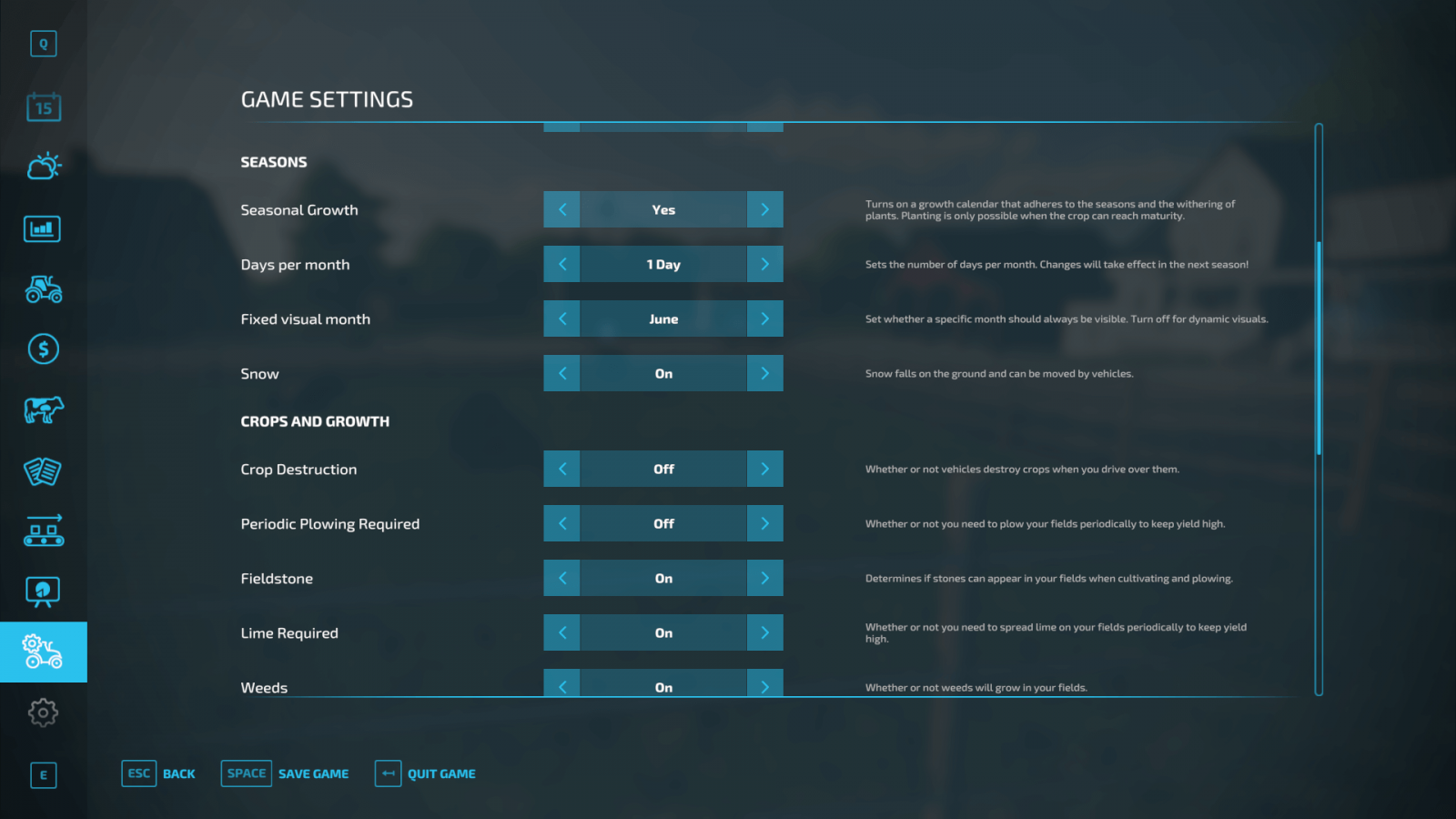
Seasonal Settings
In FS22, you can change seasonal settings at any time, so you can enable or disable the gameplay aspect of seasonal cycles and work calmly without worrying that winter is approaching. However, some settings take effect only after the current season changes.
Seasonal Growth. An important setting that determines whether you need to grow your crops according to a special calendar included in the game. This option adds a lot of realism to your gameplay, but if you haven’t played the Farming Simulator series before, it’s better to keep this setting off for now. Playing with this setting enabled makes the game more realistic but also much more challenging.If you think the seasons change too quickly, you can increase the number of days in a month to 28. That means one year will last 336 days. By default, 1 day = 1 month in the game. So, 1 year in FS22 equals 12 days. But this can be easily changed. Experiment and find a comfortable value for yourself.You can use the Fixed Visual Month setting to keep the visual aspect of the seasons unchanged. So, if you want eternal summer with no snow or other visual seasonal changes, you can do that.The Snow option lets you decide whether snow will fall and remain on the ground. This setting controls the gameplay aspect of snow; snowflakes will appear regardless, but if you enable Snow mode, snow will accumulate on the ground and will need to be cleared to free paths.
These are the interesting seasonal settings in Farming Simulator 22.
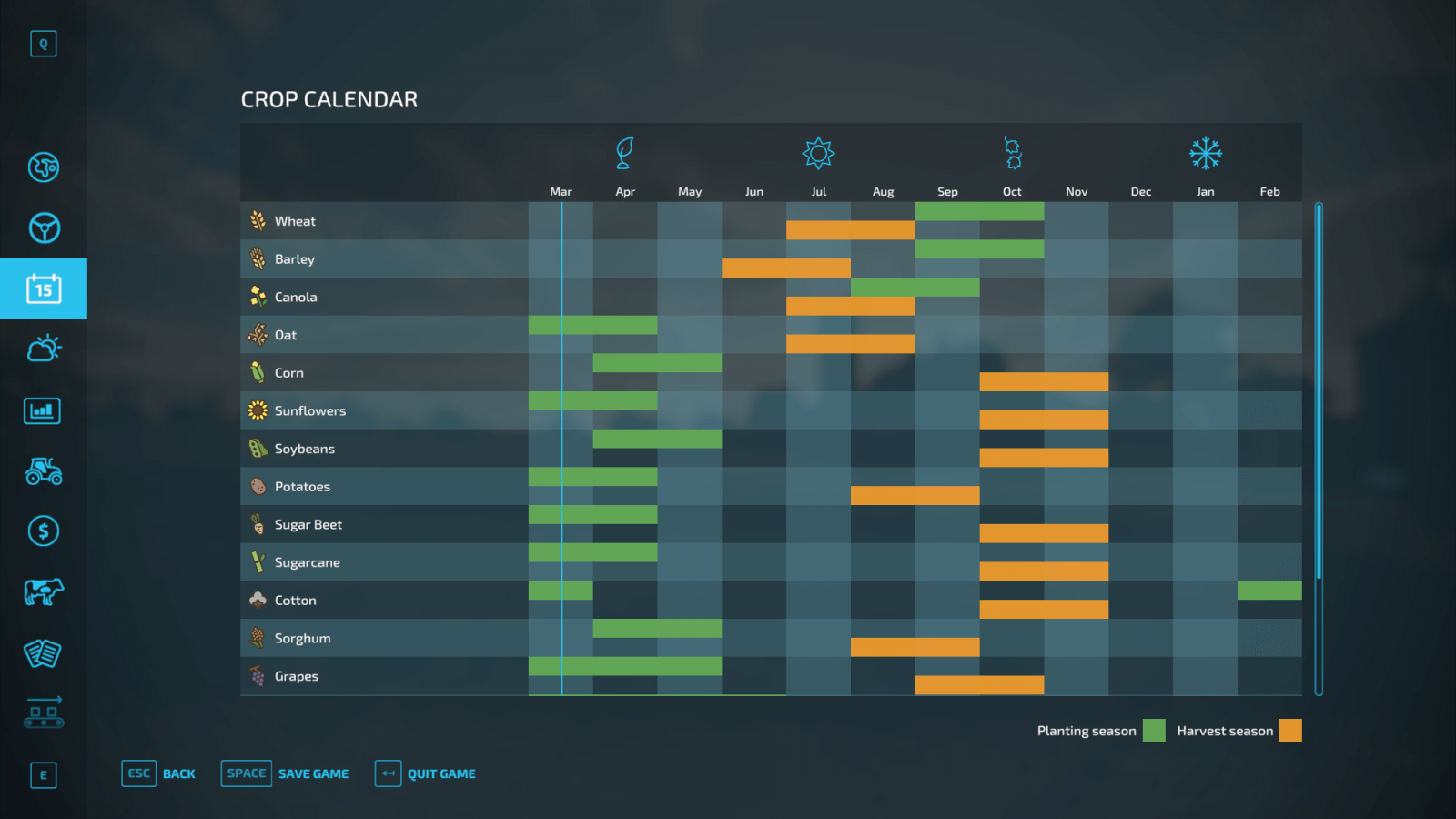
Harvest Calendar
If you decide to play with seasonal cycles enabled, you will definitely need the in-game seasonal calendar. Each type of crop has specific requirements that must be followed to succeed. The seasonal calendar helps you determine which crops to grow in which seasons and when to harvest them.
Take wheat as an example. It’s best to sow wheat in September or October. This period is marked in green on the calendar. After that, you need to wait 10 months (again, according to the calendar). Therefore, the harvest should be gathered in July or August. If you ignore these requirements, you won’t get any yield.
But don’t forget, seasonal growth can be easily turned off in the settings!
Four Seasons
The seasons differ not only visually but also in gameplay. The game starts in August, following this cycle: summer, autumn, winter, spring. Let's take a look at each of these seasons.
Spring. This season is ideal for sowing the majority of available crops in Farming Simulator 22. Summer. This season is also suitable for sowing (since the cycle for most crops starts in March and ends in June). But summer brings other tasks as well, as it’s the perfect time to manage pastures and prepare for winter (for example, by gathering feed for your animals).Autumn. If you didn’t start preparing for winter during summer, you should do so immediately in autumn. However, this season is busy enough on its own, as from September to November you need to focus on harvesting. Winter. The most challenging period in Farming Simulator 22, since growing crops is impossible during winter (except in greenhouses). You will need to clear snow from roads, feed your animals, manage production chains, and if you have greenhouses, you can grow other crops.
Seasonal Settings
In FS22, you can change seasonal settings at any time, so you can enable or disable the gameplay aspect of seasonal cycles and work calmly without worrying that winter is approaching. However, some settings take effect only after the current season changes.
Seasonal Growth. An important setting that determines whether you need to grow your crops according to a special calendar included in the game. This option adds a lot of realism to your gameplay, but if you haven’t played the Farming Simulator series before, it’s better to keep this setting off for now. Playing with this setting enabled makes the game more realistic but also much more challenging.If you think the seasons change too quickly, you can increase the number of days in a month to 28. That means one year will last 336 days. By default, 1 day = 1 month in the game. So, 1 year in FS22 equals 12 days. But this can be easily changed. Experiment and find a comfortable value for yourself.You can use the Fixed Visual Month setting to keep the visual aspect of the seasons unchanged. So, if you want eternal summer with no snow or other visual seasonal changes, you can do that.The Snow option lets you decide whether snow will fall and remain on the ground. This setting controls the gameplay aspect of snow; snowflakes will appear regardless, but if you enable Snow mode, snow will accumulate on the ground and will need to be cleared to free paths.
These are the interesting seasonal settings in Farming Simulator 22.
Harvest Calendar
If you decide to play with seasonal cycles enabled, you will definitely need the in-game seasonal calendar. Each type of crop has specific requirements that must be followed to succeed. The seasonal calendar helps you determine which crops to grow in which seasons and when to harvest them.
Take wheat as an example. It’s best to sow wheat in September or October. This period is marked in green on the calendar. After that, you need to wait 10 months (again, according to the calendar). Therefore, the harvest should be gathered in July or August. If you ignore these requirements, you won’t get any yield.
But don’t forget, seasonal growth can be easily turned off in the settings!
|
|
ARTICLE | ||
|
3.1K
|
0
0 |
||
29 Sep 2025 at 10:04
Fields in FS22
We have covered the basics of Farming Simulator 22. Now it's time to learn more about fields and farmland. There will be separate guides on many topics; in this article, we will look at the basics of working with soil.
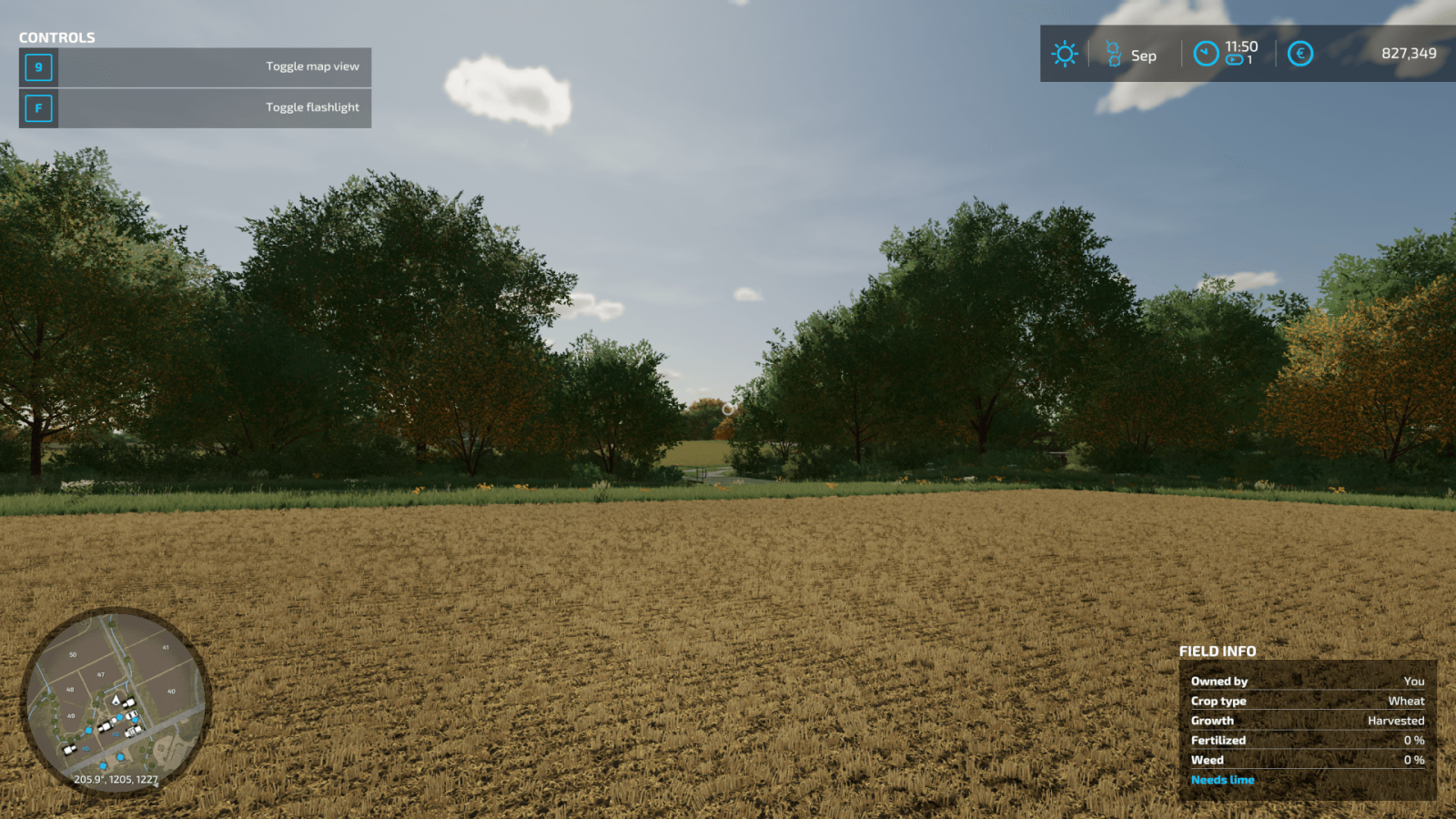
Field Information
When you are on the field, in the bottom right corner you can see useful information, namely:
Field owner. Displays whether you own this field or not. If not, you cannot use it until you buy it.Crop type. Shows which crop is currently being grown on this field.Growth, progress. Provides more information about the condition of the field and the crop currently growing there.Fertilization. Information about how much fertilizer has been applied.Weeds. Shows the percentage of weed growth on the field. Weeds should be removed, so if this indicator is high and the field is yours – start weeding immediately.Additionally, you can find information on whether plowing is required.
Map Information
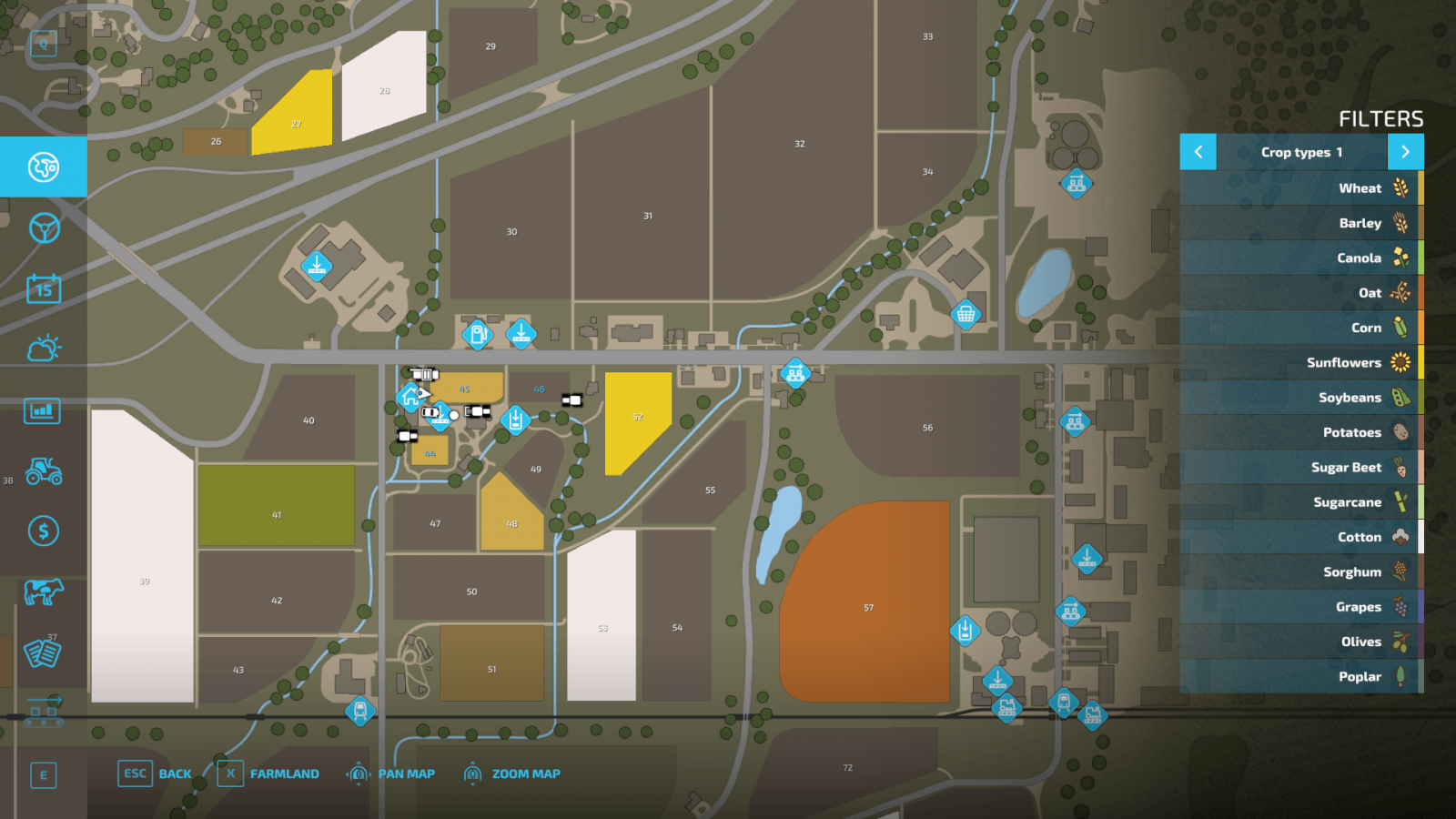
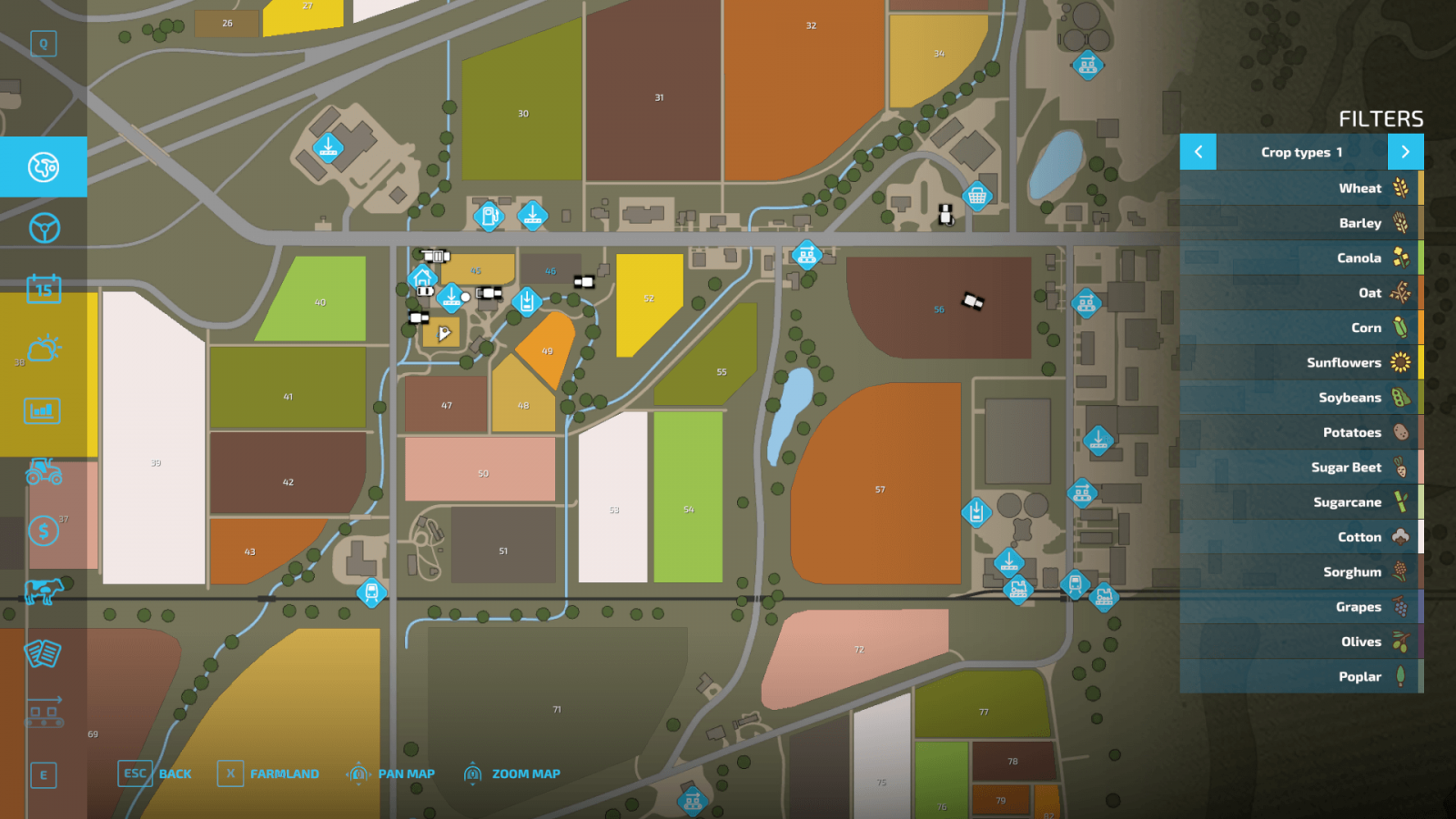
Open the map, which also contains a wealth of useful information. On the right, there are so-called filters that allow you to get useful data. On the right, you can see the legend for various icons, and crop types have different colors, so you can identify what is being grown on specific fields by color.
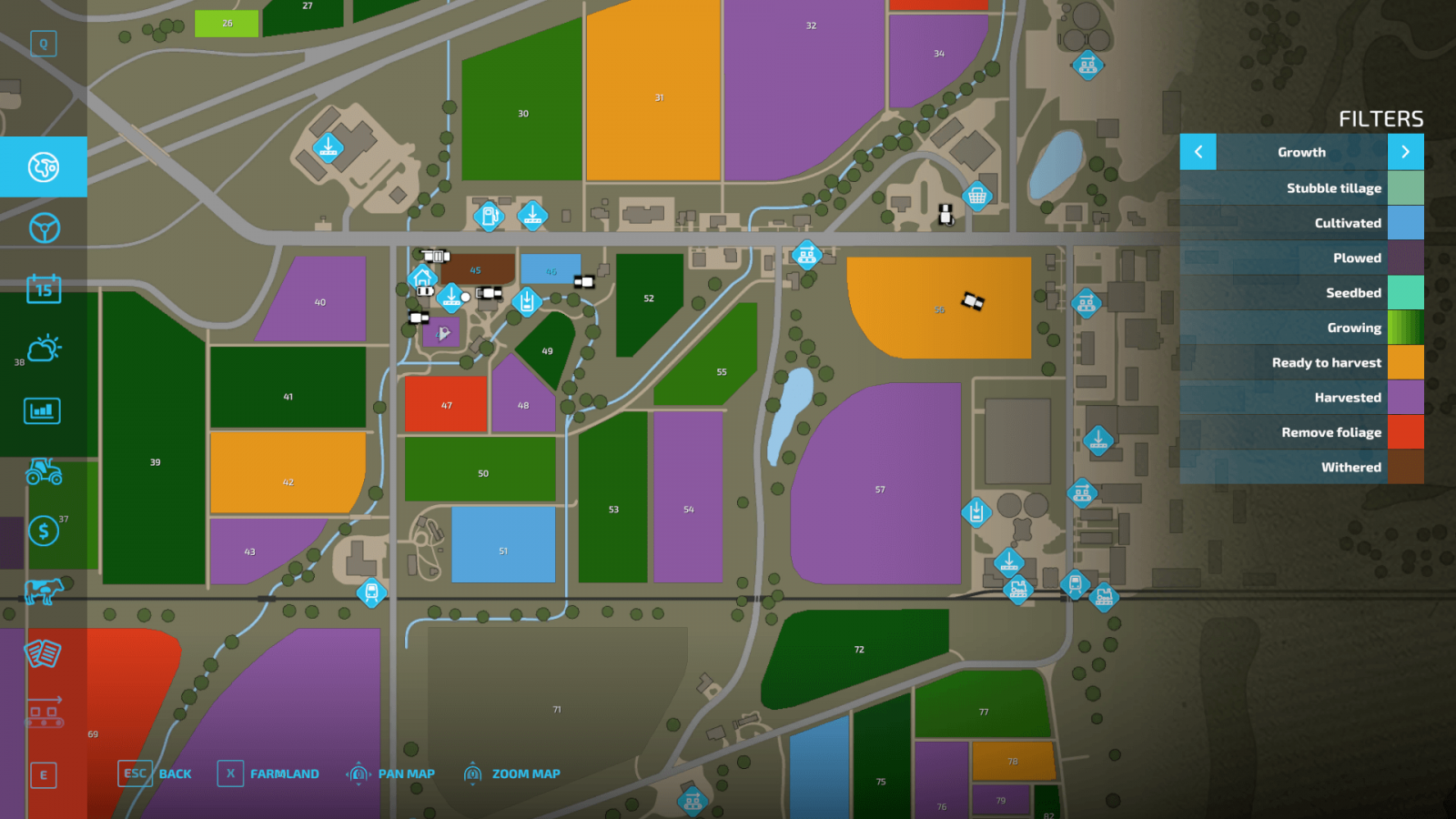
Now switch to the growth filter, which shows the condition of your fields and crops, if any.
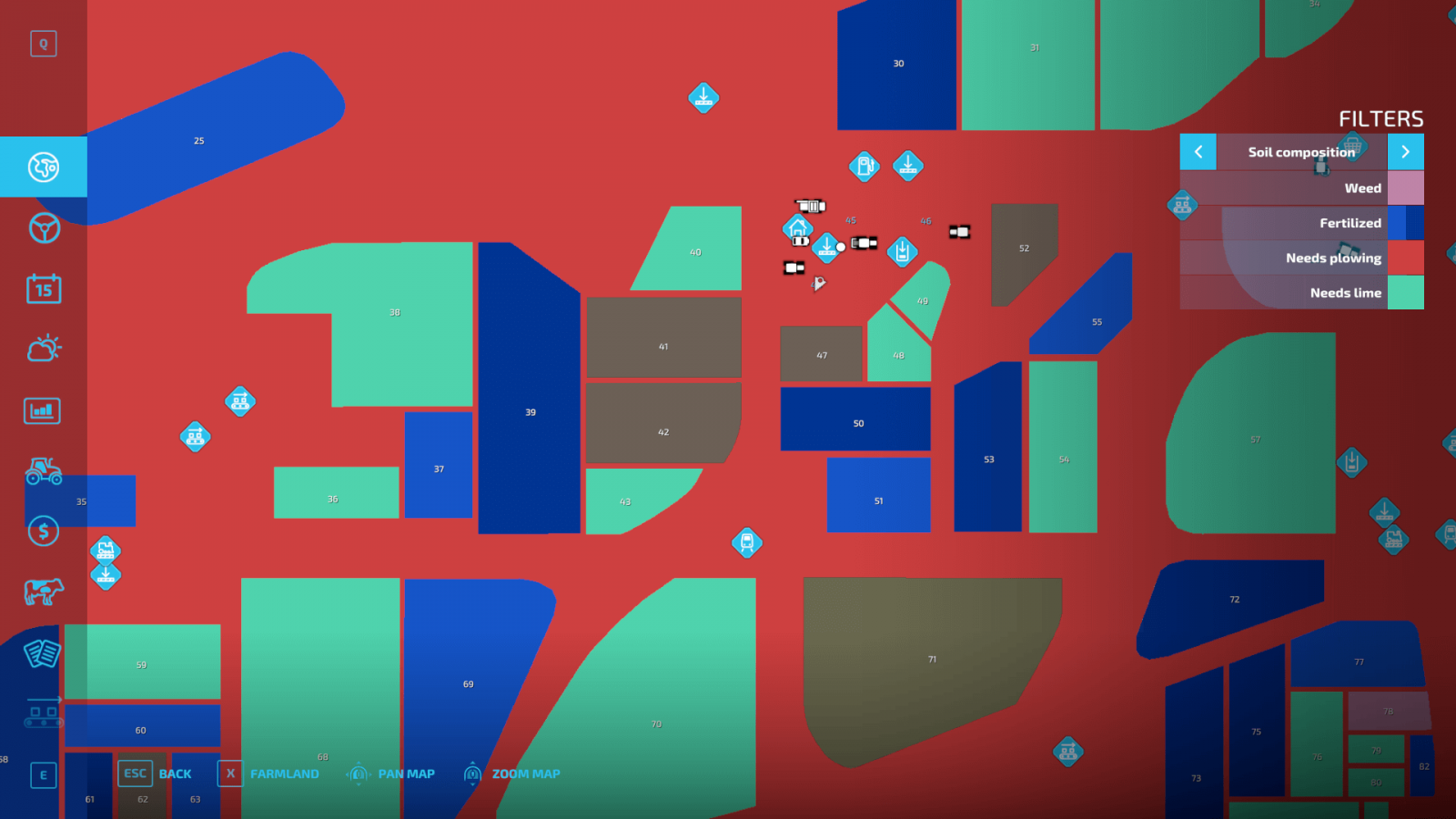
There is also a very useful filter that shows more detailed information about your fields: whether plowing is needed, if weeds need to be removed, whether fertilization is required, and other information. Again, each value has its own color.
Buying and Modifying Fields
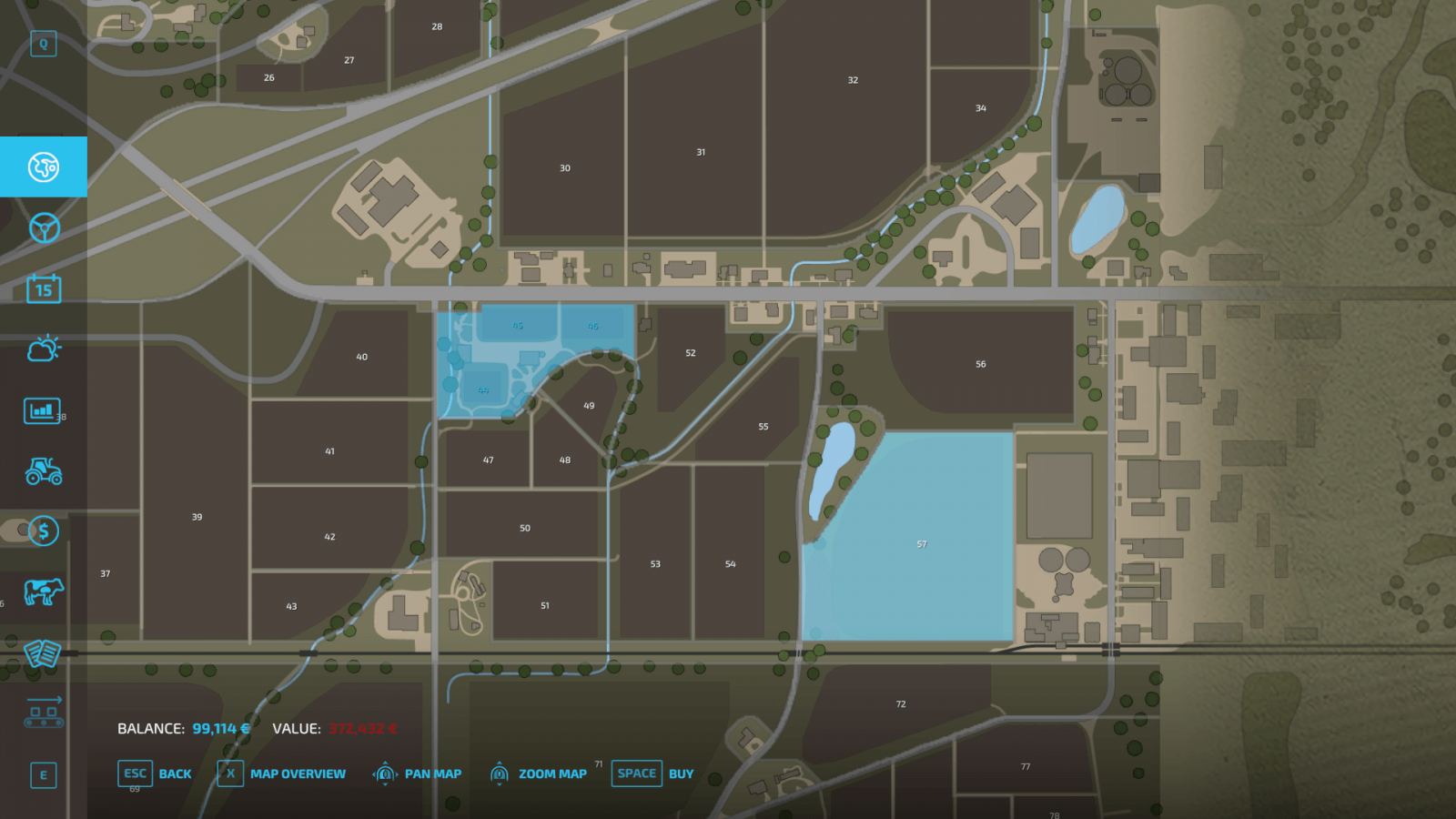
In the dedicated farmland screen, you can monitor all the fields under your control and those available for purchase. By the way, you can also sell your fields from there if you no longer need them or urgently need money.
There is another important feature you should know about. Plows have an interesting function for creating fields. By selecting the appropriate function, you can either change the shape of your fields and expand them or merge several of your fields into one. For the latter, the fields must belong to you and must not be separated by roads or other infrastructure.
If you plan to buy several fields at once – try to ensure they are located close to each other to save travel time and to have the option to merge them if desired. If there are trees on the land – you can remove them using forestry equipment, which is quite expensive. Long fields are better than wide ones because they require fewer maneuvers and turns during cultivation. Try to maintain ideal spacing between rows when using different tools (cultivator, sprayer, etc.) to cover as much area as possible in one pass and save a lot of time.
Field Information
When you are on the field, in the bottom right corner you can see useful information, namely:
Field owner. Displays whether you own this field or not. If not, you cannot use it until you buy it.Crop type. Shows which crop is currently being grown on this field.Growth, progress. Provides more information about the condition of the field and the crop currently growing there.Fertilization. Information about how much fertilizer has been applied.Weeds. Shows the percentage of weed growth on the field. Weeds should be removed, so if this indicator is high and the field is yours – start weeding immediately.Additionally, you can find information on whether plowing is required.
Map Information
Open the map, which also contains a wealth of useful information. On the right, there are so-called filters that allow you to get useful data. On the right, you can see the legend for various icons, and crop types have different colors, so you can identify what is being grown on specific fields by color.
Now switch to the growth filter, which shows the condition of your fields and crops, if any.
There is also a very useful filter that shows more detailed information about your fields: whether plowing is needed, if weeds need to be removed, whether fertilization is required, and other information. Again, each value has its own color.
Buying and Modifying Fields
In the dedicated farmland screen, you can monitor all the fields under your control and those available for purchase. By the way, you can also sell your fields from there if you no longer need them or urgently need money.
There is another important feature you should know about. Plows have an interesting function for creating fields. By selecting the appropriate function, you can either change the shape of your fields and expand them or merge several of your fields into one. For the latter, the fields must belong to you and must not be separated by roads or other infrastructure.
If you plan to buy several fields at once – try to ensure they are located close to each other to save travel time and to have the option to merge them if desired. If there are trees on the land – you can remove them using forestry equipment, which is quite expensive. Long fields are better than wide ones because they require fewer maneuvers and turns during cultivation. Try to maintain ideal spacing between rows when using different tools (cultivator, sprayer, etc.) to cover as much area as possible in one pass and save a lot of time.
|
|
ARTICLE | ||
|
4.9K
|
0
0 |
||
29 Sep 2025 at 10:03
More About Crops in FS22
Crops are an important part of the Farming Simulator series, as they are the very essence of the game. Farming Simulator 22 features quite a variety of crops, and some of them require a unique approach. Later, we will explain how to sow, cultivate, and harvest different crops, but today we will talk about the basic mechanics.
Types of Crops in FS22
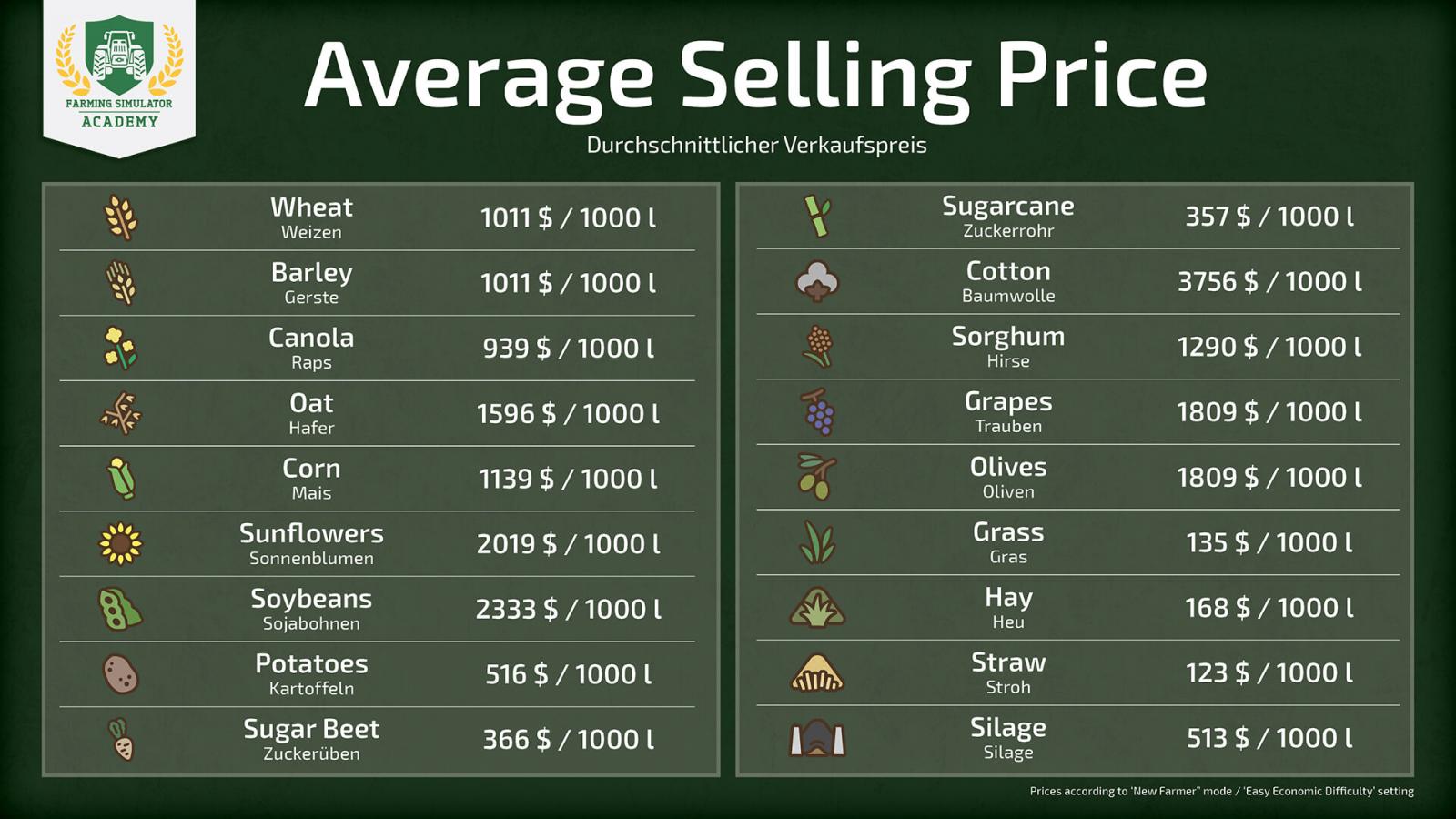
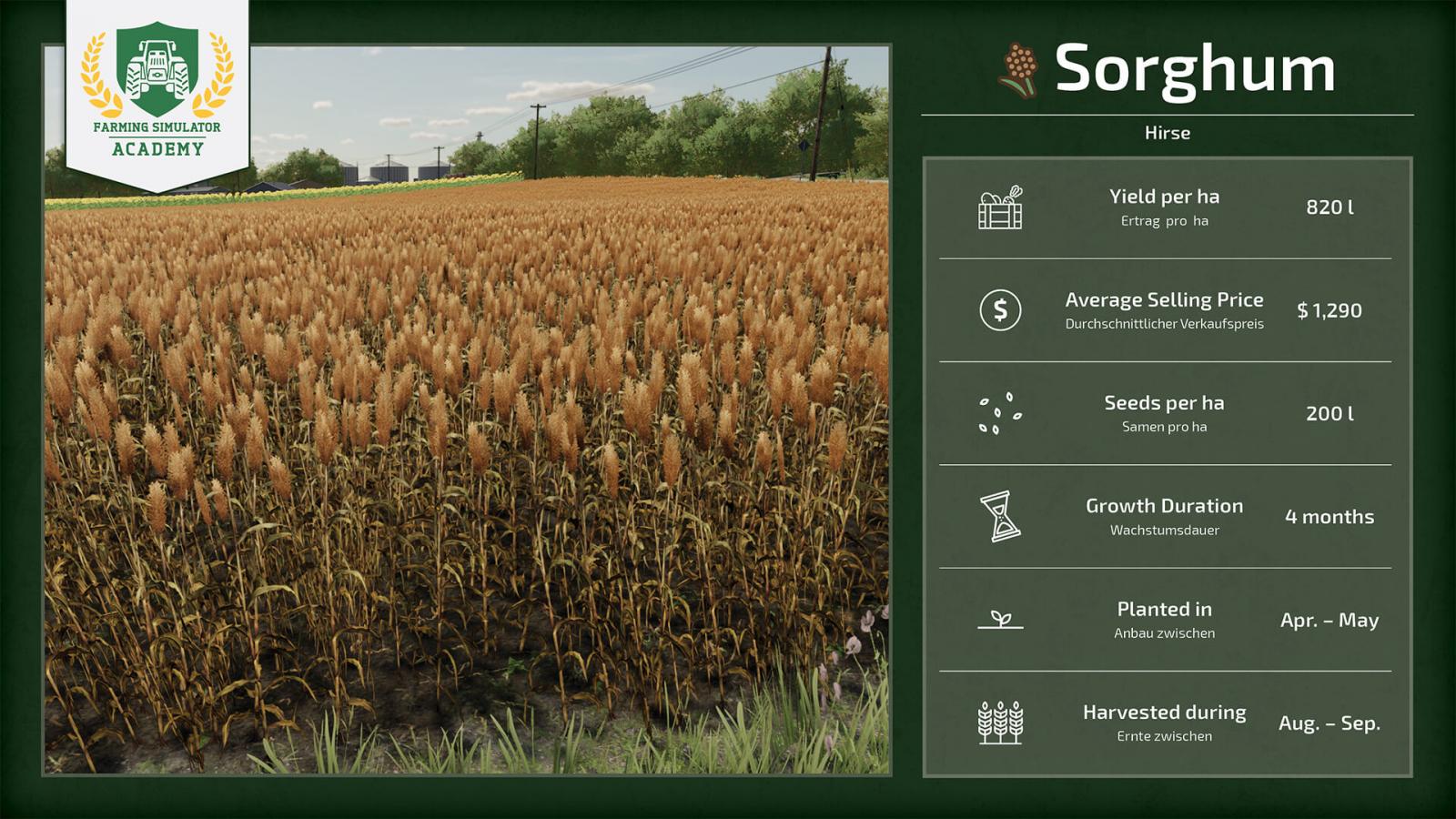
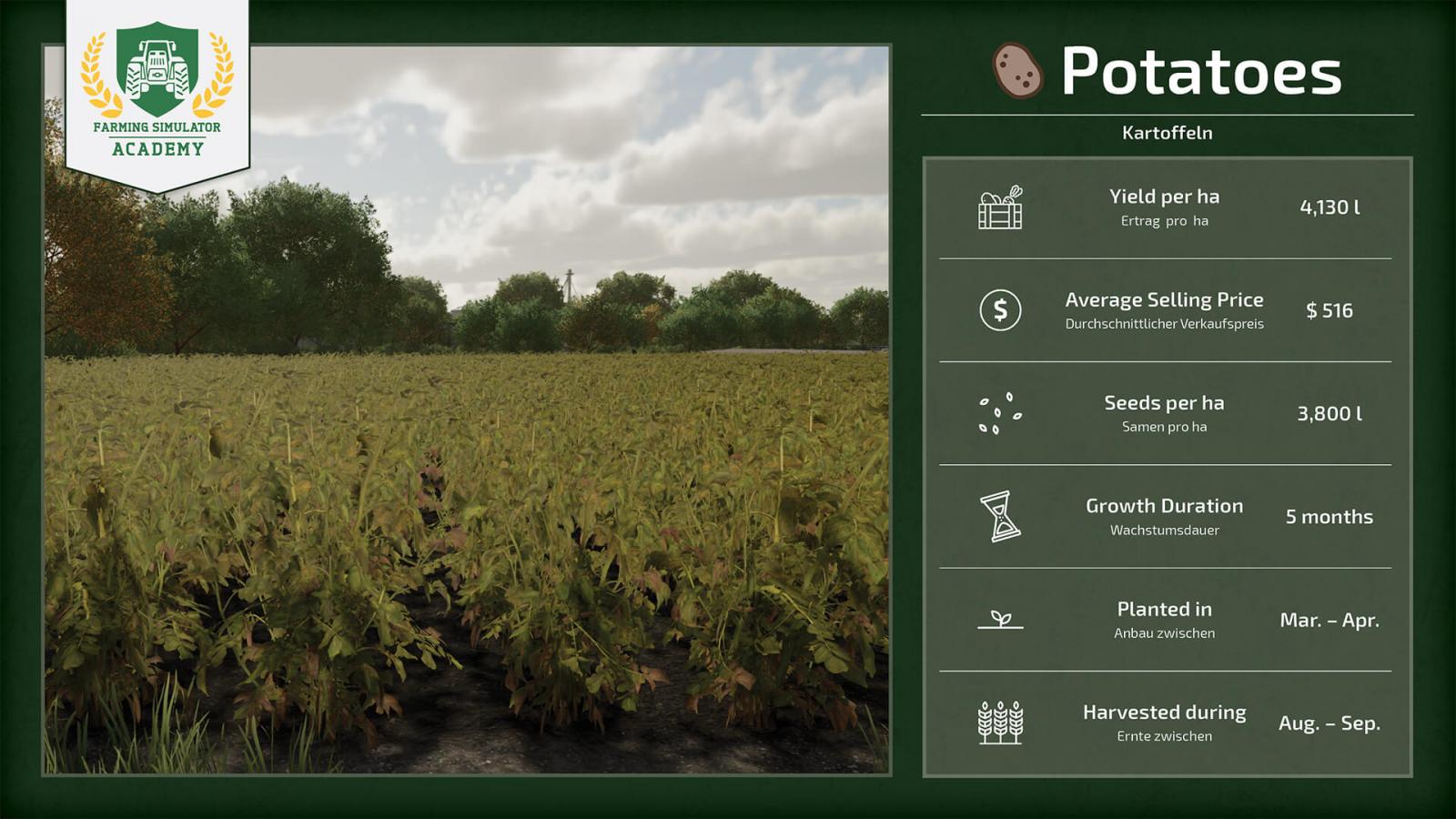
At the start of the game, it is very important to choose the right crop to grow, as each crop has its own price, yield quantity, and characteristics. If you play with seasonal cycles enabled, you will also need to keep track of the calendar, which significantly complicates the game. We suggest you take a look at the screenshots below to learn more about each crop and make your choice.
Profitability
In the screenshot above, you can see the profitability/profit margin of each crop. This will greatly simplify your choice. Keep in mind that prices constantly fluctuate, so you need to sell your harvest at the most opportune moment if you want to earn enough money and recoup your investments and time.
To achieve maximum yield and get the highest profit, you need to take care of your crops. Monitor whether the field has been plowed, if lime needs to be applied, whether it is sufficiently fertilized, and if there are any weeds. If all indicators are in good condition, you will be able to earn the maximum amount of money, as the harvest will be larger. Keep an eye on price fluctuations and choose the right moment to sell.
It is important to understand that with some additional tools, you can earn even more money. In other words, the more you invest, the more money you can make. For example, if you grow corn and there is straw left after harvesting, you can process this straw into silage and sell it if you have the necessary equipment. Therefore, one crop can generate profit in two directions. Don’t forget to constantly invest in your own farm by purchasing modern and powerful machinery.
Grain Crops
It’s probably best to start the game with grain crops (wheat, barley, oats, etc.), as many of these crops are harvested with the same combine harvester and grain header, so you don’t need to invest heavily in equipment. We suggest you take a look at the screenshots with more detailed information about grain crops in Farming Simulator 22.
Wheat, sorghum, barley, oats, canola, and soybeans are harvested with the same tool, which is quite convenient and fast.
Root Crops
Root crops are a bit more complicated because they require special equipment: a special seeder and a special harvester. There is also more work involved, as the field needs to be plowed each time before planting root crops. The harvested crop must be stored on the ground (in barns, for example). Learn more about the types of root crops from the screenshots below.
Orchards and Vineyards
Farming Simulator 22 adds 3 new crops: sorghum, grapes, and olives. If you want to grow grapes and olives, you will need to create an actual orchard or vineyard. This is done in the construction mode. But that’s only part of the process, as special machinery is required to care for these new crops.
Other Crops
Farming Simulator 22 also includes other crops. For example, cotton and corn. They also require special tools, and these tools are not cheap, so it’s clearly not worth starting with them. The best option for starting the game is grain crops, but as your agricultural business develops, you can buy special equipment and grow whatever you want. Let’s take a look at the other crops that do not belong to grains or root crops.
How to Harvest in FS22
We will talk about each crop separately, but the mechanics are quite straightforward. First, use a cultivator to loosen the soil. Then apply lime. This is necessary to reduce soil acidity. Fertilize the soil, then sow or plant. Be sure to monitor for weeds, remove them immediately, and harvest on time to prevent drying out. That’s it!
We will soon provide you with more detailed information about each type of crop and their specifics. The above are just the basic steps, but each crop has its own nuances, which we will discuss in other guides!
Types of Crops in FS22
At the start of the game, it is very important to choose the right crop to grow, as each crop has its own price, yield quantity, and characteristics. If you play with seasonal cycles enabled, you will also need to keep track of the calendar, which significantly complicates the game. We suggest you take a look at the screenshots below to learn more about each crop and make your choice.
Profitability
In the screenshot above, you can see the profitability/profit margin of each crop. This will greatly simplify your choice. Keep in mind that prices constantly fluctuate, so you need to sell your harvest at the most opportune moment if you want to earn enough money and recoup your investments and time.
To achieve maximum yield and get the highest profit, you need to take care of your crops. Monitor whether the field has been plowed, if lime needs to be applied, whether it is sufficiently fertilized, and if there are any weeds. If all indicators are in good condition, you will be able to earn the maximum amount of money, as the harvest will be larger. Keep an eye on price fluctuations and choose the right moment to sell.
It is important to understand that with some additional tools, you can earn even more money. In other words, the more you invest, the more money you can make. For example, if you grow corn and there is straw left after harvesting, you can process this straw into silage and sell it if you have the necessary equipment. Therefore, one crop can generate profit in two directions. Don’t forget to constantly invest in your own farm by purchasing modern and powerful machinery.
Grain Crops
It’s probably best to start the game with grain crops (wheat, barley, oats, etc.), as many of these crops are harvested with the same combine harvester and grain header, so you don’t need to invest heavily in equipment. We suggest you take a look at the screenshots with more detailed information about grain crops in Farming Simulator 22.
Wheat, sorghum, barley, oats, canola, and soybeans are harvested with the same tool, which is quite convenient and fast.
Root Crops
Root crops are a bit more complicated because they require special equipment: a special seeder and a special harvester. There is also more work involved, as the field needs to be plowed each time before planting root crops. The harvested crop must be stored on the ground (in barns, for example). Learn more about the types of root crops from the screenshots below.
Orchards and Vineyards
Farming Simulator 22 adds 3 new crops: sorghum, grapes, and olives. If you want to grow grapes and olives, you will need to create an actual orchard or vineyard. This is done in the construction mode. But that’s only part of the process, as special machinery is required to care for these new crops.
Other Crops
Farming Simulator 22 also includes other crops. For example, cotton and corn. They also require special tools, and these tools are not cheap, so it’s clearly not worth starting with them. The best option for starting the game is grain crops, but as your agricultural business develops, you can buy special equipment and grow whatever you want. Let’s take a look at the other crops that do not belong to grains or root crops.
How to Harvest in FS22
We will talk about each crop separately, but the mechanics are quite straightforward. First, use a cultivator to loosen the soil. Then apply lime. This is necessary to reduce soil acidity. Fertilize the soil, then sow or plant. Be sure to monitor for weeds, remove them immediately, and harvest on time to prevent drying out. That’s it!
We will soon provide you with more detailed information about each type of crop and their specifics. The above are just the basic steps, but each crop has its own nuances, which we will discuss in other guides!
The most popular mods

 Spintires: MudRunner
 SnowRunner
 Euro Truck Simulator 2
 American Truck Simulator
 Farming Simulator 2017
 Farming Simulator 2019
 Farming Simulator 2022
 BeamNG.drive
 City Car Driving
 Farming Simulator 20
 OMSI 2
 Assetto Corsa
 MXB
MXB
by downloads per week
by downloads per month
There are no mods yet
by downloads per week
by downloads per month
There are no mods yet
by downloads per week
by downloads per month
There are no mods yet
by downloads per week
by downloads per month
There are no mods yet
by downloads per week
by downloads per month
There are no mods yet
by downloads per week
by downloads per month
There are no mods yet
by downloads per week
by downloads per month
There are no mods yet
by downloads per week
by downloads per month
There are no mods yet
by downloads per week
by downloads per month
There are no mods yet
by downloads per week
by downloads per month
There are no mods yet
by downloads per week
by downloads per month
There are no mods yet
by downloads per week
by downloads per month
There are no mods yet
by downloads per week
by downloads per month
There are no mods yet
by downloads per week
by downloads per month
There are no mods yet